Nature Photographers Network
This is the preserved archive of the original Nature Photographers Network. The community continues at naturephotographers.network.
Aging Gracefully....+b&w
‹ PreviousLandscape GalleryNext ›

Aging Gracefully....+b&w

by Lon Overacker

Gallery: LandscapePosted March 10, 2017221 views13 comments
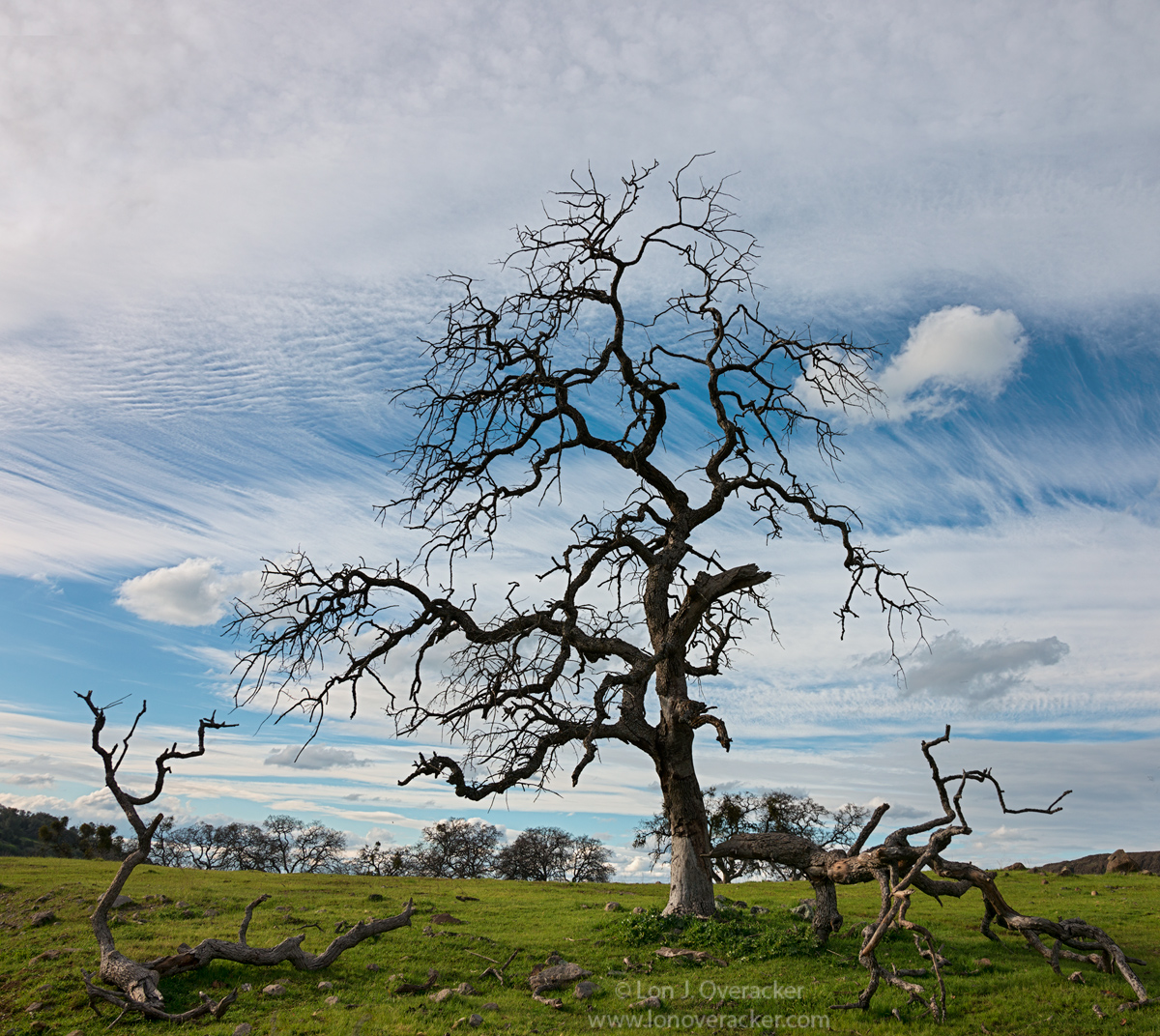
... or not.  California oaks have been stressing for years, recent drought hasn't helped.  I was cruising home, still keeping an eye on the sky and looking for that grand oak. This was captured exactly 1 hr after the previous post.  

I spied this silhouette in the corner of my eye while cresting a hill at 50+mph - a drive by.  A mile or so later I made a u-ie determined to capture this oak.   Of course when I got back, I discovered it was going to be a challenge. I couldn't get the whole tree from the road, so I had to scramble up a steep 12-15' embankment. At the top, there wasn't a ledge to speak of as the barbed wire fence was right on the edge.  Anyway, awkward foothold, straddled the tripod thru the wire, and relied on the wire and metal post for stability.... sounds pretty dangerous eh? Just like traversing a glacier with an ice pick or something.... angel

The good news is that the vantage point revealed the ground and the fallen limbs; which I think add to and now tell a story beyond just a silhouetted oak tree.

Would love your thoughts and comments on this, especially processing. B&W would be an option here, but like the other image, the green grass with the blue and white sky seem to go well together.

Thanks!

Lon

Comments

13 comments
Comment posted by Ron Pullen on March 10, 2017 at 12:25 PM
No nits, love the clouds too.  Ron
Registered on December 18, 2005, 74 Posts, 1413 Comments
Comment posted by Dave Dillemuth on March 10, 2017 at 12:46 PM
Yeah, I've done some high speed driving while looking for comps. Not a good long term survival strategy... 

This is an interesting image that is not necessarily pretty but definitely tells a story. Processing looks good but my inclination is that this image would be more powerful and graphic in B&W. No biggie, but if you have more to work with I also would like a tad more room on the right.
Registered on December 10, 2015, 104 Posts, 1112 Comments
Comment posted by Igor Doncov on March 10, 2017 at 1:08 PM
This is a marvelous image. Having driven through this area for years, I wondered if you two would come up with any really good oak images. No doubt about it, this tree has character. Good seeing on your part. The branches are all twisted yet there is great balance and spacing in them. I agree that a b&w would probably be inferior. I speculate that that's because the tones at the ground level will probably merge together a bit as they did in your previous post (this one's better). The weakest element is the top layer of the sky, which could use a bit more color but you can only shoot what's there.
Registered on November 22, 2014, 189 Posts, 2733 Comments
Comment posted by Harry Lichtman on March 10, 2017 at 1:10 PM
The contrast of life (grasses) and death (tree, especially the tree's shape) is a nice metaphor for me.  Great streaming sky to go with it.  Processing looks fine.  Tree branches do appear a bit darker than the rest of the trunk / large branch areas, especially in areas of the sky.  It is always a tricky processing issue, when trees poke into a bright sky.  At least for me when processing.  While tempting to brighten those areas of trees, I often narrow my gaze when actually looking at trees that boarder a  bright sky and they actually do appear much darker, as our eyes try to compensate for a bright sky.  I try looking lower on the tree, and though the bark is the same tone, no sky allows our eyes to expose for those areas so they look brighter.  Sooooo, looks fine.  Enough of my my blah, bla.
Registered on September 17, 2010, 304 Posts, 3507 Comments
Comment posted by Lon Overacker on March 10, 2017 at 2:20 PM
Thanks for the comments and suggestions so far. This is extremely helpful - especially since I like to make my images the best they can be.  And often times, it takes comments and opinions from others - including non-photog's as Igor recently pointed out.

@Dave. Agree, that I think with the make up of the sky, and the "story" that b&w could make that more powerful. Agree, and here's my effort.  Also, this is a different frame, clouds moved and yes, I had more room on both sides. Originally I wanted to eliminate the bg oaks on the right, but including them I don't think takes away much.

@Igor, Thanks for the comments.  This is a different frame and I think the top layer of clouds is a little better defined (not much diff in color version though.)  And to your point with the grass/land, that was my concern. So in processing the b&w, I increased the yellow channel and targeted contrast in the grass as well.  I think it's enough to help tell the story with the fallen branches as well.  Least I hope so.

@Harry.  I'm glad  you mentioned the dark branches up top, I was wondering if anyone would.  Good analysis too; in the RAW file, there is detail there, but as the branches get smaller in the frame, the details are compressed to the eye and in the web version, they go dark.  I'm ok with that, after all, I new I was doing a silhouette type image. ;-)

I wanted to ask.  What you you all use for converting to b&w?  I will use the simple PS adj layer, but often times I'll use Nik's Silver EFex Pro.  What really bothers me about this concept of the plugin is that you're simply picking between a number of options without really knowing what the H you're doing. Although I do make adjustments in the app, not just defaults.)

thanks again!  Click to view large

Lon
Registered on November 24, 2006, 521 Posts, 19147 Comments
Comment posted by Peter Richter on March 10, 2017 at 2:51 PM
Lon, I prefer the color version because the sky is most interesting on its own and thereby complements the structure of the oak in an amazing way to me. A real story teller for me, I like it a lot.

Peter
Registered on November 10, 2010, 218 Posts, 2723 Comments
Comment posted by SandyRichardsBrown on March 10, 2017 at 2:54 PM
A glorious old oak!
Not the tiniest nit from me..
Sandy
Registered on November 24, 2003, 3937 Posts, 12909 Comments
Comment posted by Harry Lichtman on March 10, 2017 at 3:35 PM
Lon - I usually just covert to BW in PS using the BW converter under Adjustments.  I have tried using the Adobe Camera Raw converter, since it appears there are more color options to adjust to fine tune, but it just hasn't seemed to work as well for me - less contrasty results maybe.  After converting in PS, I sometimes use ACR and further adjust clarity, and use other adjustments in the main control to see if I can improve in things.  I have seen some great results with the 3rd party tools, but I am honestly too lazy to try to figure them out at this point!  I'm overwhelmed with PS as is, and unless my results are consistently poor, I'll probably just stick with the PS conversion.  It seems there are many ways to convert, I love simplesad
Registered on September 17, 2010, 304 Posts, 3507 Comments
Comment posted by gary phillips on March 10, 2017 at 9:36 PM
There is a lot to unpack here, Lon.  First of all the original image is really nice.  I have been looking at dead trees around here, intensely, for the last couple of months.  We have had a lot of fires in the past, so thousands of burnt acres.  Lots of knarly trees, but it's proving difficult to find the right set up.  For me, the branches are really important, they hold my eye just enough to then catch the main show.  Love the silhouetted presentation.    The b/w is superb in my eyes.  One thing I could see and are extremely difficult to avoid,  are halos around the dark silhouette of the tree.  I have learned to deal with them, but are time consuming and tedious, for me.  I use Silver Effects Pro, I like the dynamic brightness control, and the soft contrast as a starting point.  I then use the color channels to tweak.  That's all I use it for.  Then it goes to PSCC, and Tony's actions for all final adjustments.    Anyway............I love the tree and the image.   What a great way to spend the day.  Looking for the right combinations of elements while driving is a way of life for me. I love it.
Registered on October 24, 2013, 185 Posts, 4136 Comments
Comment posted by scott lanz on March 11, 2017 at 8:52 AM
Excellent image, Lon, and well worth the effort to get it. The B&W is excellent as well. This image certainly looks great in B&W. Which is better? Neither. Simply a matter of personal preference and the situation called for.
Registered on November 14, 2003, 840 Posts, 12902 Comments
Comment posted by Harley Goldman on March 11, 2017 at 9:48 AM
B&W all the way. Much more drama and impact to my eye. Real nice!

I use CS6 B&W in adjustment layers to convert. 
Registered on November 19, 2003, 586 Posts, 11271 Comments
Comment posted by Preston Birdwell on March 11, 2017 at 6:37 PM
I like the color version, Lon, but to me, the B&W carries the mood. The tones look great.

I tried using Silver Efex for B&W. For some things, it works nicely, for others...not so much. I am now using the B&W adjustment layer in concert with TK's masks for conversions. In fact, I went back to using only ACR and Photo Shop for all of my processing.
Registered on November 1, 2003, 471 Posts, 5188 Comments
Comment posted by John Williams on March 13, 2017 at 8:47 PM
You really caught some interesting skies behind your trees on this trip Lon. The tree is the star here, of course, but that is a pretty cool sky too.

I almost always convert to BW using one of the rgb channels. Occasionally I'll use the luminosity channel from lab. It's not too rare that I'll use various parts of different channels that I like, using masks to blend them into a final version.
Registered on September 6, 2007, 221 Posts, 5985 Comments