Red Fox + Repost
by Dan Harbour
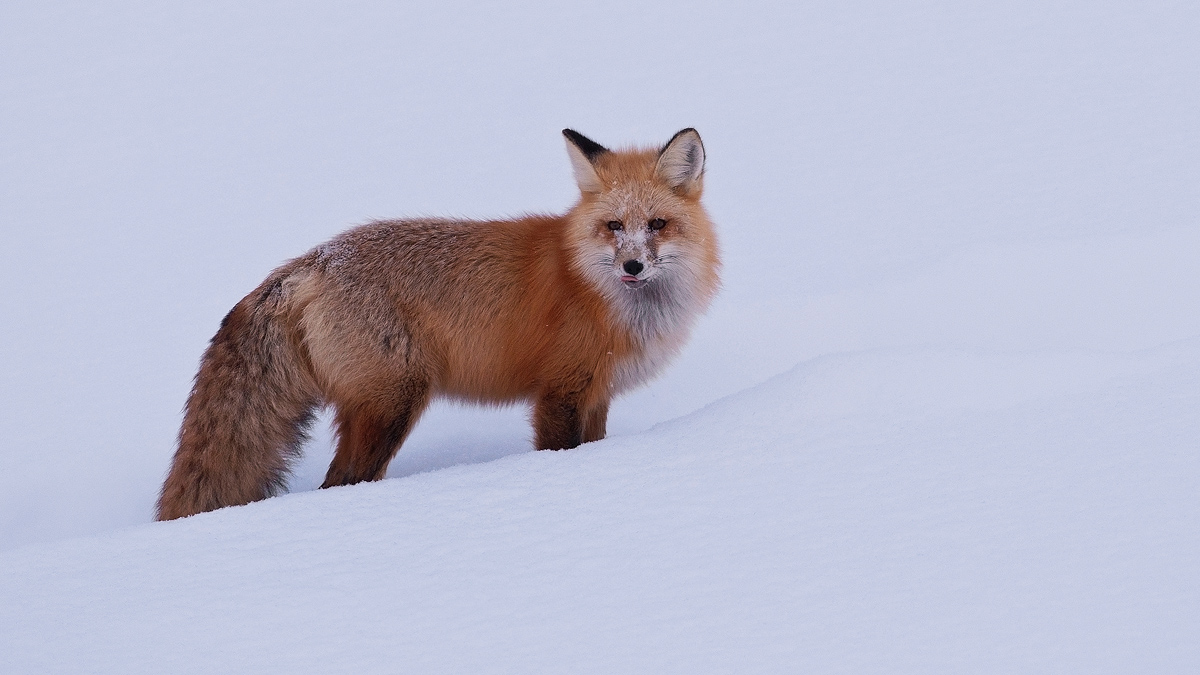
I was lucky to see a Red Fox in Lamar Valley, Yellowstone National Park. I struggled with how to present the snow.
D90, 300f4, 1/500, f6.3, iso 400, beanbag on car window.
All comments appreciated. Larger version included.

Comments
14 commentsPerfect comp, imo.
Nothing as pretty as a red fox against snow!!
Sandy
Nice simple composition and, at least to my eye, technically sound (focus, depth of field, etc.). One other thing strikes me about this shot - to me it simply looks a little under-exposed - that snow is awfully dark and the fox isn't popping out the way it could. I'm betting that increasing the brightness on this shot by about 2/3 to a full stop would make a real difference to this shot (and based on what I'm seeing I doubt the snow - or the lighter regions of the fox - would blow out with this amount of exposure increase).
Cheers...thanks for sharing this...
Brad
More suggestions on how to handle snow in images would be appreciated.
Really neat image. You did very well with the composition and the tongue is fantastic.
Rick
I prefer the re-post. While I realize snow is almost never truly white (largely due to the light it reflects), to me in the original it simply was too dark (I have no problem with the blue in it, but just how dark it was). Snow can be tricky to handle and, given where I live (in the "Great White North") I've spent a considerable amount of time playing around with dealing with it digitally. Here's a few observations:
1. The key to making snow look realistic is in ensuring that all the subtle white-on-white tonal detail is retained. Which leads to...
2. Not all raw converters are equal in retaining white-on-white detail - this is a large part of the reason I use the raw converter I do (after tons of experimentation)
3. Regardless of the raw converter one uses, it is usually possible to make the white-on-white tonal differences show better via careful contrast adjustment in your favourite image editor. I normally do this with a selective curves adjustment - and the key to doing it is picking the right point on the curve to "pivot" around.
4. While I don't like to recommend "must buy this piece of software to solve the problem" solutions, I have to admit I personally like to use a product called Light Zone to separate out (maximize the difference between) close tonal values (which in this case means maximizing white-on-white detail). I use this product as the LAST step in my workflow and tend to use it selectively (on only parts of an image). Ultimately there's nothing that this product does that you couldn't do in Photoshop (assuming a high skill level) but I find it much quicker and a very intuitive way to explore the lighting of an image (it's a good idea generator). But that's one of my most closely guarded secrets - so don't tell anyone!
To see what I mean in terms of bringing out the white-on-white detail, see the snow in this image - before a LOT of contrast tweaking in both PS and Light Zone the snow showed dramatically less detail...
Cheers...
Brad
PS: I think the snow on this image could use a LITTLE selective tonal adjustment (to bring out the white-on-white detail), but not always the easiest thing to do!
Congrats
D&L
Ken Archer
Anyhowm, this one is excellent. The snow on the snout takes this over the top for me.
Nice position, great color, nice detail on the snow, sharpened nicely