Nature Photographers Network
This is the preserved archive of the original Nature Photographers Network. The community continues at naturephotographers.network.
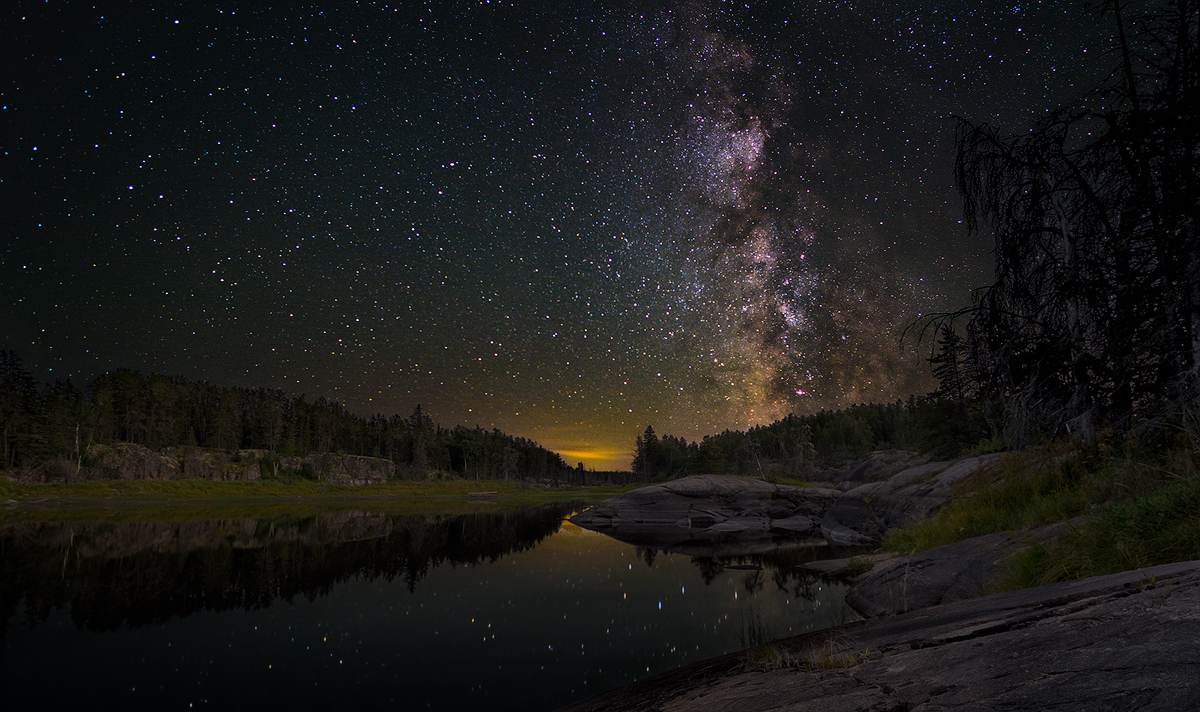
Bloodvein Milky Way
‹ PreviousLandscape GalleryNext ›

Bloodvein Milky Way

by Kerry Gordon

Gallery: LandscapePosted February 2, 2018220 views24 comments
Hi Folks, this is my first post on this board and I’m very excited to get a chance to receive some thoughtful feedback as well as offer some (I hope.)  This shot was taken last August on a month- long canoe trip with my wife along the remote Bloodvein River, which runs from Northwestern Ontario to Lake Winnipeg in Manitoba.
I have tried to upload this image several times and finally Preston Birdwell tried to guide me through what I needed to do to upload the image successfully.  Despite his suggestions (and patience) I cannot seem to upload the image so that it looks other than muddy with considerable loss of clarity and contrast.  The result is a fairly flat, lifeless image that defeats what I'm going for.  If there is anyone who can suggest how I might get better results I'd be most appreciative.
This was a rather complex shot.  I set up my tripod about a half hour after sunset to capture what would become the foreground of the image.  At around 11:30 pm I woke up and with the same tripod set up, shot 19 images including 3 black frames of the night sky/Milky Way.  In post, I stacked the 19 frames using a program called Starry Landscape Stacker and this reduced the noise considerably.  With that as my Milky Way sky I went into Photoshop and blended the stacked night sky image with a couple of the images I had taken for the foreground.  Once the blend was complete I did the rest of the post processing in Photoshop using Tony Kuyper’s TKv6 luminosity masking panel. 
My biggest concern with this image was trying to get a “plausible” tonal balance between the foreground and the night sky.  I would be interested in getting feedback on that and any other issues that folks may have that would help me improve this and future images.  Much thanks.
EXIF:  The image was captured with a Fujifilm X-T1 using a Rokinon 12mm f/2 lens.
Foreground: 12mm, ISO 400, .6 and 2.1 sec, f/14
Night sky/background: 12mm, ISO 3200, 15 sec., f/2 focused to infinity.

Comments

24 comments
Comment posted by Michael Lowe on February 2, 2018 at 7:48 PM
Is the image satisfactory to you before you upload? If so, following the process I use should yield an image that looks very close to how you saved it. Do all your processing-adjustments, sharpening, sizing, etc. then file> export> save for web. Make sure" optimized" is checked. Also, and this is extremely important check " convert to sRGB." Then adjust the quality slider to get as close as possible to the maximum file size for NPN. Then save it. I usually do a separate file for the 720 and 1600 files.
Registered on February 11, 2004, 777 Posts, 5252 Comments
Comment posted by Michael Lowe on February 2, 2018 at 7:55 PM
Forgot to comment on the image. Overall I really like it though I think it would be better without the tree on the right. I would also dial back the magenta stars. In the larger image I think the FG is pretty well exposed to complement the sky.
Registered on February 11, 2004, 777 Posts, 5252 Comments
Comment posted by Kerry Gordon on February 2, 2018 at 8:37 PM
Thanks Michael for your response.  To be honest, at this point, the most important thing for me is learning how to upload such that what is seen in the gallery more or less matches what I'm seeing in Photoshop.  I chose this image because it has proved difficult to upload and I did want to see if it could be done satisfactorily.  In the case of this image, what I'm seeing in Photoshop is much more vibrant and, therefore, satisfactory before the upload.  I have tried uploading two or three times and have followed the process you've suggested pretty much.  "Optimized" has been checked.  Prior to talking with Preston, I also checked "convert to sRGB."  That didn't seem to work.  Preston's recommendation was that I check "embed colour profile" but not check "convert to sRGB."  So I'm not sure what to try.  Also, I'm not sure what you mean by "the quality slider."
Registered on January 29, 2018, 4 Posts, 18 Comments
Comment posted by Dan Kearl on February 2, 2018 at 9:00 PM
I am not sure what you are seeing...
The large image looks good, It has a true night image feel, not too bright and a nice milky way.
It looks typically noisy for a night photo at iso3200. Not sure why the 19 images?, it looks like what a no moon night looks like to me and one 15 sec. photo exposed right would look like this.
I use Topaz for NR, it does well. There are other plug ins for night photography that work well.
Registered on September 2, 2013, 209 Posts, 1514 Comments
Comment posted by Kerry Gordon on February 2, 2018 at 9:55 PM
I appreciate that you took the time to respond, Dan.  But, you see, but that's my point.  This isn't my image.  It's not at all what it looks like in Photoshop.  Of course, it's the same composition but what I produced is crisp, the colours pop and, trust me, there is no comparison between what a stacked night sky image looks like compared to a single image using Topaz.  No comparison.  The point of stacking an image is that it virtually eliminates noise without compromising detail. And that's why the Dave Morrows, Dave Kinghams and the Ian Normans of the world stack their night sky images.  I went to a lot of effort taking and processing this image and it is very disappointing to have it look like this on a public forum.  I left this image up hoping to get some advice as to how to upload more successfully because, frankly, I find the image as it appears here, embarrassing.  If this was how it looked in Photoshop I would never put it out into the world.  I'm not saying this is a work of brilliance, far from it, but in order to get useful feedback, the viewer needs to see what I actually produced and this isn't it.  So I'm hoping someone can give me some advice as to how to upload so that the image is true to how I processed it.
Registered on January 29, 2018, 4 Posts, 18 Comments
Comment posted by Preston Birdwell on February 2, 2018 at 10:12 PM

Preston's recommendation was that I check "embed colour profile" but not check "convert to sRGB."

Just to be clear. In my instructions to Kerry via e-mail I suggested he convert a duplicate of his flattened master file to sRGB. So, leaving "Convert to sRGB" unchecked in Save for Web is appropriate.
-p
Registered on November 1, 2003, 471 Posts, 5188 Comments
Comment posted by Michael Lowe on February 2, 2018 at 11:57 PM
Kerry, I'm confused. There is no secret to uploading to NPN. THere is nothing you can do while uploading to change anything. It is what it is. That's why I asked my first question. After you've saved your image in it's final state ready for upload, does it look like you want it to look? If you've followed my directions and the image looks right, there's nothing you can do during the upload process to change it. There will be a little degradation but that's unavoidable. It should still look pretty close to what you've uploaded.
Registered on February 11, 2004, 777 Posts, 5252 Comments
Comment posted by Michael Lowe on February 3, 2018 at 12:04 AM
Forgot to answer your question. In the box that opens after you click "save to web" there is a slider in the URC that says "quality". You adjust that or enter a numerical number in the box that will get your file size as close as you can to what you want ie. 1mb for the 1600 pixel file. You can check the file size in the LLC of the box.
Registered on February 11, 2004, 777 Posts, 5252 Comments
Comment posted by Kerry Gordon on February 3, 2018 at 12:39 AM
I see what you're saying, Preston.  So really there is no contradiction only a slightly different order to the process.  But let me ask you, Preston, since I sent you a jpeg image directly via email, is it fair for me to assume that the email version is significantly better, in terms of colour, contrast and clarity, than what is appearing here on the gallery page?
In response to you, Michael, I don't want to appear argumentative.  But if this is the best I can do in terms of uploading a fair representation of the images I'm working on, then I'm in the wrong place.  How can I hope to get a reasonable critique if the image that you see is not a fair representation?  I know I don't have that problem when, for example, I post on 500px.com.  There my images come out exactly (or pretty damn close) as they were in Photoshop.  The problem there, however, is that posting is pointless since it's all about "likes" rather than meaningful critique.  That's why I was so looking forward to posting on this site. I know that it is possible to accurately post this image but, for some reason that I don't understand, it isn't happening here and that is both frustrating and disappointing.
Registered on January 29, 2018, 4 Posts, 18 Comments
Comment posted by Igor Doncov on February 3, 2018 at 2:55 AM
Welcome to NPN, Kerry,

Are you aware that you get better quality images if you click on the above image being displayed or click on the diagonal arrow below the image?

Have you looked at your own image through your browser? The image on your disk. I'm on a MacBookPro where the browers increase the size of images to appear larger on the screen. The result is always less sharp than in Photoshop which matches the pixels accurately. 

The tonal balance between land and sky is very good imo. The colors of the land have a very natural cast to them. Imo, that milky way is too bright for a moonless night (or with the moon). I believe that's popular these days but the real night sky doesn't look that bright. Also the individual stars are too large. Perhaps this is due to aggressive sharpening? A 15 sec exposure normally does not result in star distortion. And finally - do you really see stars in water reflections? I can't remember. The dashes in the water (as opposed to dots) is probably due to water movement during the exposure. Personally, I would clone them out but I often see images with them in reflections.

I find a great deal of variety in imagery of nightscapes. Much of the variability are not "mistakes" but intentionally done in a certain way. It's hard to therefore make a comment. I think some photographers try to show the Milky Way as it's shown through a powerful telescope and enhanced to look like a cloud. That's now how it looks to my eye but it's become an almost stylistic choice. 

Anyway, I've made some suggestions but really compared to most nightscapes this is really good. I like the tree on the right. The land doesn't have that unrealistic brownish cast that many nightscapes have. Heck, this would be a great landscape composition without the night sky and that's unusual as well. 
Registered on November 22, 2014, 189 Posts, 2733 Comments
Comment posted by Paul Breitkreuz on February 3, 2018 at 9:32 AM
Kerry, hello and welcome to NPN. A very impressive first image here. Everyone has a bit of a learning curve when first posting and reviewing images overall. At times things can seem off even for the best in the crowd that can or could be simple browser or monitor color management issues that have changed for no apparent reason. I know every time I get a Firefox update I have to change settings.
After reading your comment as well as a few others on the scene I might suggest taking another step overall. This scene is extremely challenging for anyone to photograph, post process, and upload to ones own personal liking.
With that all said why not take a more relaxed approach with a seemingly easier image to complete and upload to see if you've mastered the image mounting process to a final product you feel looks correct. It might be an easier way of finding out what shortcomings are real and what are perceived with regard to the NPN viewing process. Just a thought......laugh
Registered on February 25, 2006, 525 Posts, 8448 Comments
Comment posted by Harry Lichtman on February 3, 2018 at 10:39 AM
Kerry - I'm in Paul's camp on this.  Have you tried uploading this image to another social media site or your web site?  If not not, you may find that it will look similar elsewhere and it may be more of your expectations not in line with what you see.  As Paul suggested, I would try an more "normal" daylight image and see if it is more in line with your image in PS.  For a night scene, it looks pretty good to me.
Registered on September 17, 2010, 304 Posts, 3507 Comments
Comment posted by Preston Birdwell on February 3, 2018 at 11:38 AM
Kerry, I opened the jpg you sent in Photo Shop and compared it to the the large version I see on NPN. In Photo Shop, the jpg looks slightly more open, but is virtually the same color-wise as what I see on NPN.

I uploaded your jpg to my website and again compared to what I see on NPN: the images are identical.

You mentioned in your e-mail that you could upload the PSD file to DropBox. I suggest you do that so that those who wish to can compare the posted jpg to the PSD file.

I agree with Paul: Work up an image that is less complex; one made during the day, perhaps, and post it here.
--P
Registered on November 1, 2003, 471 Posts, 5188 Comments
Comment posted by Ry Birge on February 3, 2018 at 11:46 AM
Super shot Kerry!  Beautiful colors and great composition. Welcome to the club. Super entry for your first post. Keep up the good work
Registered on September 23, 2017, 118 Posts, 278 Comments
Comment posted by Kerry Gordon on February 3, 2018 at 12:11 PM
Thanks to you all for your patience and input.  I think Paul and Preston's suggestion is the best.  I'll post something else.  Perhaps it is the complexity of the image that is creating the problems, one that I'm not likely to encounter in a B&W or day lit shot.  I'll give it another go and see.
Registered on January 29, 2018, 4 Posts, 18 Comments
Comment posted by Michael Lowe on February 3, 2018 at 12:32 PM
Not to be a pest Kerry, but the problem needs to be isolated to either a processing one or uploading one. What is your process for readying photos for web presentation?
Registered on February 11, 2004, 777 Posts, 5252 Comments
Comment posted by Kerry Gordon on February 3, 2018 at 5:57 PM
Well, okay, Michael, maybe if I go through it step by step, you can isolate the problem.
I'm processing largely in Photoshop and I'm using Tony Kuyper's TKv6 panel.  I get things where I want it and it looks good to me and I'm ready to upload to NPN.
1. I send my completed image file to my external hard drive as a TIFF
2. I make a duplicate copy converting the original to a PSD file.
3. I open the PSD in Photoshop
4. I flatten it
5. I convert the image from 16 to 8 bit
6. Edit > Convert to Profile > sRGB
7. I take that file and, using the TKv6 panel, use the web sharpening action with 720 pixel as the long side.  I repeat that action with 1200 pixel as the long side.
8. I then save both the large and small versions  clicking on Save for Web (TKv6 panel).  In the dialogue box I check "Embed Color Profile" ( I leave "Convert to sRGB" unchecked since that was done earlier (step 6.)
9. I save both large and small sharpened images as jpegs to my Desk Top.
10. I upload both of those images from my Desk Top to NPN.
Are you seeing something there that I've missed or that I'm doing in error?
 
Registered on January 29, 2018, 4 Posts, 18 Comments
Comment posted by Michael Lowe on February 3, 2018 at 9:30 PM
To me, it does seem like your process should produce a good image for web display. The only thing I could possibly think of is to inquire about when you save as jpeg, do you make sure the file size is as close as possible to NPN's limits? Maybe better minds than me can help you out.
Registered on February 11, 2004, 777 Posts, 5252 Comments
Comment posted by Doug Koepsel on February 3, 2018 at 11:36 PM
Welcome Kerry.  Your last post indicated you saved the larger file at 1200px.  You can go up to 1600px, so that should make some difference.  The relative brightness between the sky and earth looks good to me, although the left bank looks brighter than the closer right side.
Registered on April 1, 2010, 196 Posts, 1592 Comments
Comment posted by John Williams on February 4, 2018 at 12:48 PM
Welcome Kerry!

First, wonderful image. I think that's a great composition, a step often missed when we concentrate on the Milky Way. That little point of light at the background really draws the eye back nicely. Very nice first post.

On the image difference, be sure you are comparing apples and apples. For example, with these night images even a slight difference in the background can change how they appear; same size, same background, etc. (For example, if you view the image in Photoshop with a black background and on NPN with a dark gray background, they may not appear the same; a white background will always kill an image like this.)

I agree with Paul's idea to upload the same image in a psd format somewhere for comparison. It would be very helpful to know if this is a difference only on your end, or something that everyone sees. There might be clues in the file settings as well.
Registered on September 6, 2007, 221 Posts, 5985 Comments
Comment posted by Kerry Gordon on February 4, 2018 at 2:59 PM
Thanks for your feedback Doug.  I was aware that images could be up to 1600 ppi or 1MB, whichever comes first.  This night sky image is 1200 ppi but is already at 896 kb so I could bump it a bit more, but, I should think, taking it to 1600 would put it well beyond the 1MB limit.
Registered on January 29, 2018, 4 Posts, 18 Comments
Comment posted by Kerry Gordon on February 4, 2018 at 3:04 PM
Thanks for your comment, John.  I don't get that much opportunity to shoot night sky Milky Way images but when I do I tend to treat them compositionally the same way I would any landscape photograph.  The night sky is kind of like a sunset - it acts as a backdrop for the image and contextualizes it without being the image in itself, if you know what I mean.
Registered on January 29, 2018, 4 Posts, 18 Comments
Comment posted by Lon Overacker on February 4, 2018 at 7:44 PM
Kerry,

First off, welcome to NPN!  I'm a little tardy here, but always want to welcome new members.  It's always a good thing when new folks come in a start contributing right away!  We look forward to your images and participation.

...upload the image so that it looks other than muddy with considerable loss of clarity and contrast.  The result is a fairly flat, lifeless image that defeats what I'm going for.  If there is anyone who can suggest how I might get better results I'd be most appreciative.

I was reading initial comments and responses and honestly was getting confused on the responses and/or what the actual issue is/was.  Then when I came back to this I re-read your comment above.  In a nutshell, sounds like your processing is fine. My only comment might be is that TK's action panel and the web-sharpening action actually do a lot of the steps for you like flattening and I believe even converting to 8bit.  When I use the action I do it straight from my master PSD file with all it's layers....

But before going any further, the issue of having the standard 720px image look flat, lifeless and dull compared to the larger view - this has been an issue posting for a long time. It comes and goes as a topic and has never been resolved.  Many attribute it to letting the system automatically generate the 720px version from a single large upload; however, I've noted this in many of my own files in years past and I always upload the small and the large view separately, just like what you did.

The point I'm eventually making is that in many cases, It's NOT your fault or something you're doing wrong in uploading!  Of course not all images display the same and MOST images we don't observe this display behavior, but there are images that still exhibit this problem. IMHO, continue processing and saving the small and large views as you have been - I don't think you're doing anything wrong and you may be spinning your wheels in fixing something that's not broken on your end.

ANYWAY, I'll close by saying this is a fantastic night-sky image.  You've done a great job mitigating noise and the star field and milky way are beautifully captured.  The other impressive point is how you handled the light and the landscape. The light levels in the non-sky areas is appropriately dark(er), yet there is nice detail.  This is certainly one of the better night images I've seen posted here.

Welcome!

Lon
Registered on November 24, 2006, 521 Posts, 19147 Comments
Comment posted by Kerry Gordon on February 4, 2018 at 8:06 PM
Thanks, Lon, both for your kind welcome and comments.  I think you're right, some images don't translate well via uploads and, I suppose that's why my next project is to learn something about printing.  I think I'm finally getting to a point where I'm coming up with an image or two that are worth the effort.  But I must say, I did learn something about posting images - it's not always as simple as it looks.
Registered on January 29, 2018, 4 Posts, 18 Comments