If He Posts 1 More Tree
by Lon Overacker
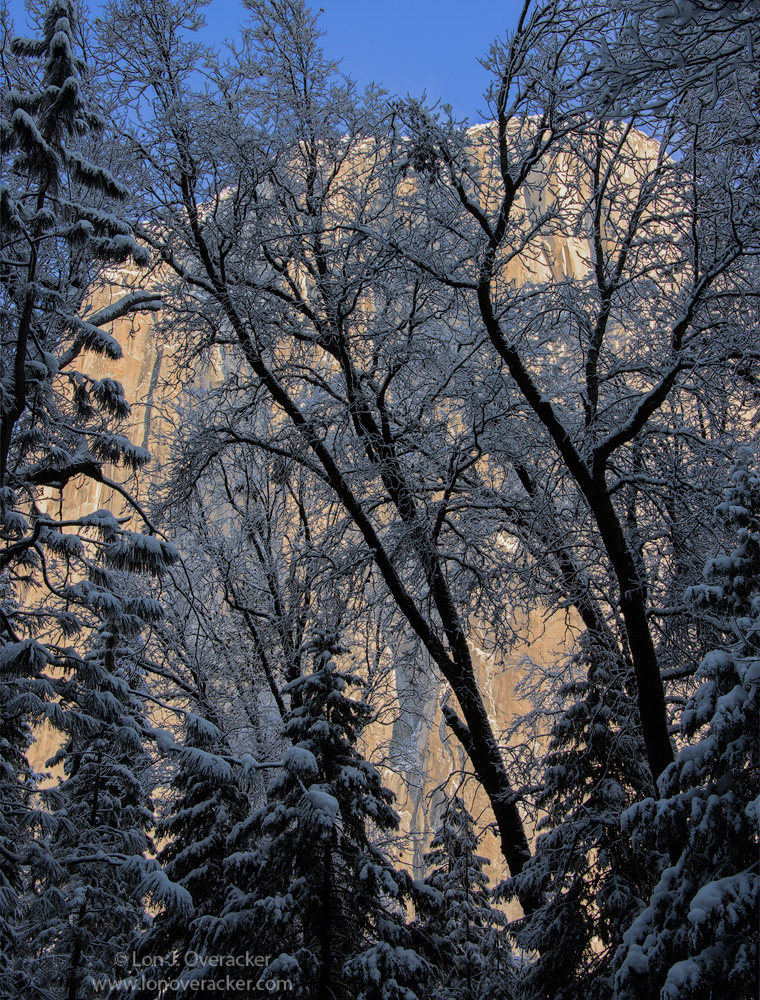
.... I'm sure you all must be tired of these Yosemite tree images by now. I wish I could say I didn't have any more... but I will try and mix it up a little bit more. I hesitated to post this because of the repetition, but also because I'm not entirely happy with it and I wanted your input. I actually didn't even look at the RAW file until just a couple days ago. Bracketed images of this have gone unimpressed on my hard drive.
I like the concept and was what I was seeking out on this trip back at the beginning of February. Seeking out scenes where El Cap wasn't the main subject, but provided a background, front light, back lighting and a backdrop for silhouettes, etc. But this is a most difficult lighting situation and I'm afraid my processing skills are just not ready to handle scenes. I didn't even attempt an HDR blend, especially after attempting to "auto-align" two different exposures. To much motion in the branches and so I didn't think even an HDR would work. But then again, I'm not versed enough. Anyway, short story long, this is processed from a single exposure. I'm afraid my efforts left the granite wall of El Cap kinda flat while trying to get enough detail and brightness out of the snow covered trees.
Your thoughts most appreciated. Does the overall comp work? Too much? Is this one worth pursuing more advanced techniques?
What say you?
Nikon D800E
Nikon 28-300mm @48mm
f/20 single image.
Thanks!
ps. oh yeah, a rare occasion that I included sky. Does it work or detract?

Comments
14 commentsOn the negative side the shadows aren't as beautifully luminescent as before and the snow on the branches has the same color and tonal value as the some of the areas of the cliff and so there is not enough separation.
BTW the smaller image has more presence because of the large white frame which is missing in the large version.
Blending images often fails fails due to things moving in the frame. I have hundreds of bracketed raw images that I planned on blending. Most of the time I only need one raw image from my 6D. Your D800e should be even better. Expose high contrast scenes as brightly as you can without loosing highlight details and process the raw image from there.
The sky looks good to me. I think it adds to the image.
On the processing side, when movement prevents blending several bracketed images, you can always try processing your RAW twice and blend those two. The results are superior to what you can achieve when retrieving shadows directly in the RAW processor itself I think. So in this case, use this one photo, and make a similarly processed RAW with the exposure cranked up say 1 stop or so (depends on the situation of course). Most of the time, I don't just crank up the exposure, but use a mix of exposure, blacks, and brightness to lighten up the lighter version.
Then you blend those two manually in Photoshop. Using the "blend if" function sometimes works great, sometimes the masking function works better, and sometimes a combination of those is the way to go. The HDR--technique is not my cup of tea, manual blending is a lot more versatile and more fun too.
With your D800 you should most of the time get enough DR in your RAW's to do this process without too much problem.
Edit - Brad's comment about exposing "to the right" is a good one, especially when using the blending from one RAW file technique. Years ago I did some testing how much this exposing to the right would improve noise, and the results were very clear. Modern cameras are better of course, but still it is a good procedure to do.
For those viewing this, the large version comes across much better.
Lon, I think you did a pretty job here handling the dynamic range. I wonder how Roel's idea to try process your RAW twice and blend the two would work.
--P
I just spent some time trying to catch up, and had a great time looking at your recent images! They are all beautiful, and I think this composition is just as nice as the others.
I like this as-is, but I do see how you would want more contrast in the rock background. There are a couple of plug-ins that make complex contrast adjustments easy. My favorite is Topaz Clarity; it works separately on different levels of contrast (kind of like making tiny bumps in the tone curve vs bigger waves). It includes an HSL filter so you can refine the contrast adjustments even more, all at once with the same filter. You can use the different levels of contrast adjustments and the HSL filter at the same time to get you where you want to go. For instance, in this image where you may want a different effect on the background than on the snowy trees, you might want to adjust the cyan and blue saturation and brightness to get the snow where you want it in relation to El Cap. If you are not familiar with the plug-in, let me know if you want me to show you a quick demo using this image.
Roel - I've heard of, but have never explored double raw processing. So I spent the better part of yesterday on Google and Youtube learning what I could. Literally hours of attempts and I finally came to the realization:
Igor, you've nailed the main issue with this image and whether or not double processing and/or blending can work. I'm guessing it can, but I don't have the skillset (yet) to pull it off. The issue that I finally came to realize is that using something like the Blend-If sliders, requires a separation of light and dark tones. Well, even with the two processed versions of the same file, there remains light and dark tones in BOTH images, so once you reach some mid-tone values, you're affecting both layers, and for the life of me couldn't get a result that comes close to what I did using basic masking and luminosity masks.
So I've got a knowledge gap here. I know there is good data in the RAW file, so hopefully I can learn and advanced way to blend this image. BTW, most of the tutorials and examples I could find were pretty simple where using the Blend-if slides were dealing with like replacing a sky, burning/dodging techniques on certain areas. I couldn't find anything on more complicated blends like my image here. Wayne, Thank you very much for the offer! I may take you up on it! I'll send you a separate email. And anyone else who wants to give this one a shot, let me know!
Perhaps THE most valuable thing I get out of NPN and the community here is learning and improving ones photography (processing, etc.) Of course the kudos are great for the ego, but in the end it's all about getting better, growing and learning. So thank you!
This is very nice. The combination of the warm light on El Cap and the cool, snow-covered trees in shadow is just beautiful. No objections to including the strip of sky - I think it helps frame the scene.
Versus your other images in this series, I don't think this comp. is quite as strong. I think I would have preferred it without the inclusion of the large evergreen on the left. My processing skills are basic so I'm not exactly sure how to raise the contrast in El Cap while opening up the trees. I would likely use a combination of shadow/highlights and luminosity masks. Personally, I think this image would work just as well with the trees going into shadow.
While I do prefer your earlier more simple composition posted on March 12, to me this image resonates in many different ways. The graceful curves of the oak tree trunks springing forth from the forest contrast so nicely with the stately tall conifers on the left and below, and all set against that wonderful warm glowing rockface. The play of the cool tones against the warmer tones also makes for a compelling image. The inclusion of the sky adds to this blue/gold aspect. The dark shadows of the trees provide a bold graphic element as well which I always enjoy, further enhancing the contrasting designs and lines mentioned earlier.
While I could see trying some of the techniques suggested to bring out more shadow detail, to me, the image as presented works. Maybe because I still cling to my film and know I could never get any shadow detail from a Velvia or Provia transparency of this scene.
Stunning work as always, Lon.