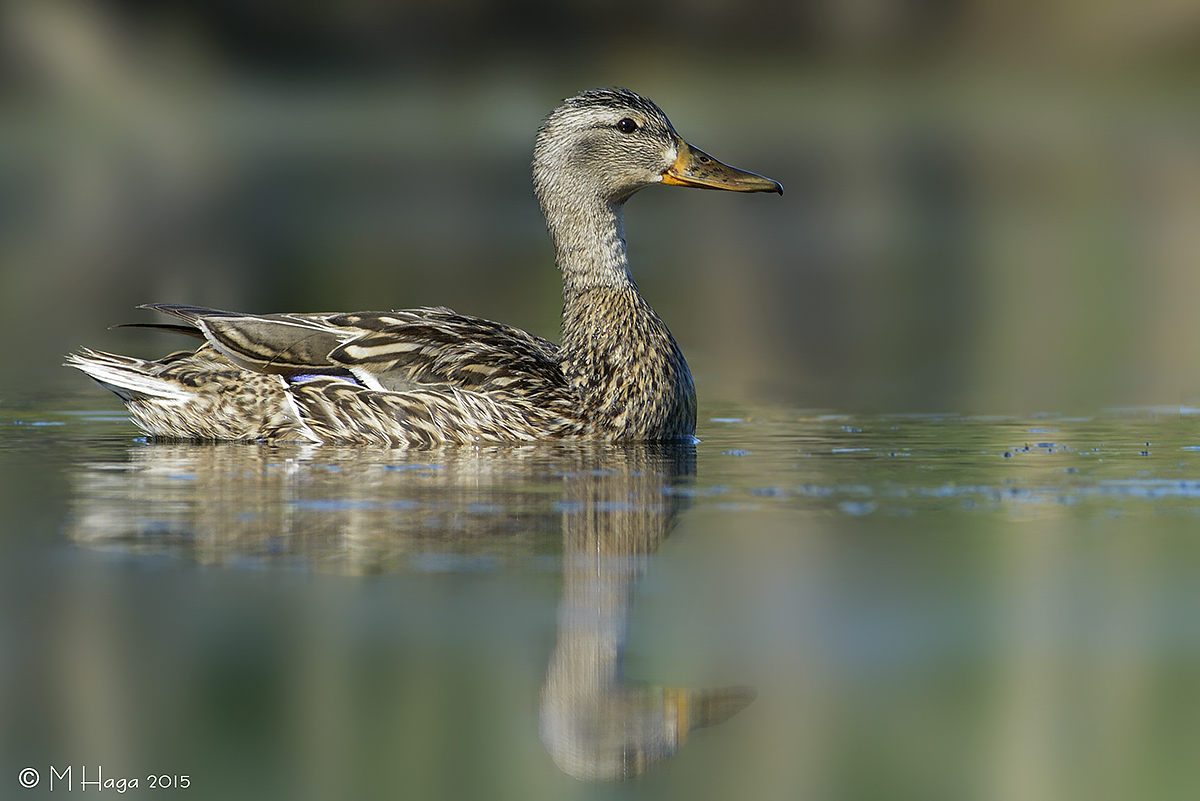
Female Mallard
by May Haga
An image from last summer when I enjoyed countless hours beside a pond in one of our local parks. I did some blurring of the background. Do you like the result?
Nikon D800, f9, 1/400. ISO 320, 300 2.8 lens plus 1.4 tc.
Thanks for looking and critiques appreciated.
May

Comments
8 commentsI like the nice low angle on the Mallard. Nice sharpness. The blurring of the background doesn't look natural. The areas of the background that are not blocked by the duck have a hard line where your blurring is evident. In real life, there would be a soft transition from focused to OOF soft background with DOF. It isn't as obvious "behind" the duck just because I can't see the "line". In Photoshop there is an option to do a "Field Blur" which is intended to create an effect like DOF bluring. I don't know what you used, but guessing something like a Gaussian blur with a mask.
My compliments on a nice, well balanced composition with plenty of really sharp detail.
I’m no expert but the BG looks fine to me however the weird blue halo on the beak really bothers me. To a lesser extent a halo is evident on the forehead, neck and other portions. If I may make a suggestion, you may consider trying the following: Using CS6, make a selection of the head and neck then inverse the selection. Expand the inverted selection by 1 or possibly 2 px and use a small diameter medium sharp clone stamp to eradicate the affected edges.
David
These colors are beautiful and I really like the blurring in the background but agree with Keith that their is something off with the transition. I wonder if simply feathering the background selection before you blur would fix the transition area. You might have to deselect an area around the duck but it might give you the transition you want. At any rate I think this photo is excellent and worth some effort to create your effect. Well done.
I very much like the idea of being able to make a gradual blurring of the background so I will keep working on the Field Blur.
Thanks again, May