Nature Photographers Network
This is the preserved archive of the original Nature Photographers Network. The community continues at naturephotographers.network.
Vestrahorn Sand Serpents
‹ PreviousLandscape GalleryNext ›

Vestrahorn Sand Serpents

by Harry Lichtman

Gallery: LandscapePosted November 6, 2015282 views14 comments
Large Version Included

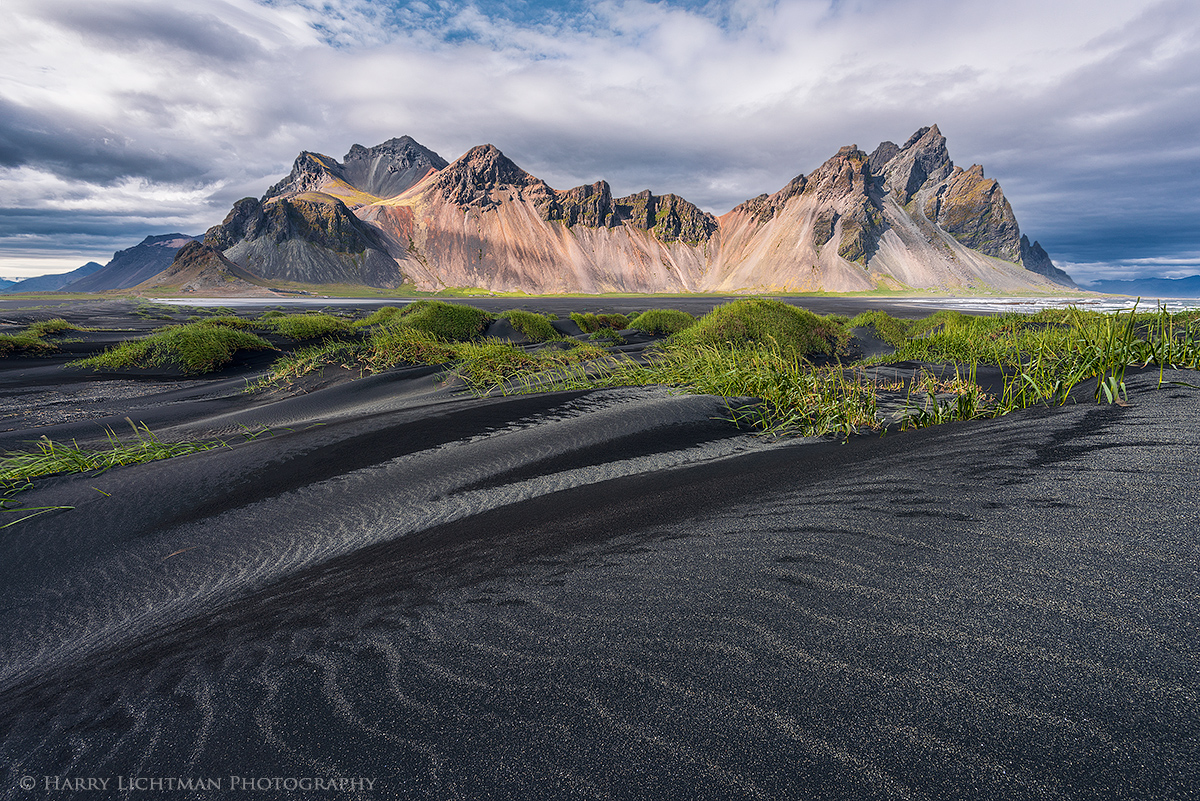
Different lighting and a different view near my last post from the southeast coast of Iceland.  I encountered fierce winds on this afternoon which required special care to prevent scratches on my lens, camera, and face.  The benefit of the winds was that it erased many of the foot prints that I had found on previous trips to these dunes and discouraged visitors from getting out of their vehicles.  Somewhere out there my hat is still blowing around.  Some of the grasses can be seen blurred by the wind but I like the effect and didn't try to freeze them.  Probably only visible in a large print.  The darker areas of sand are wet sand patches from earlier rains.  For those interested, a BW version can be found on my site:  http://www.harrylichtman.com/sand-serpents-monochrome

Single exposure, Nikon 810D, ISO 64, 16-35, 1/15 sec. f16, polarizing filter

Comments

14 comments
Comment posted by Kah Kit Yoong on November 6, 2015 at 6:52 PM
I like this a lot. The gun metal grey and ripples is a different emphasis from the many photos I've seen from this location.
Registered on September 27, 2006, 636 Posts, 10682 Comments
Comment posted by Nick Bristol on November 6, 2015 at 7:42 PM
Harry, I like it alot too. Your composition here works great and I love the colors. I think the combination of the gray sand, patterns, light and wonderful details made for a very special image. I'm enjoying the large version very much! 

Nick Bristol
Lone Rock, WI
Registered on February 1, 2004, 752 Posts, 14140 Comments
Comment posted by D.A. Edwards on November 6, 2015 at 8:35 PM
Whoa, that's an amazing rendition of a beautiful piece of the planet, Harry. Your on-the-ground images are certainly as eye-catching as your aerial series with complete control in your hands. Love the BG symmetry in mountain and clouds and the back and forth shapes in the sand. It does seem slightly crunchy to me, at least on the online version... YMMV.
Registered on October 8, 2014, 226 Posts, 1187 Comments
Comment posted by Albert Darmo on November 6, 2015 at 9:11 PM
Hi  Harry cryingThe overall  graphic detail is amazing..  giving us the illusion  that  the sand seems to be swirling.  and the mountains rising...a very  fine  presentation.devil
Albert Darmo
Canada
 
Registered on November 25, 2008, 1386 Posts, 11978 Comments
Comment posted by gary phillips on November 6, 2015 at 10:24 PM
Mister Harry this is excelllent.  I haven't checked out the b/w yet but will soon.  Absolutely perfect framing for my taste and what sweet color combo.  Love this image and wouldn't change a thing.  Beautiful work.
Registered on October 24, 2013, 185 Posts, 4136 Comments
Comment posted by David Schoen on November 7, 2015 at 12:07 AM
The textures and forms in the black sand set off by the greens of the grasses and topped by the mountain cake work very well here.
I see images posted on this site and others where the sharpness just pops out and I don't see that in my jpegs.  Are you willing to share your secret? 
Registered on November 6, 2006, 1213 Posts, 4587 Comments
Comment posted by Harry Lichtman on November 7, 2015 at 8:56 AM
Hi David - First you will find that there are many ways to sharpen for the web, my method is just easy and fast.  If you search the web, you can find much more sophisticated methods, some you will need to pay for.  You must also assess the image you are sharpening as images with lots of fine detail and contrasty edges may get oversharpened - maybe I am guilty on this one as someone commented that it looked "crunchy".  So, I take my original TIFF image and resize it so @ 72dpi the long side of the image is 2-3x the size of my final web upload size.  For this image, I think i resized to 2400 pixels on the long side.  In Photoshop, I duplicated this image layer and called it Sharpen.  I then went into Filters, Sharpen, then applied the Smart Sharpen 2X.  I have also justed used the Sharpen filter 2x in the past, but this method just doesn't have as much flexibility.  The settings I typically use in the Smart Sharpen are: Basic, Amount 100, Radius 3, Remove Lens Blur.  Again, experiment with different amounts to see the effects on the image.  This makes the image look oversharpened but it will look better once you reduce to the final web size.  I then Erase portions of the Smart SHarpened image to reveal the less sharp image, such as high contrast edges such as the edge of the mountains or the grass edges.  This will help prevent halos on the final image.  I then flatten these 2 layers and resize to the final output size.  In this case I think it was 1200 pixels.  Areas of fine detail such as the sand might get oversharpened, so sometimes you might need to erase a little into those areas to prevent oversharpening.  Change the opacity of the Erasure and you have lots of flexibility. 

Hope that helps.  Just my method.  I am sure others on this site are much more proficient at  this thatn I am, so hopefully others will give you some input on there methods. Also check out the other Forums on this site as there may be some good info there.  Or, as this question there.  Good luck!
Registered on September 17, 2010, 304 Posts, 3507 Comments
Comment posted by Marylynne Diggs on November 7, 2015 at 1:02 PM
This is wonderful, Harry.  I love the cold grays with the bright greens, and the higher perspective does add some drama to the scene and some height to the mountain.  The way the sky patterns mirror the drifted sand patterns is just perfect!
Registered on December 14, 2010, 122 Posts, 1034 Comments
Comment posted by Nick Bristol on November 7, 2015 at 2:28 PM
That is a beautiful scene, Harry. I too like everything about it and see no need for any changes. I love the looks of that dark sand and the clouds worked out beautifully for you. Very nice!

Nick Bristol
Lone Rock, WI
Registered on February 1, 2004, 752 Posts, 14140 Comments
Comment posted by Roel Wijtmans on November 8, 2015 at 11:26 AM
Once again, excellent use of those patterns in the sand! Color version is hands down the winner for me, but that's personal taste of course.
Registered on September 30, 2012, 116 Posts, 2257 Comments
Comment posted by Basil Greber on November 8, 2015 at 4:02 PM
I like the monochrome version a lot (works better for me with that kind of light). Very good composition and nice patterns in the foreground.
Registered on November 8, 2005, 219 Posts, 1340 Comments
Comment posted by Aaron Feinberg on November 9, 2015 at 4:12 AM
That's pretty crazy.  Some of the shadows looks like they're from various lighting sources so throwing me off.  Love the textures.

aF
Registered on October 26, 2009, 399 Posts, 2789 Comments
Comment posted by Bill Chambers on November 9, 2015 at 9:28 PM
Absolutely spectacular Harry - no nits whatsoever.  Superb.
Registered on April 10, 2005, 753 Posts, 21216 Comments
Comment posted by Ryan Shain on November 9, 2015 at 9:47 PM
The texture and feel of the sand is stunning on it's own harry, and you add in the grasses, mountain and clouds and you have a stunningly dynamic image!! There is such a beautiful flow of energy to this image.

Wonderful in every way

 
Registered on February 20, 2007, 226 Posts, 4571 Comments