Nature Photographers Network
This is the preserved archive of the original Nature Photographers Network. The community continues at naturephotographers.network.
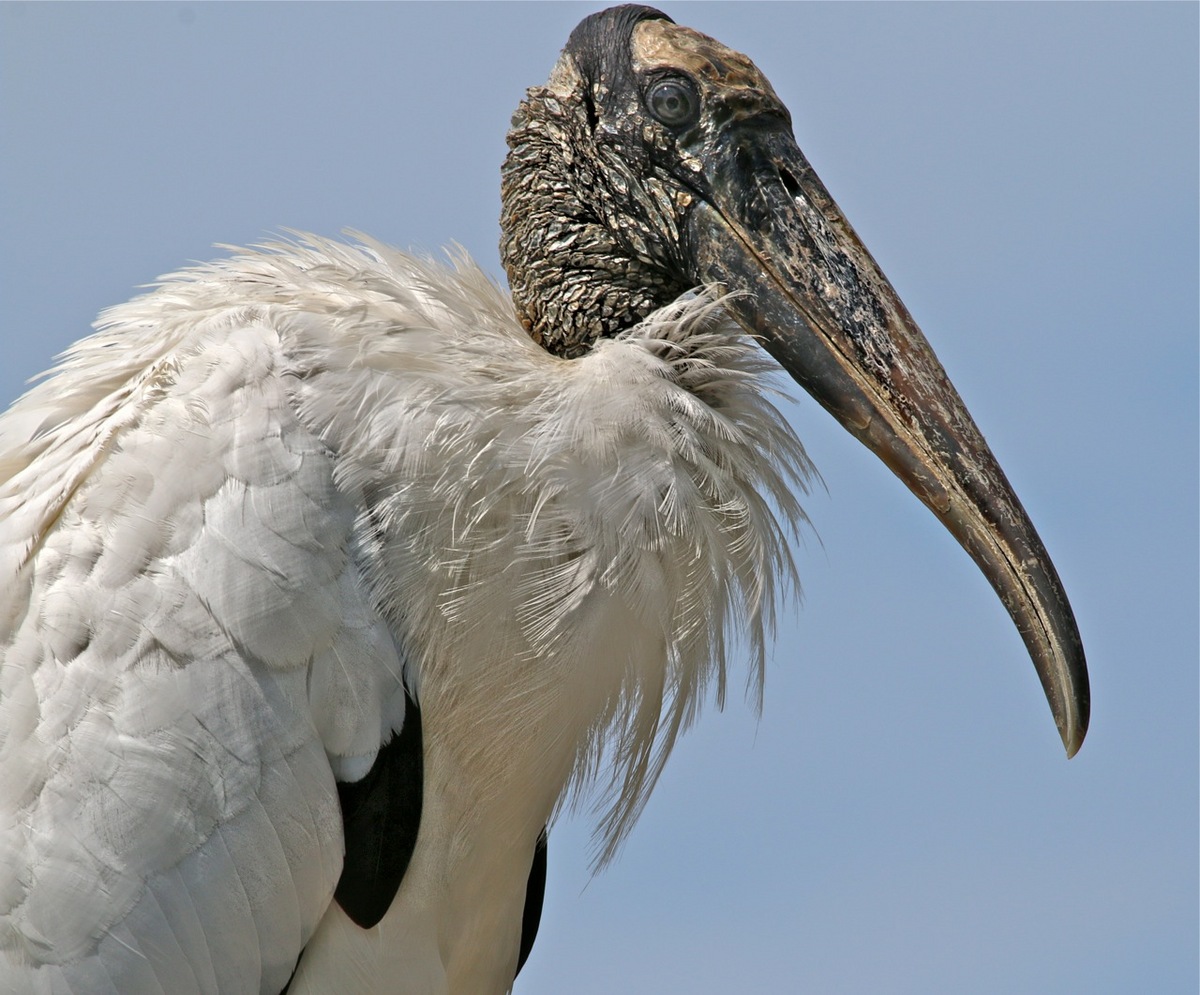
Wood Stork Portrait
‹ PreviousAvian GalleryNext ›

Wood Stork Portrait

by Sandy Scott

Gallery: AvianPosted December 22, 2013110 views10 comments
I love wood storks - they are particularly magnificent in flight and we have a considerable number in this area - the Tampa Bay Area of Florida. My mission here was to show a close up portrait type photo showing the contrast between the bird's beautiful white plumage and it's head/neck area with skin very much like bark on a tree. I'm debating over whether I would have rather framed the shot with just a bit more space on top of the bird's head - when I took this shot last summer, I was in to extremely tight framing of bird head shots. Not that I am not presently! I often find shots of this bird to be challenging as far as getting head detail due to the contrast between the head and the plumage, but this one came out exactly the way I wanted it to and I am very pleased with the shot. It has captured detail - particularly the eye which I seem to have a bit of difficulty capturing with this particular species.

250mm, f5.6, 1/400 ISO 800 :

Comments

10 comments
Comment posted by Jefferson Silva on December 23, 2013 at 9:47 AM
Nice portrait, Sandy.
I would add a little more room on the top and right sides
:)
Registered on December 18, 2012, 162 Posts, 975 Comments
Comment posted by Sandy Scott on December 23, 2013 at 9:49 AM
Thanks Jefferson - I did debate with myself about that, but for some reason, I just love those tight portraits as you will see when I post a pelican portrait tonight! :biggrin:
Registered on December 6, 2013, 85 Posts, 345 Comments
Comment posted by Dennis Plank on December 23, 2013 at 1:45 PM
Nice job on the exposure and excellent detail, Sandy. The angle looks a trifle steep, but that is difficult to avoid with some species that don't like to come down to our level. I think I'd add a little sky at the top as the head is pretty crowded there.

:toast:
Registered on January 28, 2008, 1767 Posts, 23192 Comments
Comment posted by Sandy Scott on December 23, 2013 at 1:54 PM
Thanks Dennis, unfortunately I was stuck with the angle. Wouldn't you know that when I was out on my bike this morning, 4 of them decided to hang out on the ground - I was tempted after my ride to jump in my car and go back but I'll have other opportunities. Now that I have lived with the shot, I agree that I should have left some breathing room at the top. I went back into the editing program and alas, I framed it in the camera from top to bottom as shown and the only place that I can recover space is by adding space to the right of the head, but it needs it on the top. Every post gives me more food for thought and is a new learning experience!
Registered on December 6, 2013, 85 Posts, 345 Comments
Comment posted by John Robinson on December 23, 2013 at 5:49 PM
Yes I think a little more space at the top. Great detail. Bit ugly - reminds me of s0meone !!
Cheers
JR
Registered on March 2, 2008, 535 Posts, 2453 Comments
Comment posted by Sandy Scott on December 23, 2013 at 5:54 PM
Yes John, definitely could have used a bit more space. Hopefully the reminder is not of a woman in your life! :biggrin:
Registered on December 6, 2013, 85 Posts, 345 Comments
Comment posted by Howard Cheek on December 23, 2013 at 7:09 PM
Detail/DOF looks great, good exposure of those whites too Sandy.
A face only a mother could love, without a doubt:smile:
I would add canvas on top & out in front, easy enough to do..
Merry Christmas! :wavey:
Registered on July 24, 2008, 1201 Posts, 10758 Comments
Comment posted by Sandy Scott on December 23, 2013 at 7:42 PM
Howard, I was not aware that you could do that and perhaps I misunderstood you. I was presuming that by adding canvas size you meant that I could stretch the background, but after discovering that in fact canvas size could be changed in PSE11 and struggling for a bit to make the photo expand, I guess that all it can do is add borders - is that what you meant to do. Anyway, assuming that it is, here is a brief try just adding a bit more. Did I understand the concept if not the amount to be added? Thanks. oops, that didn't work in that I added a white border which of course does not now show. Let me get clear what you meant before I tackle it some more. I took one more shot by adding a black border, but I am still not sure if this is what you meant me to do.
Registered on December 6, 2013, 85 Posts, 345 Comments
Comment posted by Howard Cheek on December 23, 2013 at 8:03 PM
Adding canvas requires you to start practicing with your PS 'tools' Sandy. And this kind of sky BG is the easiest to do..
I started here by simply adding canvas, i.e. extending the crop beyond the original borders.
Then you clone out the sky with your healing brush tool (replace). Then you can use the same tool (normal) to blend. There are other tools you can use to accomplish this, I just used these ones here to do it quickly.
Your image needed obvious space up top, but also some space out front for the bird to look into (negative) is usually best for composition.
Registered on July 24, 2008, 1201 Posts, 10758 Comments
Comment posted by Sandy Scott on December 23, 2013 at 8:14 PM
Howard, that is a thousand percent improvement in the photo - it is amazing what a difference a little tweak makes. Thank you so much for the mentoring and taking your valuable time to add the border. I need to get to work learning more about PP. I got a bit discouraged with PSE for a couple of reasons, not the least of which was slightly over a month after buying it, they upgraded to PSE12, but I did not qualify for an upgrade. I've been using iPhoto on my iMAC, downloaded a trial version of Perfect Photo Suite 8 yesterday (which I love and find to be very intuitive), and plan to get Aperture as soon as I upgrade the OS on my computer so that it will run the latest version of Aperture. Bottom line, you did mean what I thought you did, I just went about the process incorrectly using the canvas resizing rather than the cloning tool Again, thanks!! BTW, I assume that there is no way to change the main photo once it is posted. I'd love to change it to your version!! :)
Registered on December 6, 2013, 85 Posts, 345 Comments