Nature Photographers Network
This is the preserved archive of the original Nature Photographers Network. The community continues at naturephotographers.network.
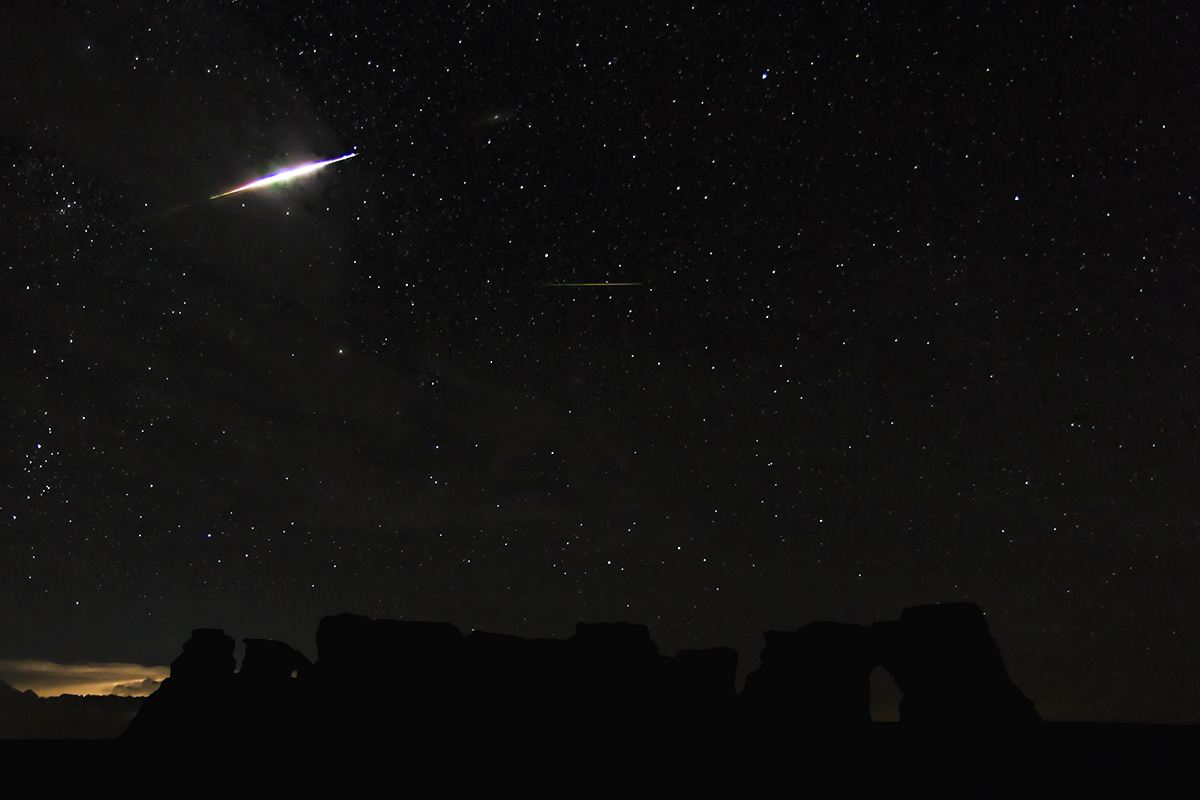
Perseid fireball +repost
‹ PreviousLandscape GalleryNext ›

Perseid fireball +repost

by Rob Graham

Gallery: LandscapePosted August 13, 20131,370 views8 comments
Just after midnight Monday morning, I captured a meteor fireball/explosion over western Kansas. Distant storms provided near constant sky lightning flashes. The skies in my area seemed clear, but the humidity felt high. I was using 15 sec exposures (7D, f/3.2, ISO 1600, 17mm), 2 secs apart. The 23 exposures following the fireball capture show a distinct colorful afterglow, fading out by the end. The glow appears to move, but this is probably just caused by the Earth's rotation. The glow lasted ~6.5 minutes. The second meteor in the photo was captured in the original frame, so a 2 for 1 :). Processing the photo seems to have brought out a few high clouds that weren't visible to the naked eye. The rock formations are the better known formation at Monument Rocks NNL. I have tried overlying a light painted foreground, but can't get the blend to look quite right. Does it need a lighted foreground? C&C always welcome and appreciated.

Any suggestions before I print this? The few night photos I have printed seem to be darker than I think they would be.

Comments

8 comments
Comment posted by Eva McDermott on August 13, 2013 at 4:44 PM
Are you sure that is not a flying saucer Rob? :biggrin: I like the left side as well as the barely perceptible rock forms. One suggestion is to crop the right making a 6 W X 7 H format. Not much going on there except the open archway so I see why you may not want to crop.
Registered on January 4, 2009, 1015 Posts, 13229 Comments
Comment posted by John Mumaw on August 13, 2013 at 7:01 PM
Yeah, this needs a landscape of some type to be successful, Rob. I can barely see the Rocks now and they would provide a nice 'anchor' to the scene.
Registered on September 9, 2005, 62 Posts, 2289 Comments
Comment posted by Neale Dyster on August 13, 2013 at 8:27 PM
Fascinating capture. It would be great to see some detail in those rocks, they look really interesting.
Registered on February 19, 2008, 94 Posts, 738 Comments
Comment posted by Rob Graham on August 13, 2013 at 10:54 PM
Thanks for the suggestions. I went back and started over, and managed to bring some detail into the rocks, and a third meteor that happened within a few minutes of the big one. How does the rework look?
Registered on August 22, 2006, 842 Posts, 2824 Comments
Comment posted by Paul Breitkreuz on August 14, 2013 at 12:34 PM
Rob, to me the repost is better overall. However, as I never do this type of night time photography I could not give more input or suggestions beyond saying I do like it. :cool:
Registered on February 25, 2006, 525 Posts, 8448 Comments
Comment posted by Stan Rose on August 14, 2013 at 8:13 PM
Cool! Personally i prefer the original. There's too much space between the fireball and rocks to make this a real prize--winner--but who cares cause it's super cool!! :wink:
Registered on September 15, 2005, 836 Posts, 17099 Comments
Comment posted by Mark Seaver on August 17, 2013 at 12:09 PM
Rob, the rocks in the repost look unnatural to me, plus there's a heavy black line along their left edge. The brightening has brought out another meteor, which is nice. For me, the monument silhouettes in the original look very natural and make a nice anchor for that amazing fireball. In looking at the smaller version, I agree with Eva's suggested crop, but I like the larger version as posted, where the added brightness helps a lot.
Registered on January 23, 2011, 1103 Posts, 17270 Comments
Comment posted by Keola Wills on August 29, 2013 at 11:29 AM
I agree with Mark, I do like the silhouette of the rock formation, I wish there was just a little more definition to them in the original. Maybe a happy medium between the two would work.
My experience with printing night photos depends on where Im having them printed. I recently started using White House Custom Colour for my prints(www.whcc.com) as they have a lot of creative options as far as surface finish, texture, and just a wide variety of products. Since I don't have a dedicated monitor to edit my photos and I am on a MBP, I found that I have to adjust my exposure by +0.5 to my file before sending it out to them. They do no corrections of any kind without you asking them, so I cannot calibrate my monitor to their printers. Prints I had done at my local lab, they would adjust exposure and color so the print would match what they thought I saw on my monitor, needless to say one of my milky way photos was absolutely butchered. Stick to one lab for consistency and you'll start to feel out there printing, or you can just calibrate your monitor.
Registered on March 29, 2013, 11 Posts, 16 Comments