Nature Photographers Network
This is the preserved archive of the original Nature Photographers Network. The community continues at naturephotographers.network.
Silver Spring WC#579
‹ PreviousWeekly Challenge GalleryNext ›

Silver Spring WC#579

by John Clulow

Gallery: Weekly ChallengePosted April 12, 201341 views7 comments
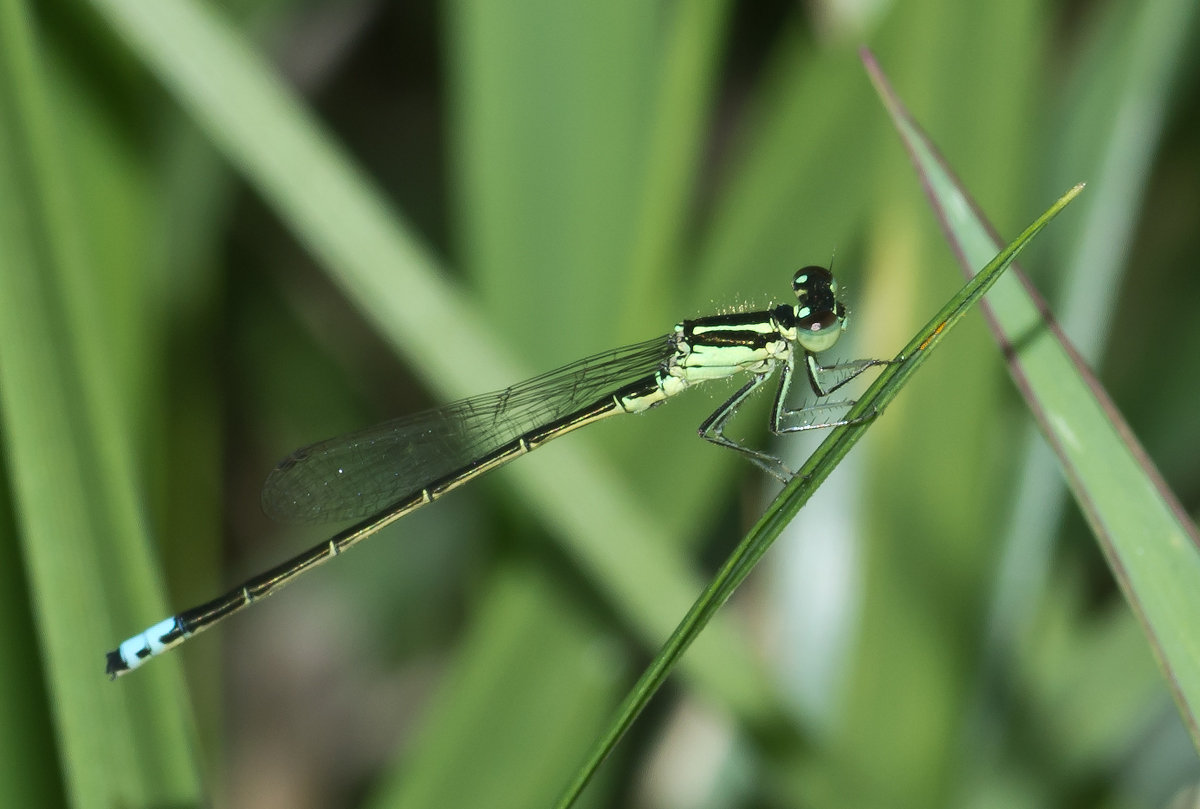
Browsing the archives, I found this damselfly shot during my Intro. to Nature Photography class last June. We went on a field trip to a State Park. This was taken right on the edge of a small channel off the south side of Loon Lake. The tip of the tail turned out a bit soft but it was my first dragon fly picture so I kept it anyway.

Pentax K-5, Tamron 90 mm macro 1:1, ISO 200, 1/160s, f/10, on-camera flash, radical crop (30% of original)

Does flash have the same problems here as it does with bubbles?

Comments

7 comments
Comment posted by Carolyn Derstine on April 12, 2013 at 8:46 PM
Great first dragonfly picture, John. They are tricky to catch in focus and you did great with this. The tail tip, as you mentioned, is a bit soft, but not a deal breaker. Nice comp too. Flash is tricky and I am still trying to figure it out myself. The extra lighting from the flash looks good on the damselfly (I like the highlights in his eyes) but did make the background pretty bright and somewhat distracting IMO. Maybe it could have been darkened in postprocessing?
Registered on February 16, 2011, 610 Posts, 3684 Comments
Comment posted by John Clulow on April 13, 2013 at 7:21 AM
Thanks for the suggestions, Carolyn Derstein. I did a quick proof-of-concept to see if I understand your darkening suggestion.
Registered on November 1, 2012, 155 Posts, 1079 Comments
Comment posted by Carolyn Derstine on April 13, 2013 at 9:26 AM
Hmmm. . . now the dragonfly looks too dark. It would take some very tricky editing to make a selection of the dragonfly and then just darken the background. This may just be one of those "oh well. . ." shots. I have quite a collection of those, including dragonfly shots! :rolleyes: To improve on it next time, suggestions would be having more distance from a busy background and having a large aperture, only focusing on the dragonfly. Maybe looking for a different angle to get a better background, such as getting down low and having the sky as the background. Again, tricky, because with a large aperture, the whole dragonfly should be on a parallel line with the camera front. . . and sometimes the critters and the environment just aren't cooperating! Maybe even just powering down your flash a bit might have helped? However, saying all this, others may have a different opinion regarding your background as it certainly does show the dragonfly in the context of its environment.
Registered on February 16, 2011, 610 Posts, 3684 Comments
Comment posted by John Clulow on April 13, 2013 at 9:51 AM
Thanks again, Carolyn. I follow all of the directions you are taking in the most recent post. Part of the problem, I think, is that in some instances the physical positioning of the subject and background is not conducive to an ideal shot given the various trade-offs to which you allude. So either one takes a shot or waits and looks for something better. At my novice stage, I was so happy to have even this opportunity that I opted for the former choice.

I'm glad I did and that I posted it because I've learned a lot in the dialogue, as I most always do here on NPN.

As to the PPing, I made a layer mask with everything in the original image hidden and then reduced the luminance and vibrance of the background. I then carefully painted in the damselfly portion of the original image onto that darkened background. So if you were to isolate the subject and compare it with the original, they should be identical.

The subjectively perceived difference, I think, comes from the change in the background which may demonstrate how complex our perception of images really is; i.e., how it is not merely an atomic or elemental aggregate but rather a sort of amalgam influenced by visual, perceptual, and cognitive factors. Without the silhouette effects of the lighter background, the darker portions of the subject are no longer differentiated and as a result the subject looks darker overall, perhaps.

Anyway, I hope to find some better photo ops this Spring and if successful, I'll seek feedback here on NPN. And all of your comments will be most helpful to that effort.
Registered on November 1, 2012, 155 Posts, 1079 Comments
Comment posted by Mark Seaver on April 13, 2013 at 12:20 PM
The original is very good. I especially like the sharpness of the eyes. With one exception, the background doesn't bother me. The exception is the leaf coming from the left. Otherwise, a modest dodging of the background (especially if you dodge through a luminosity mask to control what gets dodged, check out Tony Kuyper's web site) would provide nice separation between the damsel and the background.
Registered on January 23, 2011, 1103 Posts, 17270 Comments
Comment posted by Howard Cheek on April 13, 2013 at 1:18 PM
Great detail where it counts, good use of flash John..
Like the blurred BG that sets of the subject well also.
Looks very good in spite of the 70% crop.
Well done! :wavey:
Registered on July 24, 2008, 1201 Posts, 10758 Comments
Comment posted by John Clulow on April 13, 2013 at 3:16 PM
Thanks Howard.

I really appreciate the link, Mark. It is explained clearly enough and step-by-step so that even I can understand it!
While I've just scratched the surface, I managed to get this result before I got to tired to go on for now. But I will definitely spend a lot more time going through the tutorials he provides. Great stuff! Thanks so much!
Registered on November 1, 2012, 155 Posts, 1079 Comments