Flux
by Alex Noriega
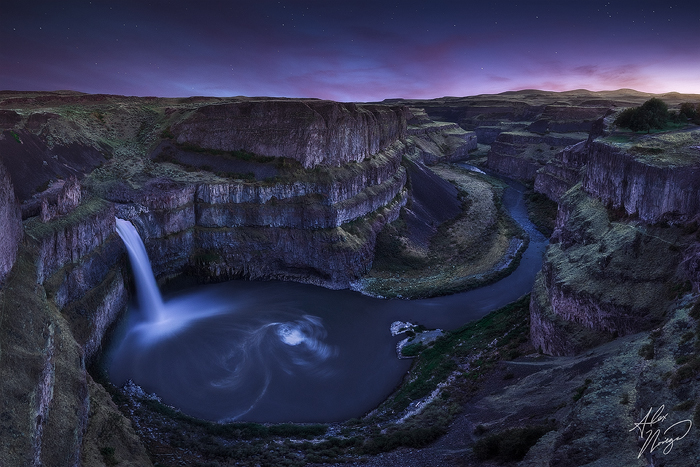
Washington's Palouse Falls at twilight in early summer. Larger version on black available at the Purchase Print link.
Because my 18mm-equivalent 12-24 wasn't wide enough for a pleasing single-shot horizontal comp from this vantage, a panoramic stitch was required.
Five exposures total:
- Three verticals stitched for the landscape: 30s, ISO 100, f/8
- One horizontal for the sky: 2s, ISO 100, f/8
- One horizontal for the stars 1/2 hour later: 30s, ISO 1600, f/4
Nikon D7000, Nikkor 12-24mm

Comments
21 commentsThe water flow is impressive.. it seems like milk, as in many photagraphs you posted on the web. I would say this is a characteristic sign of your images.
Well done!
The flow could certainly be a lot better! Check out Ryan Dyar's and Floris Van Breugel's renditions of this scene to see what the water looks like in the spring. The milky look is simply a byproduct of not having a polarizer and not having a body good at higher ISOs to freeze texture/motion in the water. It looks good here, and in my previous Cape Kiwanda image, but I'm not a fan of the look in my Triple Falls images. I need to buy a polarizer.
Michael, yes - I stitched the three verticals, then warped/transformed the stitched canvas back to proper proportions (each frame of the stitch was very different in terms of angle and placement of the landscape's features, since I was so close to the scene, shooting at a wide angle).
Then I cropped back to the proper 3:2 ratio, then downsized the stitch back to the native resolution of the D7000. Since it had extra resolution from the 3 stitched frames, but not so much extra detail after the warping, this brought it back to a good level of sharpness, and made it easier to blend with the horizontal images. The sky was easy to match up to the horizon because the horizon is so well-defined, but it would have been more difficult with things like trees on the horizon.
The reason I knew I'd need a separate sky exposure, other than highlight preservation, was that the light was disappearing quickly, to the point where each successive frame was different - the sky would (and did) come out very uneven and splotchy in the stitch as a result, even after matching the frames' exposure as well as I could in Adobe Camera Raw.
Believe it or not, the rock color in particular is pulled back from the raw exposures - there was what Sean Bagshaw calls "salmon" light on the landscape. I brought the green areas back toward green via targeted white balance adjustments, to overcome the overall magenta cast given by the light, and to provide a bit of contrast between the grass and rock via color.
I'm never motivated by what sells, which is why you won't see my portfolio full of blue skies and white clouds over rolling fields of wildflowers. I wouldn't call the image "super saturated" at all - maybe just a bit too much red and magenta overall. I gave it an overall red/magenta/yellow bump at the end, since my initial process looked too cyan/green/blue to my eyes upon finishing the image. It's hard to tell for sure though, since we perceive colors in a relative way and I was staring at it for hours. Just need to come back with fresh eyes in a couple days to be sure.
You say you did 3 verticals for the landscape. But you needed only ONE horizontal for the stars and ONE for the sky. But a vertical isn't 1/3 the width of a horizontal so something doesn't add up.
It's a beautiful piece of art - I agree with what Stan has to say Re: colors. The swirl is a nice bonus and the image has a dreamy feel to it.
Luke, when you do a panoramic stitch, there's a ton of overlap between frames - this allows Photoshop to find features common in each frame and align them properly into one large scene.
The following was detailed above, but I'm not sure I was clear:
The resolution of the landscape stitch, after PS spat it out and I transformed it back to proper proportions and cropped it 3:2, was indeed more than a single horizontal (it came out to about 6,000 pixels wide, and the D7000 is about 4,900 pixels wide natively).
However, from the warping of the scene to get it looking natural again after PS's stitch job, that 6,000 pixel image wasn't tack-sharp anymore on a pixel level, so it worked to my benefit sharpening and then downsizing it back to the 4,900px native width of the horizontal frames I had taken. It was then pretty easy to get the sky to line up where it should.
Sorry if that's confusing. Nothing fishy going on here, just overcoming the limitations of my equipment. None of this craziness would have been necessary if I had a 14-16mm lens on full frame. Give me a D800 and a 14-24, and most of these multiple-exposure images I shoot become doable in a single exposure via the angle of view, dynamic range, and high ISO performance available with that equipment.
And I still don't think the color is that ridiculous, honestly. Check out almost every other image of the falls out there for more saturation: here. I agree that the RHS is a bit bright, though - at least where it should be shadowed.
Then I did it with images with nice lingering-pink twilight clouds, and it just kind of became my thing when I saw the surreal look. I recently realized that the stars just end up being distracting and extraneous in some of the images, where the surreal feel is mostly due to everything else about my processing.
I'll probably end up removing the stars in some images and updating my portfolio, or at least toning them down and making them tiny and feint (which is how they actually were at some of these scenes at the moment the sky/landscape exposures were shot, even with cloud color lingering). Some of my posts here on NPN were processed well before I started having doubts, but I just wanted some feedback so I threw them up as they were.