Nature Photographers Network
This is the preserved archive of the original Nature Photographers Network. The community continues at naturephotographers.network.
see reposting below
‹ PreviousAvian GalleryNext ›

see reposting below

by mark daly

Gallery: AvianPosted September 20, 2012125 views8 comments
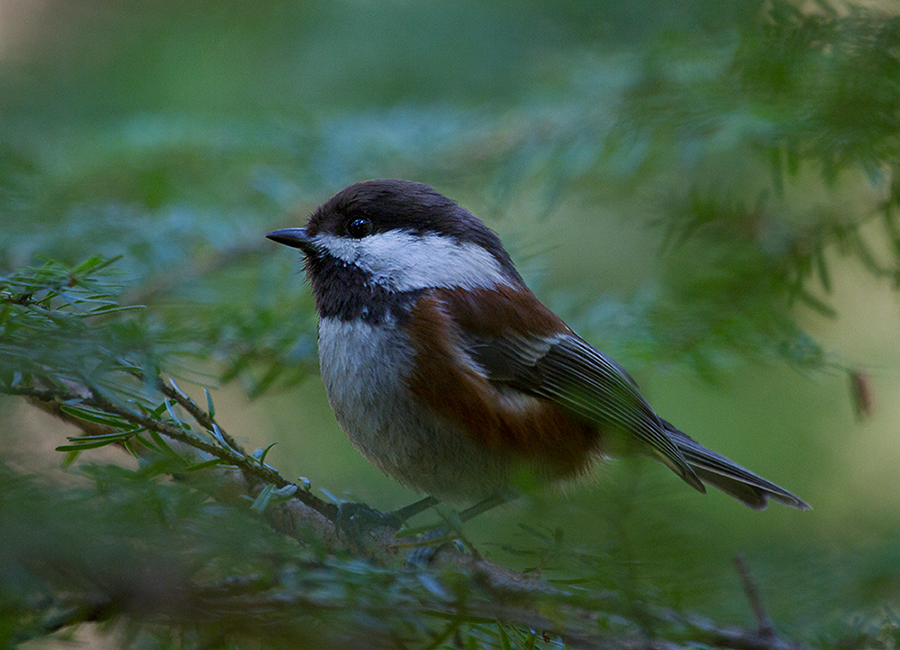
This Chestnut-backed was one of a pair looking into a nest site in a snag. While his better half was inspecting the hole, he let me get quite close. I actually like the effect of the twigs and needles in the foreground. I purposely kept most of the image soft except for the head of the chickadee.

low light (forest)
1/80
f 5.6
iso 1600
400mm
no flash or tripod

Comments

8 comments
Comment posted by Richard Ditch on September 20, 2012 at 6:19 PM
Nice getting this close for such an intimate shot. I like the setting and your choice on sharpness/blur. But this has a strong blue cast as posted and I'd shift the colors to clear that up. An easy way to do this is with a Levels Adjustment Layer in photoshop - use the center "neutral" eyedropper and click on something that shouldn't have a color cast (like the white cheek patch). If the resulting change seems too dramatic for you then you can use the opacity slider of the adjustment layer to back off a bit and retain some of the blue color cast.
Registered on November 1, 2003, 1031 Posts, 12705 Comments
Comment posted by mark daly on September 20, 2012 at 11:01 PM
Great tip Richard. I assume you can tell the cast from experience. It was hard for me to notice it until I made the change you suggested and then looked at the before/after. It does look much better now, so thanks for that. I will repost it.
Registered on September 4, 2012, 27 Posts, 28 Comments
Comment posted by Keith Bauer on September 20, 2012 at 11:01 PM
Interesting take on the bird. I kind of like the secluded habitat look. The color issue that Richard mentioned is there. I noticed that at least in the larger version, there is no color profile embedded in the image. You should always embed an sRGB color profile for web display. Pulling the larger version into Photoshop and assigning and Adobe RGB color profile, solves some of the blue cast. Still some there that can be corrected using the technique that Richard mentions. The other way is to use a Hue Saturation Adjustment layer, select the blue channel and move the saturation slider a bit to the left.
Registered on November 20, 2003, 458 Posts, 4836 Comments
Comment posted by mark daly on September 20, 2012 at 11:01 PM
Great tip Richard. I assume you can tell the cast from experience. It was hard for me to notice it until I made the change you suggested and then looked at the before/after. It does look much better now, so thanks for that. I will repost it.
Registered on September 4, 2012, 27 Posts, 28 Comments
Comment posted by mark daly on September 20, 2012 at 11:04 PM
reposting with cast reduced - is it too yellow now?(!)
Registered on September 4, 2012, 27 Posts, 28 Comments
Comment posted by mark daly on September 20, 2012 at 11:08 PM
thanks Keith-let me know what you think of the reposted one
Registered on September 4, 2012, 27 Posts, 28 Comments
Comment posted by Gary Gulash on September 21, 2012 at 12:29 AM
I agree the repost is a bit too yellow, continue to experiment in ps. I like the broken highlight in the eye. Neat bird and photo.
Registered on January 28, 2005, 879 Posts, 12098 Comments
Comment posted by Keith Bauer on September 21, 2012 at 4:27 PM
Hi Mark: Here's a quick edit to provide some color correction. I used a Threshold adjustment layer to find the best black and white points and mark them, then a curves adjustment layer to set the black and white points identified. Then a small adjustment to remove a bit more blue cast using the blue channel of a hue/sat adjustment layer. See what you think.
Registered on November 20, 2003, 458 Posts, 4836 Comments