Barn Swallows and Fly
by Steve Balke
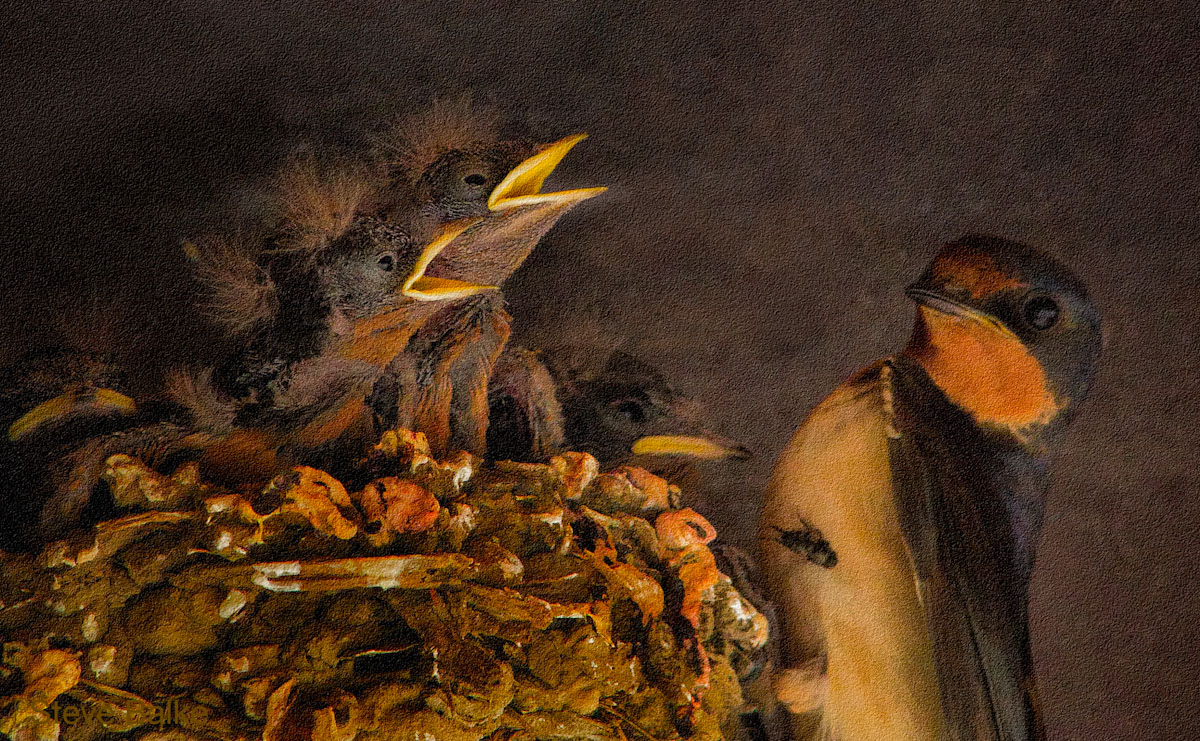
This is one (temporarily) lucky fly. The first chick on the right hand side of the nest looks pretty disappointed. The fly was dropped as the parent was transferring it.
The light was quite poor and the action was fast here. Also, the background was a speckled painted metal. Finally, the nest was very brightly colored compared to the birds. After some work in CS6 along with overlay of a fine paper texture I like the result. Also, I find the action so interesting. I hope that you all do too.
It is a fairly large crop. This final image is only 4 MP --- 25% of the original 16 MP. Despite this, I ascribe any lack of detail to the available light. [I know not everyone will agree with me! But, that's o.k. I hope that you like the image regardless.] I could have cropped the original differently to obtain more MP. However, I like this comp.
All comments most welcome.
1D Mark IV, 400 mm f/5.6, 1.4x TC, hand held: ISO 1250, 1/800s, f/13, 0 EV (Manual).

Comments
11 commentsIMO the only way that the light level effects lack of detail is if the image was underexposed and shadow detail was lost beyond recovery, or if the image was blurred from hand holding at an insufficient shutter speed. I expect that the higher ISO and the crop had mroe of an effect on captured detail than did available light.
Richard, you and I go back quite a long time in our "crop effect" discussion. I have another way of explaining it. Here goes (you likely know most of what follows….but I'm still learning and want to bounce it off you and everyone else):
LCD screens these days have a native resolution. That is, for my 27" iMac, an image which is 2560x1440 pixels would fill the screen. A raw image from the 1DMk4 is 3264x4896 pixels. So, when I see the image in Lightroom it has been scaled down to a viewable size. When I select 1:1 viewing then it is displayed at full size and exceeds the area of the screen because I am looking at an image where 1 screen pixel corresponds to one image pixel. So, our images are pretty large! At 1:1, when I look at the portion of the image that I wanted to crop out, I could see as much detail as was present, no more, no less, because I was looking at all the actual pixels that I captured. I could see that there were enough pixels to capture the very fine feathers in the chicks and other fine detail as well. I then cropped out that portion to make a 2591x1601 pixel image. The same pixels were present before and after the crop for the cropped region. No pixels were gained or lost. The hairy feathers looked exactly the same. This crop was then reduced to a 1200x741 jpeg for posting. We could wonder if that further reduction from 4 MP to about 1 MP caused any damage to detail. It's easy to compare the posted image with my image previous to jpeg conversion. I can see no loss in detail as a result of that conversion. So, the point here is that, so long as I am happy with the detail in the image due to the number of pixels before cropping, I expect to be happy with this aspect after cropping, unless I cropped below 1200x741 because then the jpeg compression would need to create new pixels.
Note that if I had been closer to the birds and there were more pixels then representing the very fine chick feathers, we might even be able to see more detail in them. However, the number of pixels I had here looked enough to me for the detail I wanted.
Now, that said, I found myself wishing that the image was more crisp and showed more detail particularly in the throat and breast of the parent bird. If the number of pixels was successfully detailing fine hairs, etc. then I needed to look elsewhere for a cause for the lack of detail. I have taken many sharp images at this ISO and shutter speed, hand held. So, I don't consider those likely sources of detail loss. However, the interaction of light with the surface of the bird to me appears a more likely source. Light intensity, direction and color all need to interact with the bird's feathers to show what we want to see. I think in this case intensity was low (light was "soft") and direction was such as to not show the fine texture. Also, it could be that this bird has very fine feathers. The interaction effect depends on both light and surface.
Just maybe you and I can agree on this explanation, Richard??
Indeed, we’ve discussed cropping many times before.
True, but irrelevant to this discussion.
Agreed: cropping has not altered any of your remaining 2591x1601 pixels.
But what cropping does is effectively reduce the resolution of your lens. A lens can only deliver a fixed amount of resolution for a given aperture - lens tests in magazines used to report this as line-pairs per millimeter but now use Subjective Quality Factor (SQF) values. And lines/mm is usually now qualified by “image height.” By using less than the full sensor with a crop you are essentially enlarging the image and spreading the fixed resolution over a larger area. Look at how the SQF rating for any lens in a Popular Photography review goes down for any aperture as print size goes up - this is basically what you do when you use less than the full size of the image captured by the sensor.
You are combining two operations in this one statement:
1. resampling the image down from 2591x1601 to 1200x741
2. converting the image to jpeg by applying the jpeg compression algorithm
Step #1 throws away a lot of information (you are going from 4,148,191 total pixels down to 889,200 which is about 21% of the cropped section before reduction. You have lost 79% of the information in the cropped section. If you saved a non-compressed 8 bit tif at this stage it would be abut 2.7MB. The downsized cropped section (1200x741) is 889,200 pixels. 3 color channels per pixel (R,B,G), 8 bits per channel (0-255), and 8 bits per byte.
Step #2 throws away more information, depending upon the amount of compression you used. The posted 1200px jpeg image is 401KB, so you’ve tossed out over 2MB of data/information in the compression step.
No need to wonder any more if those two steps have “caused any damage to detail,” at least for me.
This makes no sense to me. You’ve tossed away 79% of the data when you reduced size, and then tossed away (2.7MB-. 4MB)/2.7MB=85% of that data with the jpeg compression. How can you say that you see no loss of detail?
If you are happy with the quality you are getting this way then by all means continue to shoot, crop, and post this way. I am not saying that you should work to my standards. All I”m trying to do is make it clear that massive cropping takes a toll in image quality so that novice photographers don’t assume that there is no penalty to using such a small part of their image.
Yes, being closer to the subject and avoiding such a massive crop (75% of image lost) would have given you even more detail. Plus, your master file would be able to produce a larger print if you wanted to do that.
I would suggest doing some controlled tests to prove or disprove this assertion. That means taking the same photo in the same light of a stationary target with the camera and lens mounted on a tripod and hand held. And doing the same thing at the lowest ISO setting an then at ISO 1250. View the raw results with all the auto correction settings turned off in Lightroom or Photoshop so you are seeing the test with the same amount of sharpening and noise reduction applied.
If digital cameras could deliver the same resolution at ISO 1250 as they do at ISO 200 then why would any nature photographer ever bother using the slower ISO value? Just look at resolution values in camera tests to see that it goes down as ISO goes up for any camera.
Intensity is not the same as softness - these are separate qualities of the light. Yes, soft light will make it harder to resolve detail - to see feather detail the light has to have enough direction and contrast for the feathers to cast shadows.
Not much, it seems.
Cheryl, regarding the texture: I didn't use the texture to conceal noise. I used it because I wanted to see more texture in the image, especially in the adult bird. After trying it, I liked the look.
Richard, the saga continues! You focused on the loss of pixels and compression effects when the cropped image was reduced to a 1200x741 pixel size jpeg for posting. That's true of course. However, a larger image would have to give up even more pixels. All of our images are reduced to about the same size (same longest dimension and file size anyway). If we visualize an ideal case: two identical images except one is 16 MP and one is 4 MP and we reduce them both to the same size (0.9 MP) for posting, I don't think that you would see a difference in the two posted images. There is no "crop effect" because both images must be reduced to the same size.
Seeing the difference is a key aspect throughout our work. Now, if we are talking about a 4 MP crop and the resulting posted image, when I look at the cropped image (a psd file) and the posted image, I'm fine with what I see. If there is a penalty I cannot see it. Of course, I can't magnify the posted image as much as I do the psd image and expect to see the same detail. However, for the size on the website, the image looks fine.
Regarding iso, the 1DMk4 provides very low noise images at ISO1250. One of the reasons for buying an expensive camera is to be able to operate at higher iso values. Again, whether the noise is discernible is important. To operate in a region where the noise level is far below the normal detectability limit would allow me to claim super high noise standards but would mean that I would sacrifice shots that I would otherwise be able to obtain. Similarly with cropping, if we set our standards so high that the quality is so far above what can be discerned with normal observation then we sacrifice compositions that we could have obtained by cropping. So, Richard, although I appreciate your desire for extremely high standards, my own view is more broad. It looks like you and I will never agree on this one....although we are now pretty close on the effect of light on detail. Each to his own I guess.
Love the looks of this with the added paper texture, awesome work!