Nature Photographers Network
This is the preserved archive of the original Nature Photographers Network. The community continues at naturephotographers.network.
ID requested
‹ PreviousFlora GalleryNext ›

ID requested

by Tonia Graves

Gallery: FloraPosted November 5, 2011122 views13 comments
Nikon D70 w/ Sigma 28-200mm lens
ISO 200, F 5.6, 1/125 sec.

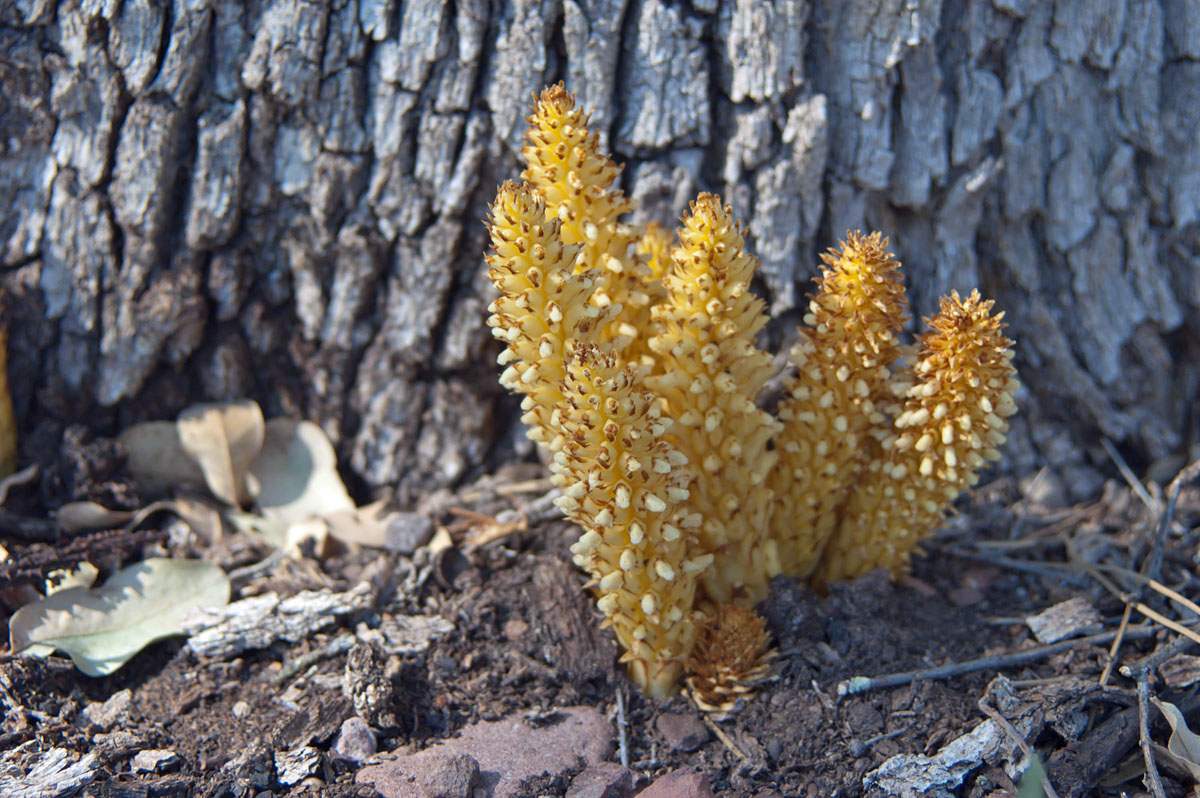
Hello everyone, this is my first post in this forum! This image was taken near Young, AZ at Haigler Creek. I am unsure of the fungus species, but I thought it held a lot of visual interest. Hope you enjoy & if you have any ideas of what I could do in the future with this type of shot,...fire away!

Comments

13 comments
Comment posted by Daniel Mosquin on November 6, 2011 at 12:52 AM
Not a fungus, but a parasitic plant: Conopholis alpina.
Registered on November 20, 2003, 24 Posts, 122 Comments
Comment posted by Bill Fach on November 6, 2011 at 7:27 AM
Tonia: Welcome to the finest Flora gallery on the planet and thanks for a fine first post here. No clue on the ID but it looks like Daniel dealt with that. I definitely like the subject and comp. My only suggestion would be to darken/burn the bright leaves in the LLC. Good DOF management. Great to have you aboard and looking forward to more. >=))>
Registered on November 1, 2003, 1805 Posts, 26981 Comments
Comment posted by Bob&Charly Nelson on November 6, 2011 at 11:21 AM
Well captured and seen Tonia. I also find the leaves a bit troublesome, and wonder if a tighter crop on the subject might help. Welcome aboard and look forward to more.
Bob :wavey:
Registered on October 27, 2005, 289 Posts, 4202 Comments
Comment posted by Richard Teller on November 6, 2011 at 6:38 PM
Very interesting subject. The only nit I have is the light areas in the image.
Registered on August 23, 2010, 1162 Posts, 6692 Comments
Comment posted by Anne K. Rusk on November 6, 2011 at 10:03 PM
Welcome, Tonia! I like how you captured this "thingie" with some environmental context. Do you use Nik filters ever? If so, there is one called "Darken Lighten" that does very subtle, but very useful vignettes. I think that would help highlight the subject and darken down the bright leaves on the left-hand side.
I am looking forward to more!
Registered on October 10, 2010, 65 Posts, 904 Comments
Comment posted by Gary Yeoh on November 6, 2011 at 10:42 PM
Tonia:
Welcome to Floral. Nice first post. I agree with others about the bright leaves on the left. If you have a polarizer, this may reduce the specular reflection from the leaf surfaces somewhat. Look forward to seeing more of your floral work including some radiograph images?
Registered on September 1, 2009, 588 Posts, 8184 Comments
Comment posted by Ian Wolfenden on November 7, 2011 at 7:26 AM
Nice to see such a good first post here, Tonia ! The thumb caught my eye immediately for the composition and the colour balance. I would personally like to see a little more dof to get the rocks at the L in focus, but this is a lovely image nonetheless.
Registered on May 18, 2007, 1108 Posts, 7647 Comments
Comment posted by Tonia Graves on November 7, 2011 at 1:13 PM
Thankyou for the warm welcome, improvement suggestions, & an ID! I thought these plants were very unique and was glad to have added them to my files. As far as processing, I am really new to this and currently only have Photoshop Elements 9. Does anyone know if I can selectively darken the leaves in that program? (I know eventually I need to upgrade to CS5 or something along those lines).

And Gary, I did post a cactus radiograph over in Photo Art and it can be seen in my portfolio as well!
Registered on October 29, 2011, 92 Posts, 1035 Comments
Comment posted by Wayne Jones on November 7, 2011 at 8:46 PM
Beautiful shot of a colony of what looks like sea cucumbers to me. Ha, shows how much a dweller of the damp northern forest knows about your part of the world! Looks pretty darn good to me as is, but if you want to make some tweaks, I am sure you can do some selective brightness adjustments in PSE. Lots of people do great work without PhotoShop (even though I have to admit that I really like it despite the astronomical price).
Registered on April 18, 2007, 953 Posts, 6435 Comments
Comment posted by John Williams on November 8, 2011 at 1:27 AM
Interesting plant! Good ideas above. I think my favorite would be to try and get a bit more DOF as suggested, especially the base of the plants. In the future, might try a smaller aperture? Speaking of radiographs, is your avatar an animal skull?
Registered on September 6, 2007, 221 Posts, 5985 Comments
Comment posted by Tonia Graves on November 8, 2011 at 12:44 PM
Thankyou John, and yes the avatar is a Mountain Lion skull that I got from a from a family member. When I was still in school for radiography, my clinical site allowed me to bring it in and x-ray it & print it out. From there I photographed it w/ my D5100 on a lightbox and blackened out the background.
Registered on October 29, 2011, 92 Posts, 1035 Comments
Comment posted by Catherine Reilly on November 9, 2011 at 3:41 AM
It's all been said by our fellow Flora enthusiasts, so, I'll just add a big welcome and wait for more images! Desert country produces some of the most interesting things to see, from grand landscape to small plants like this one. Love AZ.
Registered on August 16, 2006, 603 Posts, 9192 Comments
Comment posted by Ian Wolfenden on November 14, 2011 at 4:28 AM
Tonia : on selective darkening. I don't use Elements much myself but I think perhaps you can do this, using one of the selection tools to frame an area, then taking down the brightness. However, I have found the Nik Software programme called Viveza extremely good for selective work. It is very easy to use, but you do have to buy it and it is not that cheap. I suggest at least going to the Nik site, where they have video demonstrations of all their editing programmes, to see if you think it worth getting Viveza ( which is downloadable ).

PS I assure you I'm not on commission from Nik - their stuff has just helped me and others enormously !!!
Registered on May 18, 2007, 1108 Posts, 7647 Comments