Nature Photographers Network
This is the preserved archive of the original Nature Photographers Network. The community continues at naturephotographers.network.
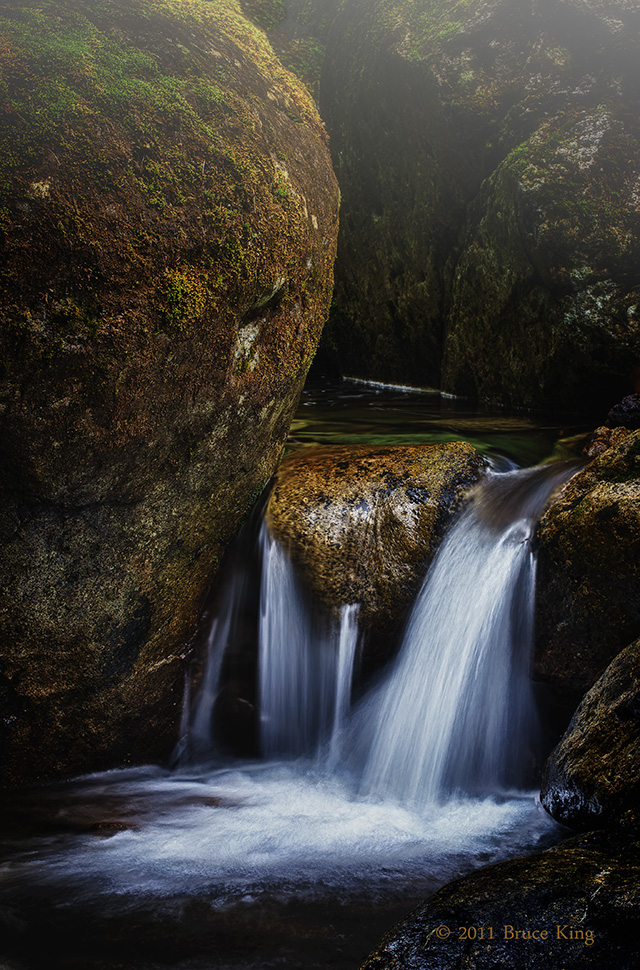
Stream at Twilight
‹ PreviousLandscape GalleryNext ›

Stream at Twilight

by Bruce King

Gallery: LandscapePosted October 8, 2011308 views13 comments
This is my first venture into HDR. A 5 shot blend using Nik HDR Efex Pro. I also created the fog effect with Nik Color Efex Pro 3. If that kicks it into the Photo Art gallery I take no offense. I realize it looks a bit crunchy, part of the learning curve I suppose. I found it difficult to keep the water from clipping as the process went along. Also lightly applied "glamour glow" filter and a vignette in Nik Color Efex. Thanks for looking.

Comments

13 comments
Comment posted by Steve Sieren on October 8, 2011 at 8:55 PM
Wouldn't know if you hadn't mentioned it. It really looks like a single exposure and the only crunchiness I see is the texture in the rock.
Registered on January 2, 2008, 360 Posts, 5321 Comments
Comment posted by Russell Colletta on October 8, 2011 at 9:09 PM
The final product looks pretty good to me Bruce. The mist is great and although bright, don't seem to be lacking any detail in even the brightest parts of the water. Still real enought o belong right were it is IMO.
Registered on October 31, 2009, 114 Posts, 1008 Comments
Comment posted by Morris McClung on October 8, 2011 at 9:11 PM
A nice intimate scene.
Registered on May 7, 2007, 670 Posts, 19650 Comments
Comment posted by Jaymes Dempsey on October 8, 2011 at 9:19 PM
I love the color of the water and the texture against the brown rock!
Jaymes
Registered on June 28, 2010, 47 Posts, 590 Comments
Comment posted by Yiming Hu on October 8, 2011 at 9:27 PM
Very nice treatment. I was horrified by some of the HDR images in a few prominent magazines lately. Yours is so much better.
Registered on April 28, 2011, 38 Posts, 733 Comments
Comment posted by John Mumaw on October 8, 2011 at 11:09 PM
The best image 'development' is that which lies undetected unless the photographer mentions it.
This one passes that test. Very nice!
Registered on September 9, 2005, 62 Posts, 2289 Comments
Comment posted by dean hebert on October 9, 2011 at 1:33 AM
I'm glad you explained your processing of this shot because when I first looked at it I thought something had been done to it but I couldn't put my finger on it. I think you've done a great job of making this simple scene worthy of a large presentation. :toast:
Registered on August 4, 2010, 70 Posts, 1132 Comments
Comment posted by Kent Mearig on October 9, 2011 at 1:53 AM
From the thumbnail, I was already skeptical about the "fog" at the top of the image from a purely aesthetic standpoint. Knowing it was added in post, I would say get rid of it. I prefer what I see when I "screen crop" the foggy top off. With regards to the HDR, I think the rest of the photo looks nice, and the prevalent dark shadows go a long way in masking any HDR processing.
Registered on September 4, 2006, 237 Posts, 4748 Comments
Comment posted by Dietrich Gloger on October 9, 2011 at 5:15 AM
Bruce, I like the scene very much. A very good composition. I think the processing looks very good too. Does not look like HDR to me and neither does the fog look "added". I actually think it fits well and adds an interesting touch to the scene. I also like that huge boulder covered with moss. So, as a final image this works really well for me. Good work!
And thanks very much for disclosing your processing. Since you disclose everything, I do not feel "cheated", but I take the chance to share some thoughts I have: I have a very simple and straight definition to help me to stay on a certain track with my own photography and processing: Adding image elements (e.g. fog layer) to create the final composition goes beyond the realm of photography in my humble opinion. Essentially, the final composition, defined by the individual subjects in the image, is created in photoshop, not by an exposure in the field. It tricks the viewer into believing that the scene existed, but it in fact it never existed in reality (no fog). Per se this is not a problem, but when an image is presented as nature photograph then there is a problem with sincerety towards the viewer. In fact, it matters how things are presented and marketed. This is where cheating happens, not in the creation process.
An exception is the blending of different exposures (for sky and foreground) - this is to overcome technical limits of the sensor. It does not change the composition significantly. Cloning is similar: It cleans the composition from "visual noise", but it is not affecting the overall comp.
I hope you do not mind my "lecture" here. I rather like to see a discussion on these points and these are the principles I go with in my own work. We all have our opinions how things "should" be done. I hope we can agree that the viewer and consumer of photography should never be mislead deliberately.

-Dietrich


Registered on January 26, 2007, 360 Posts, 9876 Comments
Comment posted by Bruce King on October 9, 2011 at 9:39 AM
Thanks for all the comments, they are always appreciated.

Didl-No, I don't mind the lecture and in fact I agree with you on most points. These are issues that have been and will probably continue to be discussed long after I'm gone. We all have to find our place in this discussion and mine has evolved with my abilities and interests. As far as cheating the viewer I feel that can only happen if the photographer implies the image wasn't manipulated or altered in ways that it actually was. Full disclosure I believe is voluntary and to assume an image is unaltered simply because the artist doesn't state that it is is naive IMO considering the technology available to photograhers today. In fact, a very succesful pro photog and moderator on this site stated he doesn't include tech info when he posts an image because he feels it detracts from what he is attempting to express (but I am almost certain he doesn't add elements to his images in PP). After all, does a painter reveal what brand of paint, the brush and how many strokes to achieve the effect? Now, having said that I do feel compelled to discluse such things as added fog, vignettes, etc. Anyway, this probably belongs in another forum.
As I stated in my intro, if the image got relocated to the photo art gallery I would have no problem with that. It's cool. :smile:
Registered on January 14, 2010, 276 Posts, 2212 Comments
Comment posted by R.Bill Moser on October 9, 2011 at 10:23 AM
A beautiful intimate scene. Wouldn't know this is HDR if you hadn't mentioned it
Registered on January 29, 2010, 285 Posts, 4281 Comments
Comment posted by Dietrich Gloger on October 9, 2011 at 2:10 PM
Thanks Bruce for your reply! I agree.
Registered on January 26, 2007, 360 Posts, 9876 Comments
Comment posted by Jay Levin on October 19, 2011 at 3:55 PM
Hi Bruce. What your image demonstrates is that one can make natural looking HDR's as opposed to the wild painterly version. So when I hear, "This doesn't look like an HDR", of course it does. You simply used the software to obtain the natural looking version. Your HDR processing has handled the contrast in the scene very well.
Registered on April 24, 2009, 21 Posts, 184 Comments