Nature Photographers Network
This is the preserved archive of the original Nature Photographers Network. The community continues at naturephotographers.network.
Flycatcher
‹ PreviousAvian GalleryNext ›

Flycatcher

by Steve Balke

Gallery: AvianPosted July 1, 201196 views10 comments
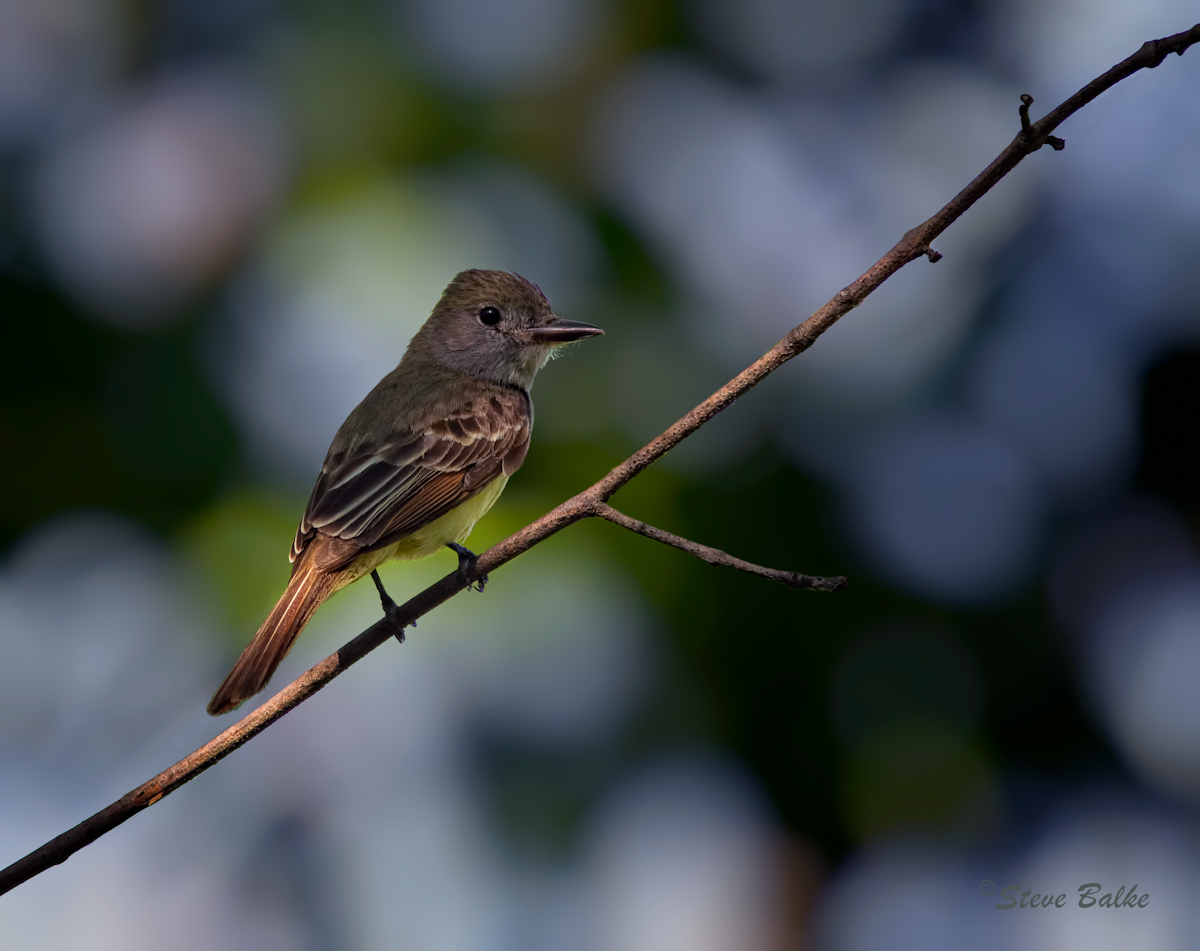
I'm not sure but I believe that this is a Great Crested Flycatcher (Myiarchus crinitus). It was busy chasing after another one: it looked like some kind of territorial dispute. At any rate, this meant that, unlike previous occasions, it didn't notice me until after I managed to capture this image.

This little bird was rather lost in a very leafy bg. So, I applied Bokeh 2 to the bg and simulated a Canon 300 mm f/2.8 at f/2.8.

The image before application of Bokeh 2 is shown below.

All comments most welcome.

1D Mark IV, 400 mm f/5.6, 1.4x TC, hand held: ISO 1250, 1/1000 s, f/8, 2/3 EV, 10.3 MP (64% of 16 MP full frame), NR, exposure adjustment, sharpening.

Comments

10 comments
Comment posted by Steve Balke on July 1, 2011 at 1:38 PM
Here is the image before application of Bokeh 2.
Registered on June 18, 2009, 229 Posts, 2915 Comments
Comment posted by Charlie Baugh on July 1, 2011 at 3:32 PM
Bokeh, eh! I've got to get some of that. :biggrin: I think your probably right about the ID with little possibility that it is a Ash throated flycatcher, as I don't think they are seen up your way but rarely. Great job with this image.
Registered on April 18, 2011, 329 Posts, 1985 Comments
Comment posted by Jim DeWitt on July 1, 2011 at 9:08 PM
I prefer the first post; but if you are going to adjust the background, if it were mine I pull the brightness of the white blotches down a bit. They're a bit distracting.
Registered on August 28, 2006, 1240 Posts, 8506 Comments
Comment posted by Sharon Hallowell on July 1, 2011 at 10:13 PM
I actually like the original! The bird is separated from the bg enough to make it work and I have more of a sense of where those bright spots are coming from. I also think it's a GCFC...nice to get him in the open! Sharon
Registered on November 1, 2003, 392 Posts, 4810 Comments
Comment posted by Brian Gatlin on July 1, 2011 at 11:02 PM
nice pose and comp, Steve, and your processing looks good to me. on the whole the image (or perhaps it's just the subject) seems rather dark to me.
Registered on March 21, 2009, 202 Posts, 4187 Comments
Comment posted by Kurt Bowman on July 2, 2011 at 12:43 AM
Steve, I have never used that SW, but after looking at the before and after, I have a few shots where I think it might be a nice thing to apply. I do however agree with Brian about the image looking dark. My guess is this was evaluative metering? With the bright spots in the BG and heavy shadows, did you consider spot metering? Also, you list 2/3 and I assume that was a plus not a minus....but you don't say for certain.
Registered on June 19, 2008, 1005 Posts, 8028 Comments
Comment posted by Steve Balke on July 2, 2011 at 11:09 AM
Thank you everyone. Excellent comments. I agree that the image is a little dark. I do tend to forget about assessing overall brightness and I just don't seem to notice it until it's pointed out to me. I'm going to rectify that in my workflow for posted images. In answer to your questions, Kurt, for this particular image I used spot metering (as I very often do) and the exposure compensation is +2/3. Note that f/8 is the maximum aperture for this lens with the 1.4x extender. However, I used exposure bracketing with shutter priority and surprisingly could see a difference due to the +2/3 exposure compensation despite that the lens could not go to a larger aperture. Perhaps the variation of light across the bird and my use of spot metering combined with camera motion are causing this result. I experimented with adjusting exposure in post processing for a repost. However, this image is a little tricky: those white blotches actually have many gradations of color to them. Trying to darken them while lightening the bird and preserving the nice interplay of light on the bird is more than I'd like to tackle for this image. However, please realize everyone that your comments will certainly help me for my future images and I much appreciate them.
Registered on June 18, 2009, 229 Posts, 2915 Comments
Comment posted by Gary Gulash on July 2, 2011 at 2:32 PM
Wow, that's some nifty software, I wouldn't have guessed it was done in pp. I like the brightness levels in the background but would brighten and sharpen the birds head and shoulder area a little bit. Nice over the shoulder look. Good job. :toast:
Registered on January 28, 2005, 879 Posts, 12098 Comments
Comment posted by Howard Cheek on July 2, 2011 at 6:37 PM
Interesting BG effect Steve, great diagonal perch and sharp details. I prefer it over the original, hands down.
I have that SW, but just haven't used it much with my birds except to experiment a few times..then I kinda forgot about it.
When you have some time, can you send me an email describing briefly what steps you used?
I agree with some of the others that overall it's a bit dark..
Have a great 4th my friend! :toast: :toast:
Registered on July 24, 2008, 1201 Posts, 10758 Comments
Comment posted by Steve Balke on July 2, 2011 at 7:46 PM
Thank you for the great additional comments everyone. I'm glad to see that some of you are interested in using the software. Howard asked that I document the details in an e-mail. However, there is really not that much to it and because of the interest I decided to document it here.
I began with the completely processed image (my usual NR, exposure adjustment and sharpening) and then carried out the following three steps:
i. Decide what you want to NOT be blurred and select it. This is the most important step. In CS5 I used refine edge and then followed that up with refining the selection even more via Quick Mask. I used a Wacom Intuos 4 tablet instead of just a mouse too. You need to be very careful because any errors in your selection will show up as unblurred areas in places that you want to be blurred. Save the selection as an alpha channel.
ii. Run the program with the selection (bird and branch in my case) showing in the image surrounded by the usual marching ants. The program is simple to use: you just pick a lens system and modify the look further if you wish (I didn't do any modification here---I just used the settings for the Canon 300 mm f/2.8 at f/2.8). It will blur the un-selected image area only.
iii. Inspect the result and decide how best to refine the image. You may wish to separately change the exposure on the bg and on the selected region (bird and branch in this case). Since you have the selection stored you can recall it and use it as you see fit to do this. I actually generated two layers (one with bird and branch only and one with bg only) and played with each. At this point you need to carefully inspect the border between blurred and unblurred regions and make any repairs that are necessary (hopefully there won't be many).
You can flatten it at that point if you wish and that's all folks! (you know if you flatten it though that you will have trouble going back to lighten the bird alone!).
P.S.: Happy 4th to you all........and happy 1st too (Canada Day).......I celebrate both!
P.P.S.: All further questions welcome.
Registered on June 18, 2009, 229 Posts, 2915 Comments