The Leopard's Spots
by Ashley Vincent
Canon EOS 7D, EF 300mm f/2.8L IS USM, f/2.8, 1/30 sec, ISO 3200, JPG from RAW
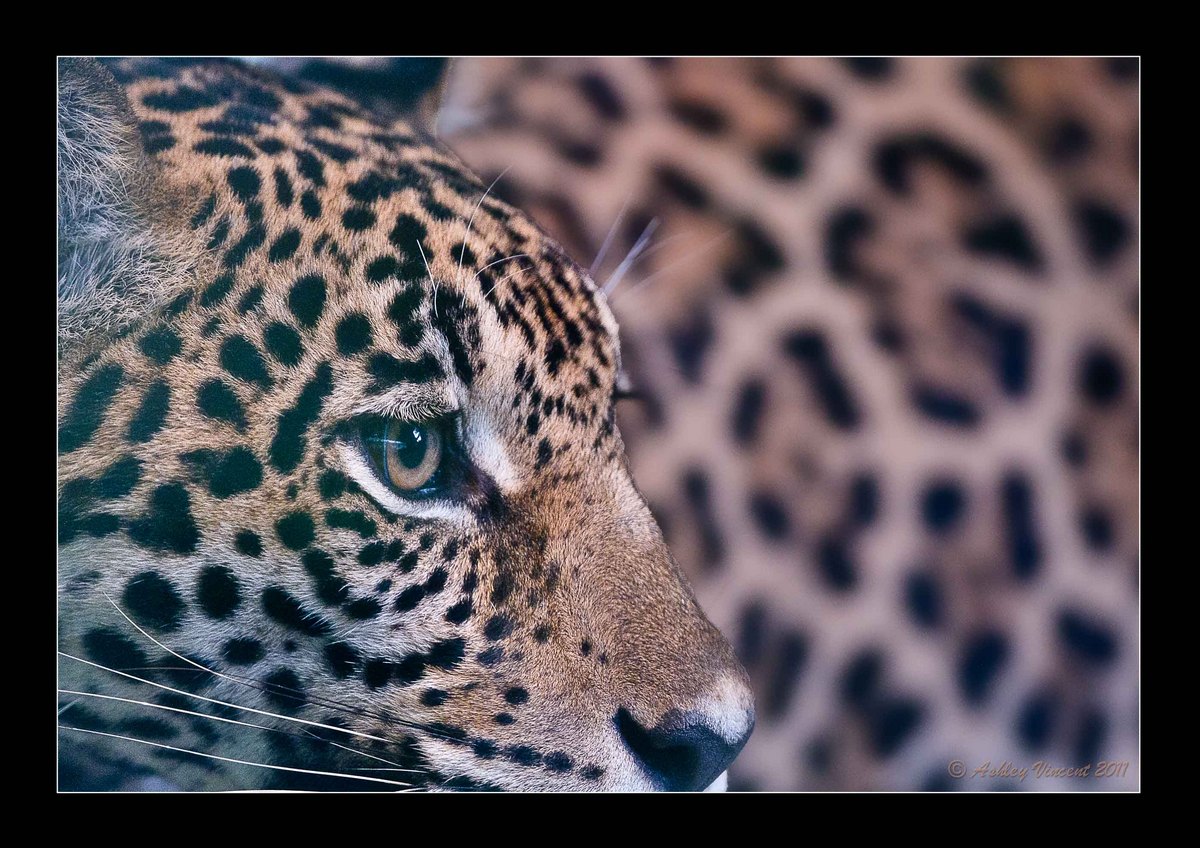
This was one of the first semi-successful photos I took of a Leopard at my local zoo with my (then) pretty new Canon 7D and 300mm lens. I say “semi-successful” as from comments (which I happen to agree with!) left on my previous Lion posts, I can tell the first though that will spring top most people's mind is that I should have allowed more space for the mouth, whiskers and ear ;^)
As it happens though, I framed this pretty much exactly as I wanted it at the time; my aim was to fill the frame entirely with the Leopard and it's spots (I guess some might call these more accurately rosettes!), partly because I thought it would create an interesting composition, and partly because to frame the subject in any other in the position it was sitting would have included something that was clearly manmade, which I really didn't want.
Once again this was shot through glass, the lighting was poor and I was just beginning to feel my way with a new camera, so I set the ISO to Auto which, on the 7D, has a tendency to jump straight to 3200 at the first hint of dimmed light. But as you can see from the shooting date above, this still only managed to acquire a shutter speed of 1/30, so I guess I shouldn't complain ;^)
PP: Full frame/No crop. Increased the black levels and worked some Surface Blur on the body of the subject to remove most of the noise.
Thoughts, opinions and suggestions always welcome, thanks in advance :^)
Kind regards,
Ashley

Comments
11 commentsInteresting idea, interesting image. I do see the colour cast, but this is something that is easily remedied. Personally, if this were mine, I think I'd carry the idea a little further and crop a little tighter - taking more off top and bottom (and possibly the right side for balance). I'd do this because your current framing almost looks like an accidental clipping (especially on top) of parts of the subject (like those whiskers on your female lion) and is thus a little distracting. By going tighter it becomes clear (tho' subliminally) that it was intentional AND the image would take on an even more abstract nature. Just my 2 cents worth!
Cheers...
Brad
I read the first few comments last night after returning home from a long, but very pleasant day out with my family and, taking to heart what I'd read, I attempted to rework this image again. But each time I tried a different crop there always seemed to be something that was missing or just didn't work well to my eye. Tired and frustrated as I was, I'd decided to give up trying and simply leave thanks for those that had already left comments, but when I posted my response I saw Brad had just posted his comment, that was pretty much in agreement with the others, which had me thinking perhaps I should give this another shot in the morning, which is now what I've done ;^)
Working from the original RAW image, I shifted the Exposure slider down to -55, from there I increased the Blacks to strengthen some of the colour lost by way of having shot this image through glass, as well as adding a touch of Vibrance. After sharpening a bit and working the eye some with the Dodge tool, I also cleaned up the fur a little. One thing I left alone this time was the Surface Blur on the OOF body, as I felt the gain was not too much of a distraction and, chances are, the effect I'd previously created with Surface Blur might have been the element that led to what some referred to as "colour cast", although I could well be wrong.
Having once again tried numerous variations of crops I finally settled on this one, as it seemed closest to most of the suggestions made while still maintaining something of the effect I was going for. Perhaps some of you would prefer to see the eye even more set to center, but any more centered than I have it here just seemed too much, as I really wanted more space in front of the subject's gaze than behind it's head.
Although I did crop more from the top and bottom (as well as the right), I kept the eye pretty much in the middle of the frame, as completely removing the nose really didn't seem to work. I guess there's any number of different ways to crop this, though I hope this version is more pleasing that the original one to most.
More than happy to receive further remarks, opinions and/or advice. Thanks again for your time and interest and wishing you all a great one ahead :^)
Ashley
I tried a number of different ways to crop this again to eliminate the ear completely, and I reckon the best way to do it is as a pano, which may well be what you and others were thinking when the suggestion of removing the ears were first made, but no one actually said it, so I had to see it for myself ;^)
Thanks again to everyone who left remarks and suggestions :^)
Ashley