Gallery: LandscapePosted March 14, 2011169 views10 comments
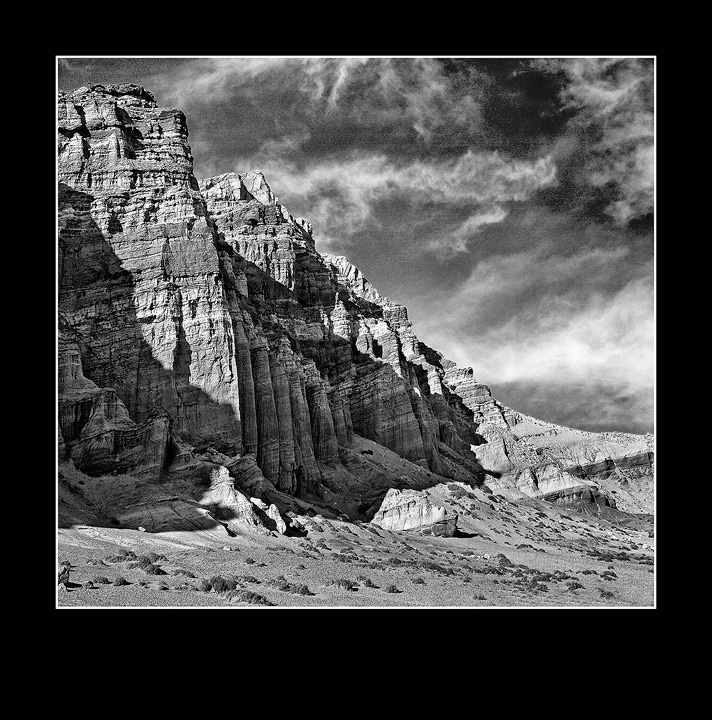
XTI, 17-40L, B&W Conversion in Silver Efex Pro. I've noticed that Silver Efex Pro 2 adds noise. Anybody else having this problem with the software?
Comments
10 comments
Comment posted by Darren Huski on March 14, 2011 at 9:09 AM
Rocks look good but yes you have some noise in the sky.
Registered on August 17, 2008, 61 Posts, 340 Comments
Comment posted by Bill Chambers on March 14, 2011 at 9:24 AM
The tones good very nice, but you definitely have some noise in the sky. I like the composition a lot.
Registered on April 10, 2005, 753 Posts, 21216 Comments
Comment posted by Harley Goldman on March 14, 2011 at 10:21 AM
Real nice image, Danny. The B&W works really well. Can you convert it in Photoshop and not have the noise problem?
Registered on November 19, 2003, 586 Posts, 11271 Comments
Comment posted by Nancy Lea Sandy on March 14, 2011 at 10:26 AM
Really like the b&w with the light and shadow on the rocks. I think the conversion was a good choice.
Registered on January 24, 2011, 576 Posts, 6942 Comments
Comment posted by Preston Birdwell on March 14, 2011 at 11:10 AM
I don't use Silver Efex, so I can't comment on that. The tones look nice with good separation in the mids. The clouds really help the balance of the comp. It does look a little 'crunchy' (noise or USM?)
I usually use the Channel Mixer on the RGB image in PS to do conversions and don't have noise issues. If you have PS, give it a try. If you get stuck, shoot me an e-mail.
--P
Registered on November 1, 2003, 471 Posts, 5188 Comments
Comment posted by Danny Laureys on March 14, 2011 at 2:45 PM
Thanks everyone for the comments
Preston, Harley,
I used to use channel mixes a lot never had much of a problem with noise, then in PSC4 I did most of the conv. with the B&W adj. layer, never had much of a noise problem either. I'm getting in touch with Nik Software, maybe its something I'm doing wrong.But the B&W in CANP was done in Silver Efex Pro 2 also, I don't seem to have a noise problem on that.Its probably something I'm doing.
Registered on January 5, 2008, 590 Posts, 1261 Comments
Comment posted by Barry Vangrov on March 14, 2011 at 7:48 PM
I use Silver Efex a lot and don't have any particular noise problem. There is an option that mimics different b&w films that will add noise depending on which film you select. Anyway you can easily get rid of the sky noise here when you're back in PS by selecting the sky and using the Reduce Noise filter. That would help this image for sure. Everything else in the conversion looks pretty good.
Registered on September 1, 2009, 148 Posts, 749 Comments
Comment posted by Tony Kuyper on March 14, 2011 at 10:05 PM
Wonderful comp and tones. Feels a bit crispy on the sharpening, but maybe that's the noise issue.
Registered on November 1, 2003, 364 Posts, 22328 Comments
Comment posted by David Edwards on March 15, 2011 at 6:58 AM
A very nice comp and b/w conversion, Danny. I don't use Silver Efex, but it does look like some heavy grain on the image. I agree with Tony re sharpening seems a bit hard. Nice work all the same.
Registered on December 6, 2008, 142 Posts, 2623 Comments
Comment posted by Doug Roane on March 15, 2011 at 1:47 PM
Superb BW conversion here, Danny. I use Silver Efx Pro version 1. Like Barry said, if you are using one of their presets, go into the "Film Type" drop down and check your 'grain' sliders. Having said that, I find that the 'structure' slider cranked up tends to add some noise. However, the toning the software does is so excellent that I'm happy to run Noise Ninja afterwards for the sky if need be.
Registered on December 12, 2008, 213 Posts, 2226 Comments

Comments
10 commentsI usually use the Channel Mixer on the RGB image in PS to do conversions and don't have noise issues. If you have PS, give it a try. If you get stuck, shoot me an e-mail.
--P
Preston, Harley,
I used to use channel mixes a lot never had much of a problem with noise, then in PSC4 I did most of the conv. with the B&W adj. layer, never had much of a noise problem either. I'm getting in touch with Nik Software, maybe its something I'm doing wrong.But the B&W in CANP was done in Silver Efex Pro 2 also, I don't seem to have a noise problem on that.Its probably something I'm doing.