Nature Photographers Network
This is the preserved archive of the original Nature Photographers Network. The community continues at naturephotographers.network.
Marcellina Gold
‹ PreviousLandscape GalleryNext ›

Marcellina Gold

by Jack Garrett

Gallery: LandscapePosted March 2, 2011520 views16 comments
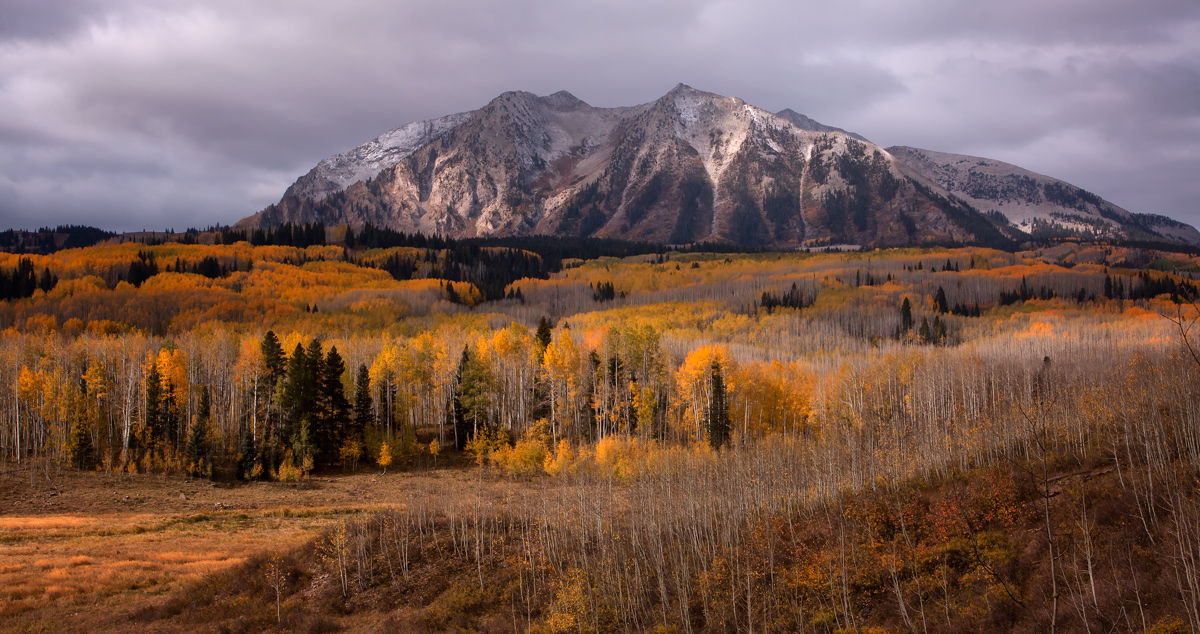
I've had this image laying around for a long time and recently started using some NIK software. I used it to salvage this image. I'll try to post the original in the reply so you can see the MAJOR difference. This is fall near Crested Butte Colorado.

C&C appreciated.

Thanks

Comments

16 comments
Comment posted by Jack Garrett on March 2, 2011 at 5:26 PM
Here was the original..not so hot!
Registered on November 7, 2007, 41 Posts, 251 Comments
Comment posted by Jared Ropelato on March 2, 2011 at 6:30 PM
Wow, what a difference. the original looks like a dud, but this image really pops! Love the light, the yellow pops, and the clarity on the range in the back. The drama in the sky is very nice also. Way to pull this together.
Registered on March 1, 2011, 25 Posts, 204 Comments
Comment posted by Morris McClung on March 2, 2011 at 6:52 PM
You worked some magic on this one, Jack! Great scene and you captured it beautifully.
Registered on May 7, 2007, 670 Posts, 19650 Comments
Comment posted by Eva McDermott on March 2, 2011 at 6:54 PM
Impressive difference Jack. Which NIK plug-ins did you use for this? Color and contrast are greatly improved.

I use some of NIK's plug-ins as well, sometimes..... especially like Silver Efex Pro 2 for B&W, Define 2 for noise reduction, and Sharpener Pro. Rarely use Color Efex Pro, but I have it. I use TK's luminosity layers in general instead of Viveza (not a critique just what I do).
Registered on January 4, 2009, 1015 Posts, 13229 Comments
Comment posted by Mark Seaver on March 2, 2011 at 7:13 PM
It's amazing what can be done in processing, which I'm just beginning to learn. Great save.
Registered on January 23, 2011, 1103 Posts, 17270 Comments
Comment posted by Luke Ormand on March 2, 2011 at 7:58 PM
The mountain is slightly off center which makes this an appealing composition and the rule of thirds has been applied wonderfully. It's quite impressive what you were able to pull out of the original.
Registered on February 4, 2009, 1093 Posts, 7035 Comments
Comment posted by Jason Kim on March 2, 2011 at 8:06 PM
The light on the background mountain really makes this image, I think. I'd be inclined to stretch even further, by adding some more drama to the clouds and peak. Beautiful, wide view and glad to see you were able to dig this out of the archives.
Registered on July 1, 2006, 60 Posts, 1233 Comments
Comment posted by Jack Garrett on March 2, 2011 at 8:30 PM
Eva,

I don't remember the exact settings but I used most of the NIK products in the suite:

Started with Viveza...brought up the structure, that makes things look much sharper already, then adjusted the brightness, contrast and saturation sliders. This is the best application for increasing saturation and you can use multiple set points.

Next I went into Color Effects Pro and used the following filters in this order:

1.Brilliance/warmth...played with the sliders..you can see results immediately.
2. Darken/lighten...you can set the point where you want the light to direct the viewer and use sliders to adjust.
3. You can also try pro contrast but I didn't like the results so canceled it. Pro contrast lets you do some colorcast corrections as well as contrast, etc.

Next, I went to D-fine and let it reduce noise automatically. The nice thing is you can use selective parts of the image without effecting other parts....awesome!

Finally, I used Sharpener Pro. You tell it the output and it sharpens for you..I let it go auto but you can make some adjustments also.

The whole process took less than 10 minutes.

Oh, I also had to use content Aware in CS5 to get rid of the ugly branches
:smile:
Registered on November 7, 2007, 41 Posts, 251 Comments
Comment posted by Tom Haxby on March 2, 2011 at 9:58 PM
I have thought of acquiring the NIK software package and you may have just made a sale for them . The processed version is beautiful.
Registered on July 6, 2006, 126 Posts, 647 Comments
Comment posted by Tony Kuyper on March 2, 2011 at 10:11 PM
Major difference, indeed. I really like how you interpreted the light here.
Registered on November 1, 2003, 364 Posts, 22328 Comments
Comment posted by Dan Baumbach on March 2, 2011 at 10:29 PM
Very pretty.

- Dan.
Registered on November 1, 2003, 473 Posts, 7980 Comments
Comment posted by Eva McDermott on March 2, 2011 at 11:20 PM
Hey thanks Jack for the explaination. I kinda thought trhat was your workflow. Since this is a learning place, just wanted to know more for others to learn. I have used the structure tool in Silver Efex Pro. Again, impressive results and thanks for responding to my questions.
Registered on January 4, 2009, 1015 Posts, 13229 Comments
Comment posted by Richard Hartmann on March 3, 2011 at 6:48 AM
Good golly, what a difference. I like the way the dappled light and color were brought out. Nice work in turning this into a keeper.
Could this have been done in Photoshop CS5?
Registered on January 15, 2009, 13 Posts, 772 Comments
Comment posted by Doug Roane on March 3, 2011 at 11:52 AM
great image and excellent processing
Registered on December 12, 2008, 213 Posts, 2226 Comments
Comment posted by Michael J Greene, on March 5, 2011 at 6:31 PM
Phenominal shot Jack. I really enjoy this scene.

Michael
Registered on June 18, 2009, 86 Posts, 2317 Comments
Comment posted by Jody Grigg on March 5, 2011 at 6:42 PM
Great work Jack :toast: :toast:
Registered on February 7, 2004, 165 Posts, 1227 Comments