Gallery: LandscapePosted February 20, 2011371 views28 comments
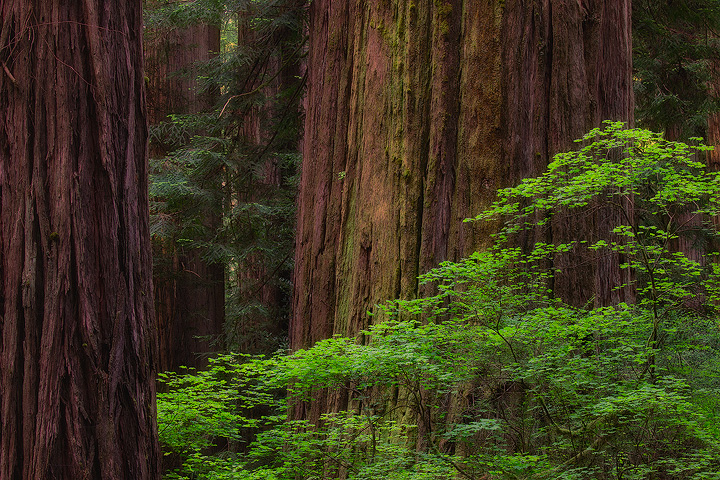
This is an image I took on my trip to the Redwoods last June. I'm not sure how well it works, I would love to get feedback on it. Thanks!
Comments
28 comments
Comment posted by Lon Overacker on February 20, 2011 at 1:54 AM
Justin,
This works wonderfully well for me. The implied scale is tremendous and I think a great image from the redwoods capturing their immense presence in the coastal woods.
The only suggestion I have is along the lines of color and that of course is usually a personal interpretation. From this web presentation, I would reduce the amount of magenta highlights and actually boost the reds here - aka - the redwoods... Otherwise, I think a great, intimate capture.
Lon
Registered on November 24, 2006, 521 Posts, 19147 Comments
Comment posted by Zack Clothier on February 20, 2011 at 2:09 AM
I love intimate forest scenes like this one. Your chosen composition works very well here, I'll echo Lon's suggestion on the color.
Registered on January 28, 2010, 343 Posts, 2257 Comments
Comment posted by Abdullaziz Bin Ali on February 20, 2011 at 4:51 AM
Love this perspective Justin
even the greens here are awesome
Registered on May 31, 2009, 112 Posts, 1590 Comments
Comment posted by Balakumar Kaushik on February 20, 2011 at 8:26 AM
Loved the colour contrasts here Justin. The greens stand out well against the brown tones of the tree trunk. Some fine textures in the trees as well !
Registered on January 4, 2008, 98 Posts, 1403 Comments
Comment posted by Miles Morgan on February 20, 2011 at 9:01 AM
Hey buddy! This looks awesome to me. Love the comp here and the way that the trees create a little visual trickery in regards to which tree is closest. The sense of scale here is terrific.
Registered on November 23, 2009, 6 Posts, 185 Comments
Comment posted by David Chauvin on February 20, 2011 at 10:04 AM
I love these scenes of the forest giants and this is wonderful. The color and comp are excellent and it has a great sense of depth.
Registered on August 5, 2004, 1007 Posts, 5595 Comments
Comment posted by Nick Bristol on February 20, 2011 at 10:37 AM
Beautiful, Justin. I love this one. This is really well done. The green leaves look fantastic in front of the redwood. Wonderful detail too.
Nick Bristol
Lone Rock, WI
Registered on February 1, 2004, 752 Posts, 14140 Comments
Comment posted by Justin Reznick on February 20, 2011 at 11:31 AM
Thanks everyone for the feedback, it means a lot!
Lon - I can always count on you for color help, I really appreciate it!!! Here's a new version with less magenta and more red, let me know what you think. Thanks again!
Registered on November 24, 2009, 79 Posts, 515 Comments
Comment posted by Rick Lundh on February 20, 2011 at 1:18 PM
I think it works perfectly... love it actually!
Registered on April 28, 2004, 774 Posts, 4351 Comments
Comment posted by Nick Bristol on February 20, 2011 at 1:41 PM
Wow! I liked it before, now it is even better. Lon's suggestion was just what it needed I guess. Awesome.
Nick
Registered on February 1, 2004, 752 Posts, 14140 Comments
Comment posted by Mark Metternich on February 20, 2011 at 2:10 PM
In an unusual subtle way IMO this works! It is one of those type of shots that has to be looked at for a bit to really appreciate it.
I had not thought of what Lon suggested about the highlights, and think I would have to agree. An easy way may be Image/Adjustments/Color Balance/Highlights. But you prob know that and other ways anyway... of course Curves would be the most powerful way to deal w it, but are a bit more complicated for some...
I like your second version, but feel it may be loosing something (a coolness) in the shadows.
Registered on June 19, 2009, 276 Posts, 6240 Comments
Comment posted by Peter Richter on February 20, 2011 at 2:44 PM
Justin, this picture is tremendous in my opinion, the contrast between dimensions is incredible; this is furthermore stressed by the delicate bright leaves. I prefer the darker shadows in the first version, especially the tree at the left.
Peter
Registered on November 10, 2010, 218 Posts, 2723 Comments
Comment posted by Tony Kuyper on February 20, 2011 at 4:52 PM
This really captures the sense of gigantic trees, Justin. Second version even better.
Registered on November 1, 2003, 364 Posts, 22328 Comments
Comment posted by Danny Laureys on February 20, 2011 at 5:09 PM
Excellent
Registered on January 5, 2008, 590 Posts, 1261 Comments
Comment posted by Dan Baumbach on February 20, 2011 at 6:42 PM
I love the color and details of the trunks. The image is nice but I expect one would have to see a larger print to really appreciate the detail.
- Dan.
Registered on November 1, 2003, 473 Posts, 7980 Comments
Comment posted by Morris McClung on February 20, 2011 at 6:50 PM
I agree it translates the sense of scale for these giants extremely well.
Registered on May 7, 2007, 670 Posts, 19650 Comments
Comment posted by Lon Overacker on February 20, 2011 at 7:59 PM
Justin,
Thanks for taking the time to rework. I think the magenta is certainly better, but along the lines with Mark M. I think some side effects crept in as well.
With your permission I'd like to post my impression. This is actually pretty tough because as you know magenta is strongly biased red to start with. So actually I think playing with the blues and greens is where this needs to go. In other words, just playing with the reds in Saturation or color balance doesn't quite work as I would have thought.
While I comment frequently on color balance in general, it's not very often that I stick my nose in other people's processing and their own interpretations. But once in a while I think an image is so worth the extra little attention that I just have to open my mouth... ;-) A great image with both depth and scale and nailing the color I think just brings out those elements even more. With your permission I can post or send you my interpretation.
Lon
Registered on November 24, 2006, 521 Posts, 19147 Comments
Comment posted by Justin Reznick on February 20, 2011 at 8:40 PM
Lon,
Please post away! I look forward to seeing your interpretation and learning the process in which you arrived at it. Never hesitate to "stick your nose" in my images, it's ALWAYS insightful and rewarding
Registered on November 24, 2009, 79 Posts, 515 Comments
Comment posted by Jason Kim on February 20, 2011 at 9:01 PM
This feels very intimate, and the framing helps convey the massiveness of the trees. I agree with Lon with regards to a slight color tweak to emphasize the redwoods (I might also tone down the greens just a tad). Very nice.
Registered on July 1, 2006, 60 Posts, 1233 Comments
Comment posted by Lon Overacker on February 20, 2011 at 9:13 PM
Thanks Justin(edit: sorry!) Now I want to emphasize that this is really about personal choice and my interpretation - doesn't mean yours is wrong or mine right.... but I know you know that. Also, these are from screen shots, so folks can ignore any sharpening or jpg issues...
This first one here is simply to highlight the areas I noticed. Just a rough idea of where I thought it was "magenta." So actually, "highlights" probably wasn't the proper term.
Anyway, the modified version follows.
Lon
Registered on November 24, 2006, 521 Posts, 19147 Comments
Comment posted by Lon Overacker on February 20, 2011 at 9:23 PM
Here's my take. I started out looking at the color of the areas in question and found out that yes, very strong in the red, but also that the blue and green values were kind of reversed for what magenta is usually seen as. I initially used the "Blur>average" method to reveal and neutralize the color cast, but that method doesn't work for all images. But what it did do is start me on a path to adjust the RGB colors. Initially a simple Levels layer of R83,G85,B70 and master at 110 (to bring back overall brightness) seemed to help with the magenta. Basically, the added blue mixed with the red is of course what gives the magenta cast. Although the overall individual RGB values were dropped, the adjustments favored green, which is what I think removed the magenta look to those areas. Also, reducing blue makes a difference.
So there was the Levels adj layer and then a regular Saturation layer. All I did with the Sat layer was actually Reduce the greens and yellows since greens were boosted in the Levels layer. Actually, I think you have the range to increase the reds in the Sat layer, although I didn't.
For me, this has just a little bit more pop to it while still keeping the greens/yellows reasonable.
Always fun playing with this stuff. Some may or may not like the changes - especially since your original wasn't far off to start with. Thanks for letting me play.
Lon
Registered on November 24, 2006, 521 Posts, 19147 Comments
Comment posted by Lon Overacker on February 20, 2011 at 9:26 PM
ok, here's another version. just added +10 in red and +5master in the Sat adj layer.
Registered on November 24, 2006, 521 Posts, 19147 Comments
Comment posted by Justin Reznick on February 21, 2011 at 11:31 AM
Lon,
Looks fantastic! Really great to see your process! I was using color balance to adjust the color, using an adjustment levels layer is new to me and is a great new tool to add to my processing skills.
One question about the process you described, where do you get these values? "R83,G85,B70 and master at 110"
Thanks again Lon!
Registered on November 24, 2009, 79 Posts, 515 Comments
Comment posted by Lon Overacker on February 21, 2011 at 3:38 PM
Thanks Justin! Drop me an email if you would like the psd file.
The RGB values can be seen in the Levels dialogue box you see here. By "master" is mean the RGB channels all together. But with Levels, as with Curves, you can adjust the individual channels. That's where you can see the values for Red, Green and Blue if you pull down the Channel drop down.
The middle slider where the 1.11 is pictured is also called the "Gamma Slider" (I believe.)
You can also adjust individual color channels in a similar way with the hue/sat adj layer. That adjust does refer to the general saturation as "master." But you can also select individual colors, red, green, yellow, cyan, blue and magenta. I use this frequently to reduce magenta, but it wasn't working very well with your specific image.
Oh, btw, I'm using CS3. I believe either in CS4 or 5, the adjustment layers no longer pop up, I think they're displayed in the palettes somewhere. So this screenshot may be different than what you have.
Hope this helps.
Lon
Registered on November 24, 2006, 521 Posts, 19147 Comments
Comment posted by James Fougère on February 21, 2011 at 8:42 PM
I have not had a chance yet to get to this location, but I feel your image from there is great ! The tree in the fore ground really gives those redwoods some scale. Well Done
Registered on October 25, 2010, 41 Posts, 831 Comments
Comment posted by Scott Smorra on February 21, 2011 at 8:57 PM
This is a very nice redwoods shot Justin. This has to be one of the most challenging places to find a good composition. I think you did a good job capturing the scale of the place. Thanks to Lon for showing his color adjustment strategy.
Registered on November 2, 2009, 161 Posts, 2143 Comments
Comment posted by Vance Gese on February 21, 2011 at 10:21 PM
Beautiful, Justin. The foliage really helps to give a sense of scale to these huge trees. Very nicely done.
Registered on November 13, 2008, 298 Posts, 6629 Comments
Comment posted by Nathan Buck on February 22, 2011 at 12:43 AM
Very peaceful Justin. Works well for me. I love the delicate leaves in concert with the huge trunks with their strong texture. Very nice.
Nathan
Registered on November 1, 2003, 1101 Posts, 13589 Comments

Comments
28 commentsThis works wonderfully well for me. The implied scale is tremendous and I think a great image from the redwoods capturing their immense presence in the coastal woods.
The only suggestion I have is along the lines of color and that of course is usually a personal interpretation. From this web presentation, I would reduce the amount of magenta highlights and actually boost the reds here - aka - the redwoods... Otherwise, I think a great, intimate capture.
Lon
even the greens here are awesome
Nick Bristol
Lone Rock, WI
Lon - I can always count on you for color help, I really appreciate it!!! Here's a new version with less magenta and more red, let me know what you think. Thanks again!
Nick
I had not thought of what Lon suggested about the highlights, and think I would have to agree. An easy way may be Image/Adjustments/Color Balance/Highlights. But you prob know that and other ways anyway... of course Curves would be the most powerful way to deal w it, but are a bit more complicated for some...
I like your second version, but feel it may be loosing something (a coolness) in the shadows.
Peter
- Dan.
Thanks for taking the time to rework. I think the magenta is certainly better, but along the lines with Mark M. I think some side effects crept in as well.
With your permission I'd like to post my impression. This is actually pretty tough because as you know magenta is strongly biased red to start with. So actually I think playing with the blues and greens is where this needs to go. In other words, just playing with the reds in Saturation or color balance doesn't quite work as I would have thought.
While I comment frequently on color balance in general, it's not very often that I stick my nose in other people's processing and their own interpretations. But once in a while I think an image is so worth the extra little attention that I just have to open my mouth... ;-) A great image with both depth and scale and nailing the color I think just brings out those elements even more. With your permission I can post or send you my interpretation.
Lon
Please post away! I look forward to seeing your interpretation and learning the process in which you arrived at it. Never hesitate to "stick your nose" in my images, it's ALWAYS insightful and rewarding
This first one here is simply to highlight the areas I noticed. Just a rough idea of where I thought it was "magenta." So actually, "highlights" probably wasn't the proper term.
Anyway, the modified version follows.
Lon
So there was the Levels adj layer and then a regular Saturation layer. All I did with the Sat layer was actually Reduce the greens and yellows since greens were boosted in the Levels layer. Actually, I think you have the range to increase the reds in the Sat layer, although I didn't.
For me, this has just a little bit more pop to it while still keeping the greens/yellows reasonable.
Always fun playing with this stuff. Some may or may not like the changes - especially since your original wasn't far off to start with. Thanks for letting me play.
Lon
Looks fantastic! Really great to see your process! I was using color balance to adjust the color, using an adjustment levels layer is new to me and is a great new tool to add to my processing skills.
One question about the process you described, where do you get these values? "R83,G85,B70 and master at 110"
Thanks again Lon!
The RGB values can be seen in the Levels dialogue box you see here. By "master" is mean the RGB channels all together. But with Levels, as with Curves, you can adjust the individual channels. That's where you can see the values for Red, Green and Blue if you pull down the Channel drop down.
The middle slider where the 1.11 is pictured is also called the "Gamma Slider" (I believe.)
You can also adjust individual color channels in a similar way with the hue/sat adj layer. That adjust does refer to the general saturation as "master." But you can also select individual colors, red, green, yellow, cyan, blue and magenta. I use this frequently to reduce magenta, but it wasn't working very well with your specific image.
Oh, btw, I'm using CS3. I believe either in CS4 or 5, the adjustment layers no longer pop up, I think they're displayed in the palettes somewhere. So this screenshot may be different than what you have.
Hope this helps.
Lon
Nathan