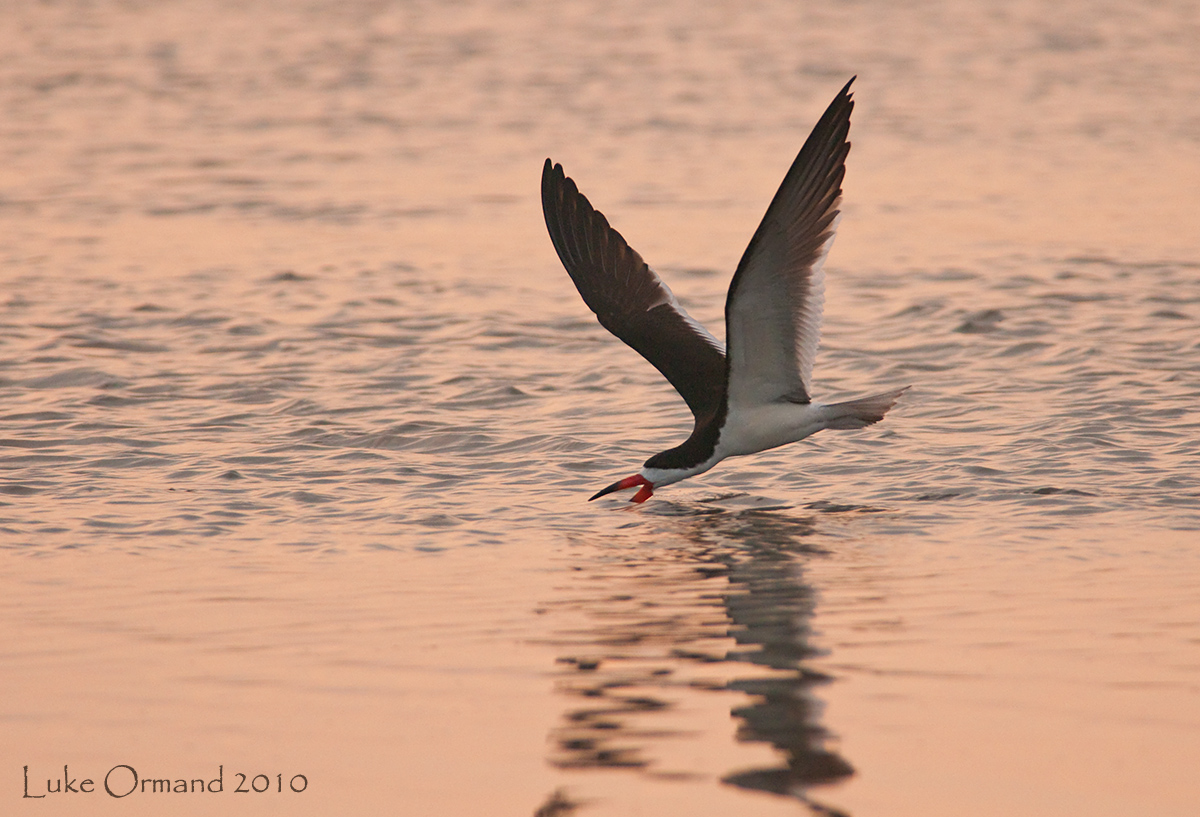
Black Skimmer
by Luke Ormand
About 1 minute after my last Osprey posting. A handful of Skimmers flew by and one turned around and did a skim right in front of me. This is "backlit" but the sun was kind of hiding anyway - I just wish there were some light on the eye.
Nikon D300s 300 f4 + 1.7X TC HH
f/7.1
1/1600s
ISO 1250
No Noise Reduction except the white area of the wing, sharpened bird, cropped to about 65%
- Luke

Comments
14 commentsThere's a halo of some sort around the wingtips, especially on the smaller version. Not sure if that's from sharpening or just from downsizing using bicubic sharper setting.
I see the "halo" around the tip of the right wing but when I did a threshold layer I saw only the thinnest line around the bird (much less than what I've seen on true sharpening halos around birds). I'm thinking that being backlit would be responsible for that? I'll take a look at the original image again but the most noticeable area around the tip I'm almost certain was there naturally. I didn't do any noise reduction on the water either, which is usually a major contributor to halos.
Richard,
What re-sizing method do you use? I was informed @ some point that bicubic sharper "was the best" but there are of course various "best" versions of things in PS.
darrenmckenna.com
Here a tighter crop w/a threshold layer @ 200. There is an extremely thin halo which I suggested before was caused by backlighting.
I'm not trying to be argumentative as you all have pointed me in the right direction many times, but since we are hypothesizing what caused said halo, I submit my idea.
I like the color in the water, the skimming action and the wing position.
I see the halo that Rich D. mentions too and he helped me with a similar backlit image some time ago. I had an early morning backlit image I wanted to post of a Reddish Egret, one of the steps I take immediately after resizing an image is to apply a temporary threshold level layer to check exposure. When ever I resized the image using Bicubic I would get a halo at about level 185. I could not understand why because I had not applied sharpening at that point. I worked it up several times with the same result.
I wrote to Rich D. and asked him if he had seen or had a similar problem and he suggested I resize using Bilinear. It worked perfectly, I did not see a halo when I applied the temporary threshold level.
The graphic shows that image using Bicubic and Bilinear resizing with a temporary threshold level applied to both sides with the slider at 185, the difference is visible and you can see the halo on the Bicubic resized image. I am assuming that you had to resize both the graphics you reposted showing the threshold level. I can not, per NPN guidelines post the full color image here, but I could email it to you if you'd like.
I do not ever use bicubic sharper as I have found that it increases the chance of halo production and I mask then sharpen my birds. There are also times when I am resizing images that contain blue sky when I use Bilinear resizing because it eliminates the halos we often see in images with birds in blue skies.
Rich D. was an enormous help to me when I was postprocessing that Reddish Egret image, I would not have guessed that resizing can create halos prior to any other processing. I hope this helps to explain your halo.
I generally use bicubic, as shown in the screen grab I've included.
Adobe is misleading with this setting: the pulldown shows something like "bicubic sharper (best for reduction)," but that can very easily result in a sharp thin halo anywhere there is an abrupt tonal transition. Think black bill against light sand or bright sky.
I very rarely use bicubic sharper: if I've got an image that isn't critically sharp that is unique enough not to immediately trash it can sometimes make a smaller image look acceptable. I also used it when I had a lot of non critical images to process and I didn't want to spend time optimizing every one at the last step with Smart Sharpen - the 240+ vanity plates on my web site are a good example.