Nature Photographers Network
This is the preserved archive of the original Nature Photographers Network. The community continues at naturephotographers.network.
Oriole+Repost
‹ PreviousAvian GalleryNext ›

Oriole+Repost

by Steve Balke

Gallery: AvianPosted May 23, 201070 views7 comments
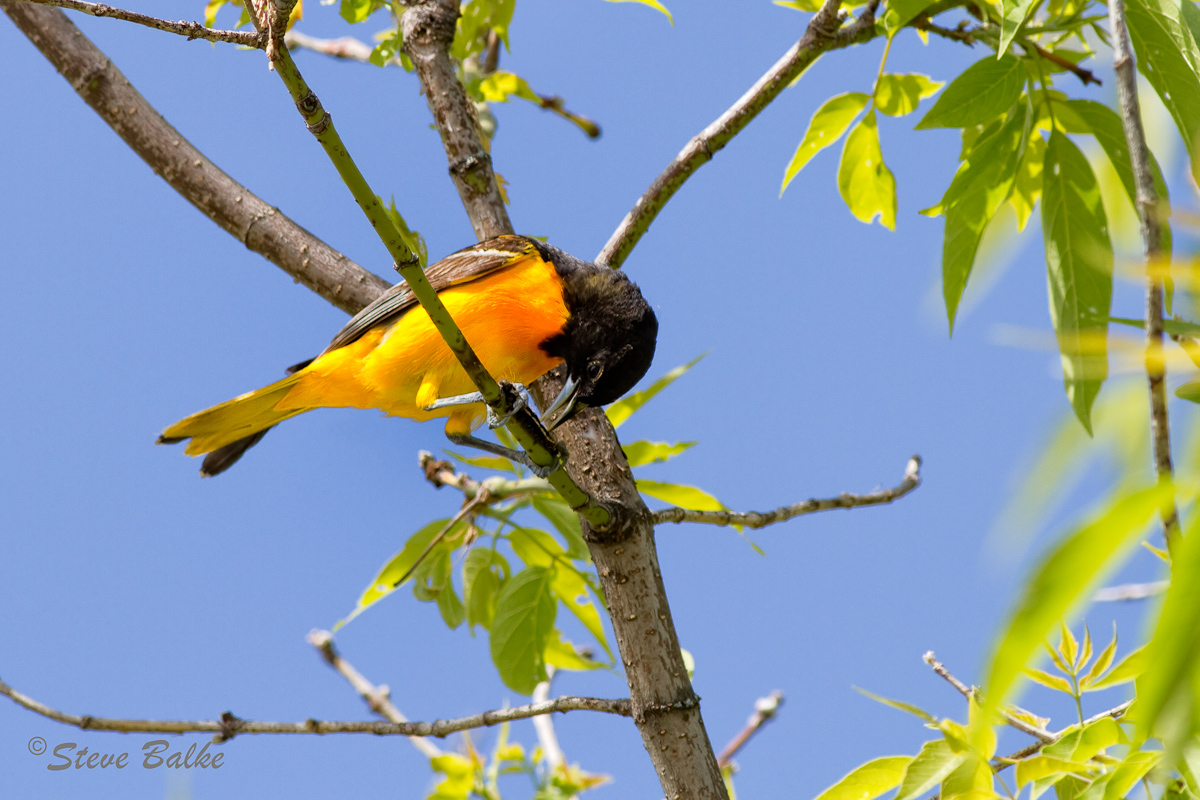
Baltimore Oriole (Icterus galbula) with Caterpillar

If you look closely you can see that this fellow is holding down a caterpillar quite effectively with both feet. I found the image interesting and I liked it the most of all images I captured in the past week. The image is sufficiently sharp to even clearly show the hairs on the caterpillar. However, some of the orange areas don’t show as much detail as I expected. I think that lighting was likely the main issue. However, perhaps the SS was not enough to capture some of the rapid movement of the bird.

All comments welcome.

EOS 7D, EF 400 mm f/5.6: ISO 400, 1/640 s, f/8.0, image is 4009 pixels x 2673 pixels (=10.7 MP or 60% of the 18 MP of the 7D). NR, some exposure adjustment and sharpening in post processing.

Comments

7 comments
Comment posted by Michael Twaddell on May 23, 2010 at 11:53 AM
I have the same problem with yellows, reds, and oranges. I am thinking of turning down the saturation levels, in-camera. I think that it is pretty cool how the bird has that caterpiller stretched out between his feet like that!
Registered on August 16, 2007, 199 Posts, 2132 Comments
Comment posted by Mia McPherson on May 23, 2010 at 3:23 PM
Steve,

It is very interesting to see the caterpillar between the Oriole's feet and the bill open as it is. I think the lighting was an issue with the yellow/orange areas as some of them are out of gamut. You could try pulling the saturation and/or luminance of the yellows & oranges in RAW and see if that brings out more detail in those areas. Sharpness looks good to me.

I find this an interesting image because of the action & behavior.
Registered on June 25, 2007, 491 Posts, 12566 Comments
Comment posted by Dennis Plank on May 23, 2010 at 7:06 PM
Excellent, Steve. Wonderful behavior shot. Did you check the individual color channels in ACR? It wouldn't surprise me if the reds were saturated in some places, which would pull down the effective contrast, even if the other color channels weren't. :toast: :toast:
Registered on January 28, 2008, 1767 Posts, 23192 Comments
Comment posted by Ron Dudley on May 23, 2010 at 7:20 PM
Neat behavior Steve - that's one caterpillar that isn't going to make an escape. I have the same problems with the bright colors of the male Bullock's Oriole in less than ideal light.
Registered on March 30, 2007, 437 Posts, 10915 Comments
Comment posted by Brian Gatlin on May 24, 2010 at 8:57 AM
cool shot, Steve. I like the caterpillar and behavior. I agree that you might be able to pull a little more detail out of the oranges by desaturating the orange channel in ACR.
Registered on March 21, 2009, 202 Posts, 4187 Comments
Comment posted by David Sparks on May 24, 2010 at 4:45 PM
Steve:
Neat behavioral shot and I think you have received some good suggestions about the yellows and oranges. :toast:
Registered on May 26, 2007, 290 Posts, 4270 Comments
Comment posted by Steve Balke on May 24, 2010 at 8:01 PM
Thank you all for your fine comments. In response to them, using Photoshop, I’ve lowered the saturation for only the orange/yellow breast of the bird. There were a few spots that were close to being saturated (saturation values (G) of 250 or so). So, lowering saturation does help and is certainly worth doing, but I can see that the quality of this image really is limited by the available light. I checked the question of exceeding the gamut posed by Mia. My understanding is that problem occurs when we take an image from a wide gamut color space to a narrower gamut color space. The raw image was captured with the 7D set for the Adobe RGB workspace (known to have a wide gamut). [Also, the 7D was set for no additional saturation to be applied to the image.] I'm far from being expert on color spaces. However, Lightroom also uses a very wide gamut workspace and Photoshop was set at Prophoto RGB (again a very wide gamut workspace). The posted image was saved as a sRGB jpeg. Even the image in Lightroom shows lack of detail similar to the posted image. So, I don’t think that gamut was an issue here. Finally, from your comments, it’s nice to know that sharpness is not the issue anyway....for a change! :smile:
Registered on June 18, 2009, 229 Posts, 2915 Comments