Nature Photographers Network
This is the preserved archive of the original Nature Photographers Network. The community continues at naturephotographers.network.
Emerald+RepostUsingBokeh
‹ PreviousAvian GalleryNext ›

Emerald+RepostUsingBokeh

by Steve Balke

Gallery: AvianPosted February 3, 2010151 views13 comments
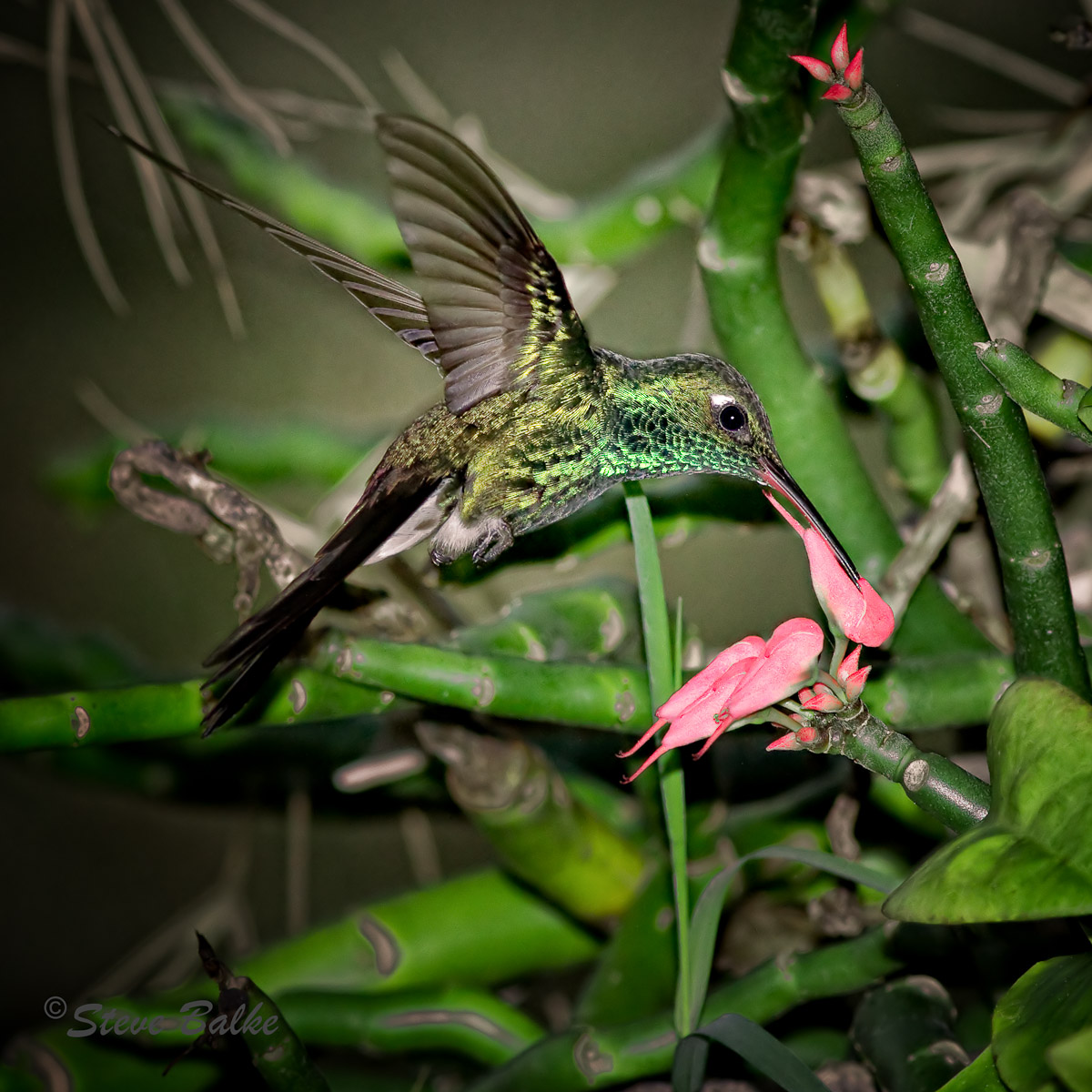
Cuban Emerald (Chlorostilbon ricordii) The range of this hummingbird is only the Bahamas and Cuba. In my one week stay at Jibacoa, Cuba I only saw it twice. However, over the week several people came up to me (as the only fellow with a long 400mm lens-equipped camera wandering around the resort!) and directed me towards where they saw one. Somehow, it just kept one step ahead of me the whole week. I only managed to obtain three shots: only one showing the face of the bird! This is it...taken on the very last day of vacation. As you can see, there is a very busy background. However, I like the colors, the pose and the detail of the bird. I tried various measures to emphasize the bird over the background. Here I’ve used a fairly large, square, crop and lowered the exposure on some of the edge vegetation.

This was shot in the very early morning, just after the sun came up. I was in the middle of testing ISO/flash combinations when this bird unexpectedly appeared. He didn't stay long either. So, I think I could have obtained about the same result at a lower ISO. However, after noise reduction I think the image has held up quite well. Also, I like that the weak ambient light allowed the flash to effectively freeze the motion at 1/250 s.

I encourage you to examine the large version image and I look forward to your assessments.

EOS 7D, EF 400mm f/5.6, 580 EXII: 1/250 s (the x max synch speed, f/9.0, ISO 1000, flash fired, image is 2560 x 2560 pixels (=6.6 MP or 36% of the 18 MP of the 7D).

Comments

13 comments
Comment posted by István Molnár on February 3, 2010 at 5:29 PM
Cool shot! Great catch.
:toast:
István
Registered on January 7, 2010, 114 Posts, 704 Comments
Comment posted by David Sparks on February 3, 2010 at 7:11 PM
Steve:
Wow! The colors and detail of the bird are wonderful. The flash did a very good job of freezing the motion. If my interpretation of the image is correct, a few of the places where you lowered the exposure on the vegetation stands out and are distracting. I think I would try to use the clone tool to make some areas less distracting. For example, the whitish area with green surround in the middle of the dark area below the two green branches beneath the bird's tail could be made completely dark and would go unnoticed.
I also really like the beak/flower interaction. :toast:
Registered on May 26, 2007, 290 Posts, 4270 Comments
Comment posted by Brian Gatlin on February 3, 2010 at 7:22 PM
If I only got 3 shots of a bird, I'd be very happy to have one like this. Great example of the resolving power of the 7D--the detail looks excellent for 36%. The flower, detail, and frozen motion are very nice. I like the comp that you chose.

I can also see some of the telltale signs of the darkening of bright spots--there are pretty clear edges around the bright spots above the right wing and above the tail. (If you figure out how to avoid these, let me know... in my few attempts to reduce brightness I get these constantly. maybe a question of feathering the edge to a greater extent?) I think that in the larger version, the white diagonal line on the wing edge may show some sharpening artifacts.

You seem to have the right idea for getting bird shots in winter--head south! I'll be doing the same in a week--brown pelicans, brown and blue-footed boobies, red-billed tropicbirds, and lots of shorebirds are in my near future.
Registered on March 21, 2009, 202 Posts, 4187 Comments
Comment posted by Ed Dubois on February 3, 2010 at 7:23 PM
Nice catch Steve. You did a really good job of freezing the motion.

I find the darkening you did around the edges distracting. When I first looked at this I thought the flash had been zoomed to a longer focal length than your lens and that caused what looks like vignetting.
Registered on February 22, 2005, 129 Posts, 4739 Comments
Comment posted by Cheryl Molennor on February 3, 2010 at 7:24 PM
Great fill and natural setting. Love it
Registered on June 30, 2009, 300 Posts, 5051 Comments
Comment posted by Steve Balke on February 3, 2010 at 7:56 PM
Thank you all for your rapid responses. I'm still experimenting with how best to treat this image. The bird provided almost no problem: I applied minimal sharpening ( I don't see any artifacts, Brian. However, maybe my eyes aren't tuned right!). [The 400 mm prime lens is great--especially with the 7D!] The background is a real pain. If I avoid the darkening (yes, it really is like vignetting, Ed) then it really becomes a "find the green bird in the green plants problem!". I used Viveza 2 for lowering the exposure. This program selects the pixels to be changed based upon the similarity of their characteristics to a control point selected pixel. It looks like, sometimes, when there is a gradation in brown coloration for example, then the program only darkens a portion of the pixels (only the similar ones). In this case the border pixels on some brownish plant parts were selected in preference to the center ones. The result: the lowering exposure occurred preferentially in the border. I went to CS4 and used cloning/patching to remove those. I would have rather let them remain but they even look artificial on the original unprocessed image! (Nature seems to look artificial sometimes!) I'm sure there are other strange looking things remaining in this background: it's a matter of where to draw the line. Anyway, here is where I am at the moment (please see repost). All further suggestions welcome! :wavey:
P.S.: Brian, I've been trying to darken those white areas you mention in your comment. I can do it....and generate new color variations to distract us! Not so easy. I agree about traveling south! Good luck in your trip! :toast:
Registered on June 18, 2009, 229 Posts, 2915 Comments
Comment posted by Jerry Marella on February 3, 2010 at 9:28 PM
Nice catch for the situation as it happened. The bird is great, and the flowers and vegitation in front of the bird add to the photo. If you have the time and patience maybe you could try to clone out the confusion above and behind the bird. That's not going to be easy, but it would give us a better look at the wings without fighting with the stuff behind them.
Registered on November 1, 2003, 142 Posts, 862 Comments
Comment posted by Ed Dubois on February 3, 2010 at 9:57 PM
One thing that might work Steve is to select the bird, invert the selection and then lower the exposure on everything but the bird. It'd be fiddly but it might be a way to minimize the BG issue without having to burn in specific areas.

I'm sure the PS gurus on this site will share some more sophisticated ways of dealing with this but unfortunately I'm not one of them. Do keep us posted on your progress.
Registered on February 22, 2005, 129 Posts, 4739 Comments
Comment posted by Mia McPherson on February 4, 2010 at 6:45 AM
Steve,

I like the Emerald's pose, how it is sipping from the flower and the lovely details in the bird's plumage.

I don't know much at all about using flash but this seems over flashed to me. That could be an illusion though caused by the background.

People do darken backgrounds by selecting the bird (in this case you would need to select some of those plant features in the foreground too), inverting then using a curves layer to darken every thing in the background. I think then the problem would be that the bird would appear even brighter than it it is.

Of the two smaller versions provided, I prefer the second.

All of that aside, I've be thrilled if I got this photo to remind me of seeing this lifer bird. I've seen Cuba from several miles off of the coast and it looks like it would be a fascinating place to find birds.
Registered on June 25, 2007, 491 Posts, 12566 Comments
Comment posted by Steve Balke on February 4, 2010 at 9:42 AM
Thank you all again for your very constructive suggestions. I recalled seeing demos of a program called Bokeh (Alien Skin Software) and thinking that I would have no need for it. It essentially allows the background to be blurred in a tailored way. However, after spending too much time trying to overcome all this greenery distraction using only exposure adjustments, I decided to try it. There are many, many options in this program. I decided to let it mimic the background of a Canon EF 85 mm f /1.2 L II @ f/1.2 and allow it to use a "natural vignette" for the lighting as well. The most difficult part for me was selecting the bird and flower using CS4. Anyway, here is the result. I bet that many of you could do even better. I think it looks better than any of my previous attempts. I'd sure be interested in knowing if any of you have experimented with this and what you think of it. I know that we can implement blurring using CS4. However, this program really takes this to a whole new level in my opinion. I left the crop about the same as previous. However, I expect that situation is different now too.
Registered on June 18, 2009, 229 Posts, 2915 Comments
Comment posted by Mia McPherson on February 4, 2010 at 2:51 PM
Steve,

I like the second repost much better, all it reallt needs now is more creful selction when masking the bird and foreground vegetation, then the bokeh program applied again.

I've never used Alien Skin, but it seems to have resolved some of the issues present in the original iimage.
Registered on June 25, 2007, 491 Posts, 12566 Comments
Comment posted by Brian Gatlin on February 4, 2010 at 4:37 PM
wow--that is a powerful program--it looks really good. I agree with Mia, it just needs a little fine-tuning of the selection. (As for how to do it, I might try zooming in and using the quick selection tool to subtract those areas along the edges.)
Registered on March 21, 2009, 202 Posts, 4187 Comments
Comment posted by Steve Balke on February 5, 2010 at 5:50 PM
Thank you all for your additional comments. Certainly blurring the background using the Bokeh software can do a nice job of removing distractions. It's great to be able to actually select an expensive lens to simulate. However, selection in CS4 is quite challenging when done for this purpose in bird photography. The blurring starts immediately at the border of the selection (even feathering did not help) and it's often very easy to obtain a visible border of unblurred image adjacent the subject. I experimented with various ways of selecting, including using Nik's control point method to form the selection but so far my impression is that the result will not be up to our standards most of the time.....at least not when I do it! :smile: There are other background blurring options, including CS4 and blur vignetting in Nik software. I have not evaluated them yet.
To be continued... :smile:
Registered on June 18, 2009, 229 Posts, 2915 Comments