Gallery: FloraPosted August 14, 2017380 views10 comments
2011:05:30 15:06:00
D300s
70-180mmmacro @ 122mm
1/50 sec, f/8
Mode: Av
Metering: Multi-segment
Exp comp: -1/3
ISO: 640
AF mode: AF-C
White balance: AUTO
Flash: Off
Comments
10 comments
Comment posted by Jerry Austin on August 14, 2017 at 3:44 PM
Beautiful capture, Sandy. Love the black background.
Registered on January 6, 2012, 651 Posts, 3448 Comments
Comment posted by Philip Hodgkins on August 14, 2017 at 7:54 PM
Very stylish and expertly processed. Good work!
Registered on July 24, 2006, 2741 Posts, 12349 Comments
Comment posted by Kathy Snead on August 16, 2017 at 1:00 PM
Sandy
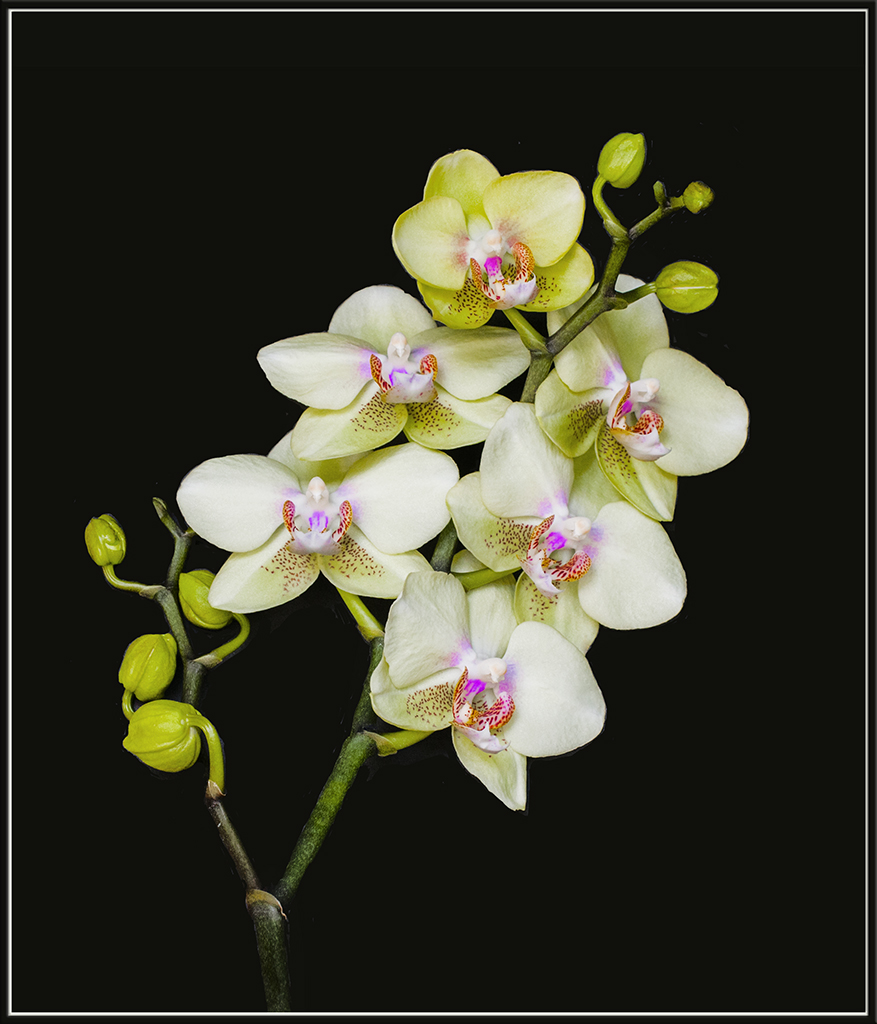
Very pretty orchid Sandy. Sometimes it's hard to position these, but this one is positioned oerfectly
Best
Kathy
Registered on April 6, 2017, 104 Posts, 397 Comments
Comment posted by Barbara Graham on August 17, 2017 at 5:54 PM
Agree, agree, agree, especially in the "larger" version. I know you've been doing this (posting at NPN) a whole lot longer than I have, but I would love to know what software you use and/or a tiny bit about your processing, even if you just add it to your list of info occasionally. (But you don't have to.)
Registered on July 27, 2010, 1310 Posts, 5035 Comments
Comment posted by SandyRichardsBrown on August 17, 2017 at 6:54 PM
Nothing magic (except a couple Photo Art images where there IS magic involved!)
1. Start with a good image (in PA, you can occasionally get away with a not-so-good image, since you're using filters, etc)
2. For a flower, start with as perfect a bloom as you can (lesson learned long ago from Catherine Reilly) . Otherwise, you will be cloning out dark spots and blips forever)
3. With orchids, especially, try to find a bloom whose flowers are on the same focal plane, unless you stack which I have not learned to do yet. This orchid (above) is all on the same plane, so was quite easy. often, the blooms are every which way which makes for a beautiful orchid, but horrible picture.
4. I often bracket exposures - gives the best chance at getting close to right
5. CS6 - exposure, whites, and highlights most crucial)
6. Levels and curves adjustments
7. Here, I do a loose crop to make the image larger on the screen, to see details. The final crop will be later
8. Adjust colours selectively.
9. Use shadows tool if needed to lighten dark areas. Not too much or it looks fake
10. If you don't like the BG - change it - here, I had a black cloth behind the orchid that I simply had to darken with the levels slider, but you can always paint in a BG ( although it takes forever.) Topaz Re-Mask will also drop out a BG quickly.
10. Here, .I usually run the main part of the image through Viveza to bring out structure.
11. Correct what needs to be corrected. I used to be more of a purist like Rich Ditch and never clone junk out; now I have no hesitation to get rid of bad areas, crossing branches, any crap I don't want.
12. Remove or lessen noise if needed. Make the final crop.
13. If you think you're done, enlarge the image on the monitor and look at every square inch - I always find something I missed.
14. Make a frame, if you're interested.
15. Post and pray!
16. Enlarge the posted image again and check every inch. I sometimes find I have still missed something, so delete it, re-do, and re-post
17. PRACTICE PRACTICE PRACTICE PRACTICE
Hope this helps!
Sandy
Registered on November 24, 2003, 3937 Posts, 12909 Comments
Comment posted by Barbara Graham on August 18, 2017 at 8:47 PM
Thanks, Sandy!
Registered on July 27, 2010, 1310 Posts, 5035 Comments
Comment posted by Bill Fach on August 20, 2017 at 9:09 PM
Sandy: Beautiful blooms superbly lit and captured. Most excellent.>=))>
Registered on November 1, 2003, 1805 Posts, 26981 Comments
Comment posted by Shirley Freeman on August 26, 2017 at 3:36 PM
Sandy, this is REALLY nice! Congratulations on EP. Nothing but perfect.
Registered on May 27, 2017, 77 Posts, 844 Comments
Comment posted by Ed Williams on August 26, 2017 at 9:32 PM
Beautiful flower and very nice work Sandy. Thanks for the explanation of your processing too. Congrats on WP! Hope you didn't get stuck too badly int he Madras traffic jams this week.
Registered on December 28, 2010, 636 Posts, 3499 Comments
Comment posted by Giuseppe Guadagno on August 27, 2017 at 3:19 AM
I missed this beauty Sandy. An award very well deserved.
Registered on February 3, 2007, 827 Posts, 5052 Comments

Comments
10 commentsVery pretty orchid Sandy. Sometimes it's hard to position these, but this one is positioned oerfectly
Best
Kathy
1. Start with a good image (in PA, you can occasionally get away with a not-so-good image, since you're using filters, etc)
2. For a flower, start with as perfect a bloom as you can (lesson learned long ago from Catherine Reilly) . Otherwise, you will be cloning out dark spots and blips forever)
3. With orchids, especially, try to find a bloom whose flowers are on the same focal plane, unless you stack which I have not learned to do yet. This orchid (above) is all on the same plane, so was quite easy. often, the blooms are every which way which makes for a beautiful orchid, but horrible picture.
4. I often bracket exposures - gives the best chance at getting close to right
5. CS6 - exposure, whites, and highlights most crucial)
6. Levels and curves adjustments
7. Here, I do a loose crop to make the image larger on the screen, to see details. The final crop will be later
8. Adjust colours selectively.
9. Use shadows tool if needed to lighten dark areas. Not too much or it looks fake
10. If you don't like the BG - change it - here, I had a black cloth behind the orchid that I simply had to darken with the levels slider, but you can always paint in a BG ( although it takes forever.) Topaz Re-Mask will also drop out a BG quickly.
10. Here, .I usually run the main part of the image through Viveza to bring out structure.
11. Correct what needs to be corrected. I used to be more of a purist like Rich Ditch and never clone junk out; now I have no hesitation to get rid of bad areas, crossing branches, any crap I don't want.
12. Remove or lessen noise if needed. Make the final crop.
13. If you think you're done, enlarge the image on the monitor and look at every square inch - I always find something I missed.
14. Make a frame, if you're interested.
15. Post and pray!
16. Enlarge the posted image again and check every inch. I sometimes find I have still missed something, so delete it, re-do, and re-post
17. PRACTICE PRACTICE PRACTICE PRACTICE
Hope this helps!
Sandy