Imm Gr Heron/redox2
by Barbara Graham
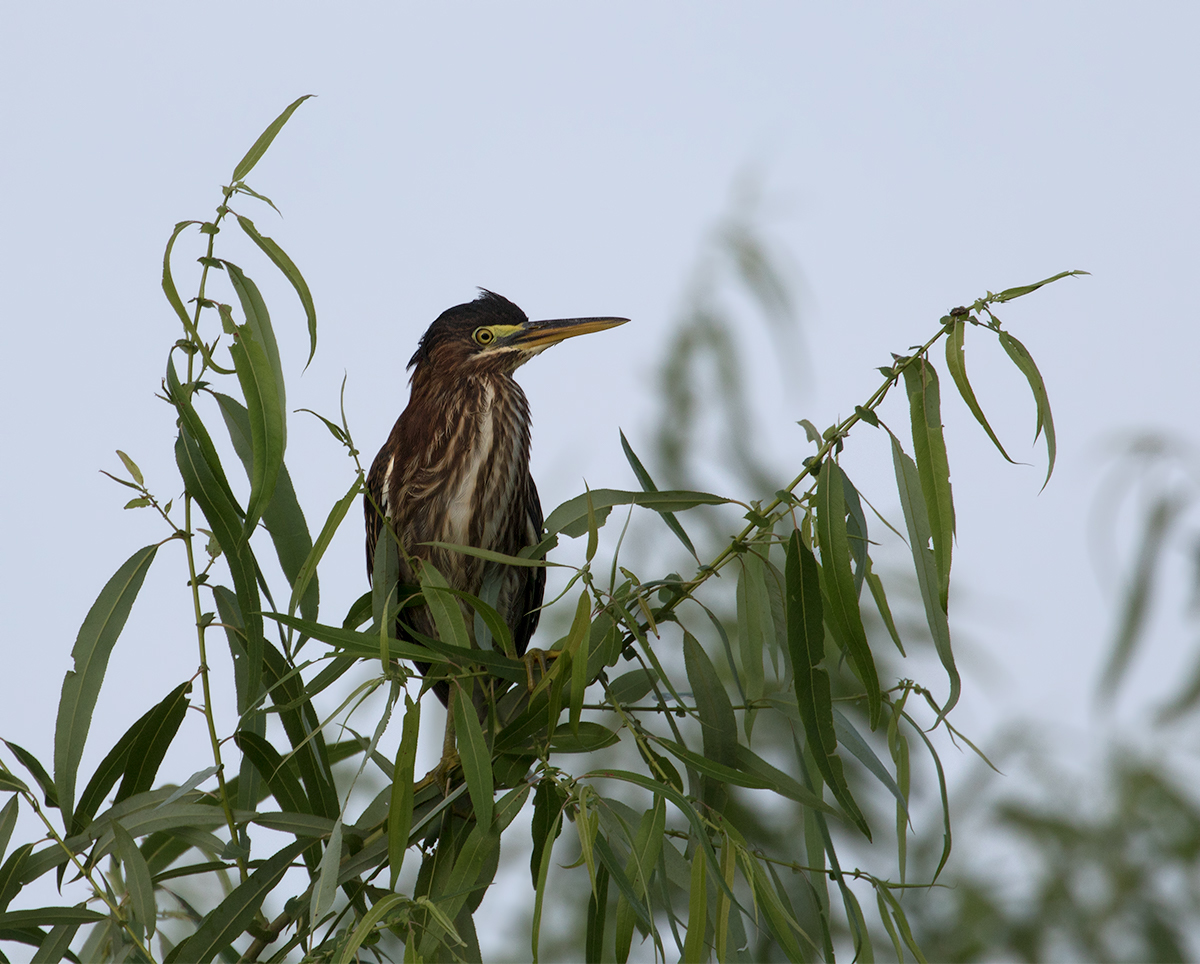
First image posted with new gear, somewhat confused. Please bear with me.
Lake Apopka Wildlife Drive
6/10/2017, 8:05:56 AM
Canon EOS 7D Mark II EF100-400mm f/4.5-5.6L IS II USM +1.4x III @ 560mm
ISO 200, f/8, 1/640
Aperture priority, Evaluative metering
62% of full frame
I'm having trouble understanding the File Info, and I'm also having to use Bridge to copy some of it to here. Is there a way to get it copied through Photoshop File Info like you could before Creative Cloud?
This is 62% of full frame, but doesn't the size of the image matter, too? I think these images are larger than they were on the 7D. Is what matters the file size, which is 258.41 MB, or does that not mean anything?
I'm also having trouble switching from Manual to Aperture priority, although I think the results will be much better when I see exactly what I need to do. I enabled Safety Shift, which seemed like a good idea. I won't explain it all, but it shifts the exposure and/or the ISO if necessary. I don't know if this is why it shot this image at f/8 when I know I start at f/7.1. I also temporarily (for the whole weekend) forgot that I needed to change to a different f stop to get bokeh when I needed it.
I think it was too early in the morning for ISO 200 and it should have been 400, so I had to use a Curves layer to lighten this some. It may still need to be lighter. I also did NR on the blue sky and Smart Sharpen on the bird.
As you can see, being able to use 560mm helped here.
I like the way the leaves frame the Heron.
Hopefully my questions will get immensely less as I work through two or three images.
Any feedback would be greatly appreciated. Thank you!

Comments
11 commentsThe files from the 7D II are larger (more megabytes on disk) than the 7D because it has more resolution (more pixels). By the time you resize for the web as a jpeg at 720 pixels for the small image and 1600 for the large image the sizes shouldn't be much different. Each image is different because of the content.
I don't understand the trouble switching from Manual mode to Aperture priority. Push the lock button in the middle of the dial and turn it.
Safety Shift: I'd turn it off. I hate options that decide to change camera settings to "help me". It will take effect if the subject brightness changes and the metered exposure can't be obtained by changing some other parameter like ISO.
No your image was at f/8 because you were at the 400mm end of your lens which is f/5.6. Then you used a 1.4x converter which makes the largest possible aperture f/8. You may have seen f/7.1 because you were zoomed out further at some point. Remember the lens you have is a variable aperture lens changing as you zoom from 100 to 400. You said you forgot to change aperture to get the bokeh you wanted for the whole weekend. You CAN NOT open up further than f/8 at 400mm with the 1.4x TC.
ISO: You achieved 1/640 at f/8 with ISO 200. If you would have moved to ISO 400 you would have had 1/1280 at f/8 and the picture would be identical for exposure since you were in AV mode.
Yes your picture is underexposed: The light colored background fooled your meter into underexposure. You needed to add exposure via exposure compensation in AV mode. Simple enough, turn the big dial on the back of the camera 1 click to the right for 1/3 stop, 2 clicks for 2/3, etc. (assuming you've set your camera to use 1/3 stop increments).
You can get all your file Info by down loading Digital Photo Professional 4 form Canon. Go to Quick Check and click on Info, then past it into Word. Nice shot.
Peter
I'm afraid I can't help with the file information aspect as I've never used that feature.
For what it's worth, I don't have Safety Shift enabled on mine, but there wasn't any really good reason for that decision.
I agree that sio 200 is pretty low for early morning. I usually start my mornings at 1250 and rarely get below 500 even in the brightest light.
A very nice shot of the heron, especially for the first outing with new gear, which always makes things difficult.
62% of full frame does need to be looked at in the context of the number of pixels the camera has. That's why I gave up on it and just report a pixel count. File size, as in your 258.41 MB means little or nothing since most of that comes from the processing you've done rather than the number of pixels in the image.
Keith is right about the change to f/8. It is due entirely to the TC.
If I do leave it, what do you think?
When I first joined NPN I bought a Spyder (I think that's the name of it) calibration....whatever it was. But I don't know where it is now, and so I haven't color calibrated my monitor in a long, long time. I will look and see what they have available now.
Here is a redo with the right-hand Slider in Curves at 225.
When I'm in PS I always keep the histogram showing in the panel, so I can see where I am on the brightness curve.