Nature Photographers Network
This is the preserved archive of the original Nature Photographers Network. The community continues at naturephotographers.network.
Man and Color
‹ PreviousPOP Photos GalleryNext ›

Man and Color

by Richard Sandor

Gallery: POP PhotosPosted February 27, 2016115 views8 comments
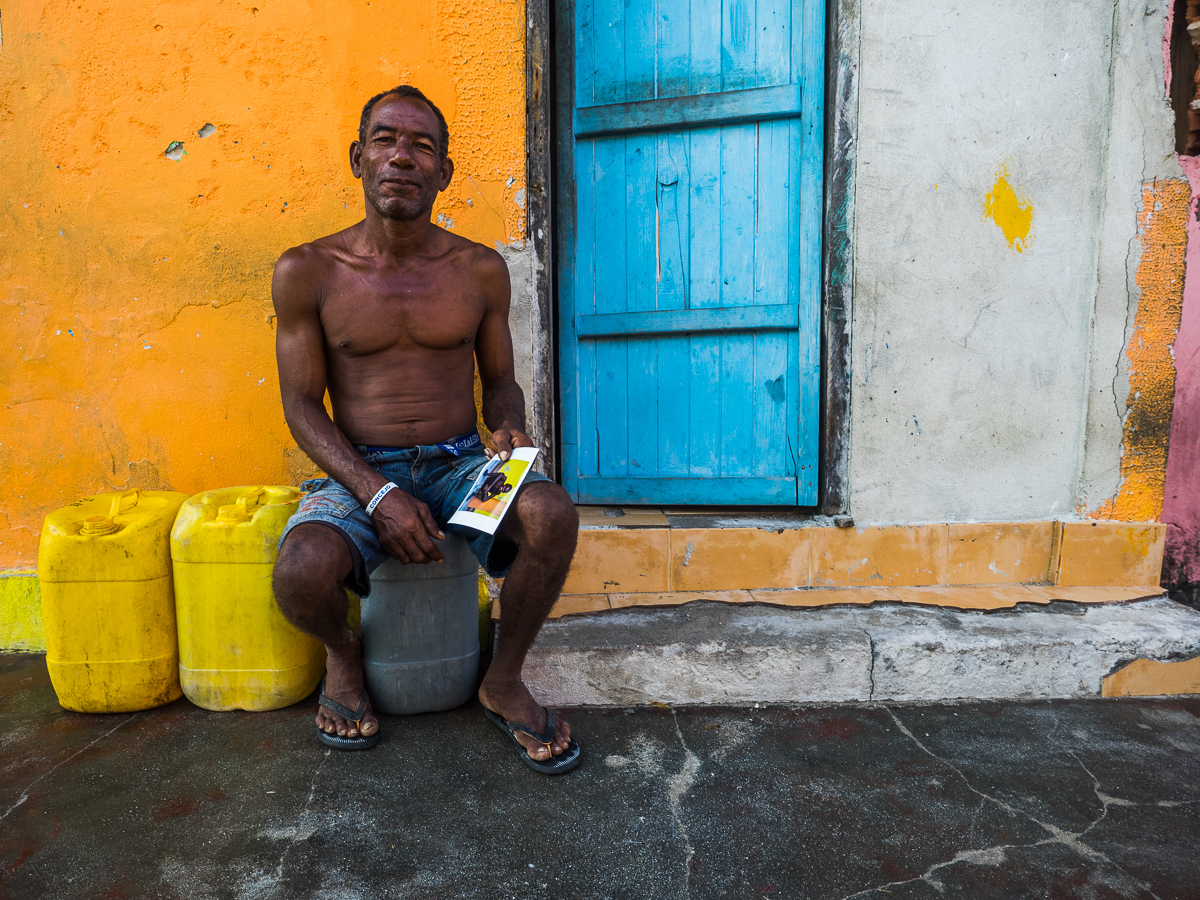
The man in the photo had just been given a photo of himself and was quite happy with it. I liked the strong colors of the background and the apparent happiness the man showed. I made a second version by cropping the colored wall along the right most edge but chose to stay with this original photo. Taken with an Olympus E-M1 and 12-40 at 12mm, 1/250, f/4 and ISO 200. C & C welcome. Richard

Comments

8 comments
Comment posted by Floyd Hopper on February 27, 2016 at 7:23 PM
Just beautifulblush
Registered on May 1, 2009, 652 Posts, 762 Comments
Comment posted by Harley Goldman on February 29, 2016 at 10:50 AM
Cool image with great colors. Might be my tired eyes, but I am seeing significant lens distortion throughout. Maybe do  a PS lens adjustment?
Registered on November 19, 2003, 586 Posts, 11271 Comments
Comment posted by Richard Sandor on February 29, 2016 at 12:57 PM
Floyd and Harley: thanks for your comments. Harley, straight lines and flat walls/doors were at a premium on this tropical island.  enlightened  Thanks, Richard
Registered on January 12, 2014, 453 Posts, 1625 Comments
Comment posted by Kent Staubus on March 2, 2016 at 7:31 PM
Very nice as shot, but I think I would cropped  this one square, myself.  Crop off some on the right.  Of couse, I might be too used to using a Rolleiflex and Hassleblad in the past.


Kent in SD

 
Registered on November 11, 2003, 121 Posts, 2098 Comments
Comment posted by Richard Sandor on March 3, 2016 at 10:40 AM
Kent: thanks for your comment. As I mentioned in the original post, I made a version with some of the right edge cropped off, but not a square as you suggested. I've attached that file. For me, the plain white wall is just not that interesting while the color in the right edge adds some interest and balances things with the left side of the image. Thanks again. Richard
Registered on January 12, 2014, 453 Posts, 1625 Comments
Comment posted by Preston Birdwell on March 6, 2016 at 1:56 PM
I prefer the original post, Richard. I like the balance. The colors are wonderful, and I like the story the image tells.

I see the distortion Harley commented about. If you have Photo Shop, you can use the Skew function to correct the distortion. To use it...

In Photo Shop:
  1. Flatten the Image
  2. Create a copy of the Background Layer (Ctrl + j)
  3. Edit>Transform>Skew (A Marquee will surround the image.)
  4. Drag either the top-right corner inward and/or drag the lower corner outward to suit.
  5. Crop, if needed
  6. Next, merge the two layers.
  7. Save
--P
Registered on November 1, 2003, 471 Posts, 5188 Comments
Comment posted by Richard Sandor on March 6, 2016 at 6:50 PM
Here's a re-do as suggested by Harley and Preston. I added a small amount of canvas on each edge and filled that via content aware with the hope of keeping as much color on the right side as possible after transforming and cropping. Richard
Registered on January 12, 2014, 453 Posts, 1625 Comments
Comment posted by Reno DiTullio on March 7, 2016 at 8:16 PM
Love the colors.  I prefer the cropped image; in the original the color edge on the right keeps pulling my eye in that direction, somewhat distracting.
Registered on November 14, 2003, 130 Posts, 1644 Comments