Nature Photographers Network
This is the preserved archive of the original Nature Photographers Network. The community continues at naturephotographers.network.
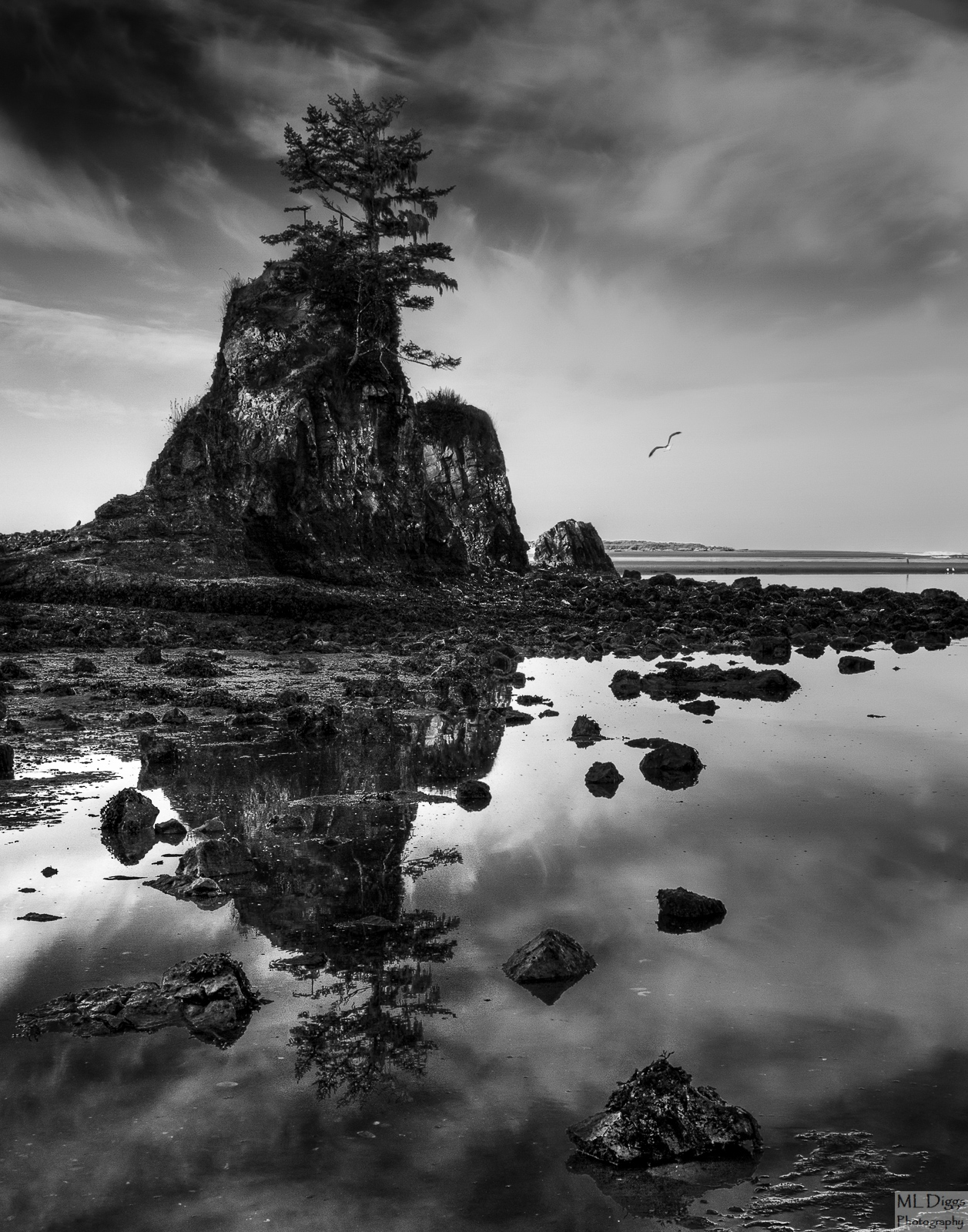
Seastack--Scroll to Diff Crop
‹ PreviousLandscape GalleryNext ›

Seastack--Scroll to Diff Crop

by Marylynne Diggs

Gallery: LandscapePosted December 5, 2015222 views15 comments
This is another in my ongoing series of B/W conversions.  I'm working on a portfolio of black and white landscape images.  Please let me know what you think of this one (and feel free to visit my gallery on this site to see the previous images in the series).

This one is quite nice in color, and I think I prefer the color image; however, I wanted to give it a chance in BW as well. 
Canon 7D with 24-105mm at 24mm
Three images blended for exposure in Photomatix
Conversion to BW in Nik Silver Efex
Some finishing in LR

As usual, I'm interested in general feedback as well as suggestions for composition and contrast, etc.  You have all been very helpful as I work on this series, and I can't thank you enough for the improvements you have encouraged me to make.

 

Comments

15 comments
Comment posted by Jim Gavin on December 5, 2015 at 5:40 PM
Another very nice B/W. It seems a bit contrasty, but it could be my monitor since your others have looked great. At first I thought there was a person middle right (by what appear to be two seagulls), but on closer exaam it looks like it could be an eagle.
Registered on August 14, 2008, 293 Posts, 1250 Comments
Comment posted by Preston Birdwell on December 5, 2015 at 7:14 PM
I like the composition. I do feel the contrast in the foreground and the stack is a little strong with a lack of midtones. The sky looks good. The other thing that bothers me a bit is that the reflection of the sky is brighter than the real stack and the sky. This could be due to the blending process. Other than that, this is a strong image.

--P
Registered on November 1, 2003, 471 Posts, 5188 Comments
Comment posted by Marylynne Diggs on December 5, 2015 at 8:04 PM
I think the person-looking creature is a great blue heron.  

I have another version of this with less contrast, and I thought I toned down the highlights in the water, but I'll comb through that area one more time.  Look for a repost tomorrow.
Registered on December 14, 2010, 122 Posts, 1034 Comments
Comment posted by Mark James Ford on December 6, 2015 at 3:03 AM
Hi Marylynne, I think the B/W conversion here works very well - the bottom of the stack (for me not a problem as such) is much darker than the reflection of the bottom of the stack which for me then doesn't work so well. I would be tempted to put more contrast into the reflections if a 'contrasty' finish is the effect you are going for.  There is lots of structure in the sky to play with so that i think there is some chance to pull in some darker tones on the right side off the image in both sky and reflection which would I think enhance the overall 'moodeness' of the image and would mean the eye would not be pulled so strongly to the top left corner.  Great composition.
Cheers, Mark
Registered on January 16, 2015, 60 Posts, 430 Comments
Comment posted by scott lanz on December 6, 2015 at 8:09 AM
I like this a lot, Marylynne. The seagull is a nice touch. I like the processing. Looks good to me except just for the dark areas in the seastack.  
Registered on November 14, 2003, 840 Posts, 12902 Comments
Comment posted by Katie Jones on December 6, 2015 at 10:42 AM
Hi Marylynne,
I love the compostion and the reflection here. I think you've nailed that. I guess I agree with the others regarding the contrast. It's a bit intense on the stack and I would love to see some more detail there and maybe a little lightening of the foreground. The sky is spot on and the gull is a really nice touch. Great capture! :)
Registered on November 17, 2015, 17 Posts, 91 Comments
Comment posted by Bruce King on December 6, 2015 at 12:23 PM
Great composition but ditto what has already been said about contrast. I also have been venturing into BW and what I like might not be your preference. To me, too many of the shadows appear blocked. Some blocked shadows are OK but too much can hurt the mood. Also the midtones need to be lightened some. Some images can obviously be short on midtones which makes it difficult to process the image without it appearing too contrasty, maybe that's the case here it's hard to tell. I think the highlights could use a boost also. If the brightest spot on the right horizon gets too bright cropping it out probably wouldn't hurt or bring it back down selectively. I might try to balance the tones somewhat in Silver Efex then develope mood with some Glamour Glow since you have the NIK Suite. I usually leave in just a hint of color with the opacity slider in the BW layer...not enough to see at a glance but just an ever so subtle touch, I often find this helps create a little more depth and can also add contrast in a slightly different way, not just lighter and darker. I do like it as presented but I would keep working it. Not my typical critique but this is such a great shot those would be my thought processes if it were mine. I hope my comments weren't too heavy handed. Have a great weekend.
 
Registered on January 14, 2010, 276 Posts, 2212 Comments
Comment posted by gary phillips on December 6, 2015 at 1:10 PM
For me the image is about the reflection, wich looks very good.   I think if you can make the upper part of the image appear with the same or slightly lighter contrast then it's a clear winner. It's just too dark for me on top.  
Registered on October 24, 2013, 185 Posts, 4136 Comments
Comment posted by Marylynne Diggs on December 6, 2015 at 1:55 PM
Thanks everyone!  There is a lot of exposure opportunity for me in this one since it is a 3 exposure blend in Photomatix before being converted to BW in Nik. There is no such thing as heavy-handed feedback.  I am interested in every suggestion.  I haven't really experimented with keeping a tish of color, and this one could work well that way, so I might tinker with that a bit, but I didn't do that here.  This image is actually pretty smashing in color (feel free to look at the gallery), but I wanted to play with it in BW.  It could be that its textural complexity, combined with the foreground reflection and rocks, etc. makes in hard to really unify in BW.  Just a theory.

What I did here: reduced overall contrast, lifted the mid tones, changed white and black points a bit, and use the LR adjustment brush to reduce highlights in the reflection and reduce the overall darkness of that top right corner.

Let me know if this is an improvement, and feel free to say it's not and make other suggestions.  I learn best through feedback, so feel free to keep it coming.
Registered on December 14, 2010, 122 Posts, 1034 Comments
Comment posted by Bruce King on December 6, 2015 at 2:28 PM
I think the repost is a fine improvement. you may be on to something with the textural complexity and all that. I have one with similar tones and textures that I can seem to find a sweet spot.
 
Registered on January 14, 2010, 276 Posts, 2212 Comments
Comment posted by Preston Birdwell on December 6, 2015 at 7:32 PM
The repost is definitely a fine improvement, Marylynne. I think you pretty much nailed it.

I think a lot of us here who did darkroom printing in the past can attest to the fact that we would go through a series of 'work prints', varying contrast through exposure and development and burn/dodge, before the expressive print was finally realized. Today, it's not much different: We proceed through various incarnations of an image until we arrive at the "This is it!" moment.

--P
Registered on November 1, 2003, 471 Posts, 5188 Comments
Comment posted by gary phillips on December 6, 2015 at 9:09 PM
Yep, way better.  Seems you have a lot of data to work with and that's a very nice thing.
Registered on October 24, 2013, 185 Posts, 4136 Comments
Comment posted by Harry Lichtman on December 7, 2015 at 8:35 AM
I lke your contrasty conversion, but the comp. feels a little left heavy.  Not sure if that was possible, as the reflection would move away from between the rocks.
Registered on September 17, 2010, 304 Posts, 3507 Comments
Comment posted by Roel Wijtmans on December 7, 2015 at 11:00 AM
Repo looks spot on, very nice!
Registered on September 30, 2012, 116 Posts, 2257 Comments
Comment posted by Marylynne Diggs on December 7, 2015 at 8:10 PM
Thanks everyone.

Harry: I thought I would try a slightly different crop.  I did have a little more room on the left, but there were a bunch of random rocks that didn't add much, so I cropped a tish there.  Here I cut another thin slice (pumpkin pie lingo lingering) off the right. 

Please let me know if this feels better.  I cannot thank all of you enough for all the help you are providing as I work on this black and white project.
Muchas gracias, mi amigos!

Sorry...this looks huge, but its just 1200 long side.
Registered on December 14, 2010, 122 Posts, 1034 Comments