Gallery: LandscapePosted December 3, 201574 views7 comments
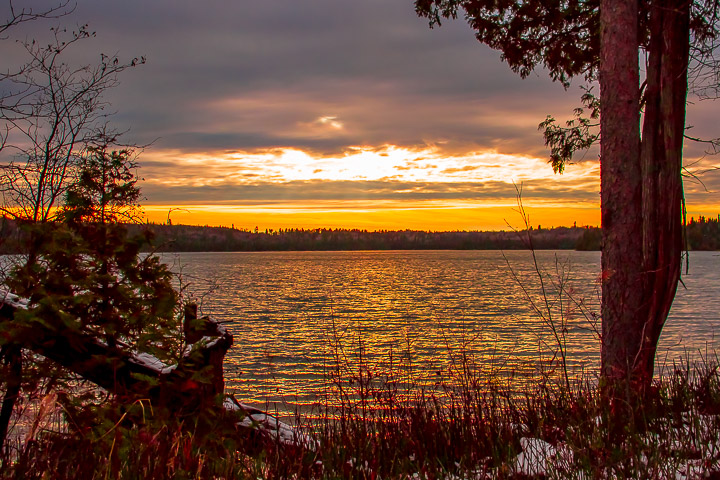
Hi and thanks to all who commented on the original posting. Using the suggestions given I have posted a re-processed the photo and would like to hear comments on the results and if I am on the right track. Thanks.
Comments
7 comments
Comment posted by Richard Teller on December 3, 2015 at 8:11 PM
I like the composition and the feeling of the image. There is some ghosting on the tree trunk on the tree on the right.
Registered on August 23, 2010, 1162 Posts, 6692 Comments
Comment posted by gary phillips on December 3, 2015 at 9:39 PM
I think this looks much better, Jim. The reds in the foreground are too strong for my tastes, Tone those down and it eill be a nice sunset image.
Registered on October 24, 2013, 185 Posts, 4136 Comments
Comment posted by Lon Overacker on December 3, 2015 at 10:10 PM
Jim,
The only difference I can really tell at this small size is that there is more color in the sky and water ( which looks good btw.) The issues I noted though were in the foreground reeds, tree, etc., which I can't see much change.
What would be helpful is if you explained whatever steps/changes you made to try and improve/resolve some things. the more you can tell us, the easier to offer suggestions. What photo editing sw are you using? for example. And if you can, you can post much larger dimention files for us to have a closer look.
thanks for the repost.
Lon
Registered on November 24, 2006, 521 Posts, 19147 Comments
Comment posted by Alberto Patiño on December 3, 2015 at 11:39 PM
Jim,
I feel that the foreground shadows are "pushed" too much, and as a result become quite noisy. The colors do look good, but the water appears to have too much contrast. I would soften the contrast and clarity throughout. As Lon says, a larger image would make it easier to give you more feedback.
Registered on December 2, 2014, 278 Posts, 1736 Comments
Comment posted by Jim Fairman on December 4, 2015 at 9:46 AM
Hi all and thanks for the comments and suggestions.
To answer some of the questions posed: I use Lightroom 6 to do the processsing, the original photo size is 5000 X 3341, I have sent this one at 1600 X 1067, I can definitely send a larger image if needed and allowed.
As to what I did, briefly, I lightened the shadows in the forground played with the noise reduction, contrast, shadows, highlights and clarity. This seem to give more colour to sky and foreground vegetation while removing a great deal of the noise but perhaps at the cost of sharpness.
note: this photo was originally 953kb but was reduced to 500kb
Registered on November 30, 2015, 20 Posts, 17 Comments
Comment posted by Preston Birdwell on December 4, 2015 at 7:25 PM
I think the repost here looks much better. You did a pretty darn good job with the challenging light you given.
--P
Registered on November 1, 2003, 471 Posts, 5188 Comments
Comment posted by Lon Overacker on December 4, 2015 at 9:57 PM
Jim,
thanks again for taking the time, and providing a few more details. The large view is great! I would highly recommend posting the larger view file in your future original postings too? In the "Post a Photo" dialogue there are 2 different file upload buttons you can use. One for the large view and the other for the dedicated 720px view.
From your description it sounds like you're doing mostly global adjustments? Although you did mention specifically ajusting the shadows ofthe foreground. are you doing some masking or painting select areas with a brush? I'm sorry,but I don't use LR so I can't offer much help here.
Personally, I like the colors of your second post, but the foreground and the treek trunk of the 3rd are much better. If you can learn how to selectively adjust areas without effecting other areas, that's where I might concentrate.
Lot's of articles here, but you can do some Googling for masking. If you want to try PS, I'd highly recommend Tony Kuyper's tutorials as well as some links he has to other photographers (former NPNer's) with some helpful tutorials on processing. Check it out. It's pretty advanced maybe, but something you may want to check out later.
Registered on November 24, 2006, 521 Posts, 19147 Comments

 Thanks.
Comments
7 commentsThe only difference I can really tell at this small size is that there is more color in the sky and water ( which looks good btw.) The issues I noted though were in the foreground reeds, tree, etc., which I can't see much change.
What would be helpful is if you explained whatever steps/changes you made to try and improve/resolve some things. the more you can tell us, the easier to offer suggestions. What photo editing sw are you using? for example. And if you can, you can post much larger dimention files for us to have a closer look.
thanks for the repost.
Lon
I feel that the foreground shadows are "pushed" too much, and as a result become quite noisy. The colors do look good, but the water appears to have too much contrast. I would soften the contrast and clarity throughout. As Lon says, a larger image would make it easier to give you more feedback.
To answer some of the questions posed: I use Lightroom 6 to do the processsing, the original photo size is 5000 X 3341, I have sent this one at 1600 X 1067, I can definitely send a larger image if needed and allowed.
As to what I did, briefly, I lightened the shadows in the forground played with the noise reduction, contrast, shadows, highlights and clarity. This seem to give more colour to sky and foreground vegetation while removing a great deal of the noise but perhaps at the cost of sharpness.
note: this photo was originally 953kb but was reduced to 500kb
--P
thanks again for taking the time, and providing a few more details. The large view is great! I would highly recommend posting the larger view file in your future original postings too? In the "Post a Photo" dialogue there are 2 different file upload buttons you can use. One for the large view and the other for the dedicated 720px view.
From your description it sounds like you're doing mostly global adjustments? Although you did mention specifically ajusting the shadows ofthe foreground. are you doing some masking or painting select areas with a brush? I'm sorry,but I don't use LR so I can't offer much help here.
Personally, I like the colors of your second post, but the foreground and the treek trunk of the 3rd are much better. If you can learn how to selectively adjust areas without effecting other areas, that's where I might concentrate.
Lot's of articles here, but you can do some Googling for masking. If you want to try PS, I'd highly recommend Tony Kuyper's tutorials as well as some links he has to other photographers (former NPNer's) with some helpful tutorials on processing. Check it out. It's pretty advanced maybe, but something you may want to check out later.