Bumper Crop
by John Freeman
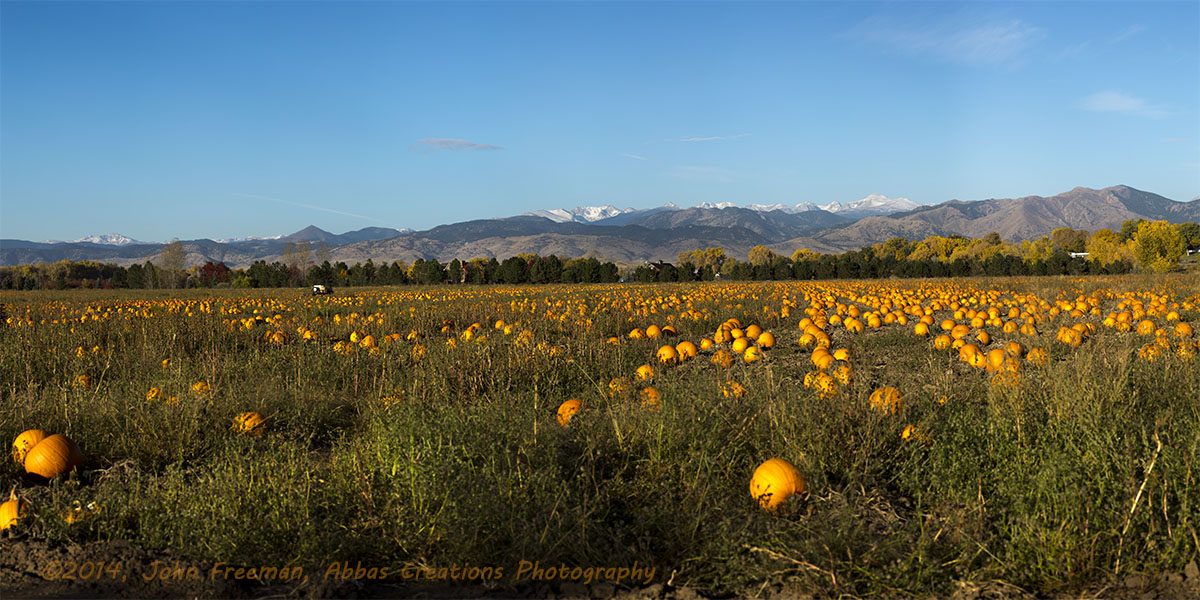
I have been driving past this field of pumpkins for several weeks waiting for the fall colors and weather to be just right. This morning I finally got the shot I was looking for. This is a stitched image consisting of 30 shots from my Canon 5Diii, f-20, 1/50th ISO 200 and 200mm. The final stitched image is 82"x41" Photo was taken on SW side of Longmont, CO near Airport Road and Boulder Diagonal.

Comments
8 commentsMark, I too noticed the vertical brightness changes. I have had this show up in some of my stitched images. I use Autopano Giga Pro for stitching. In it's blending process it seems to average the luminosity in vertical bands if you have lighter or darker objects in particular area resulting the sky brightness varying. In a nearly cloudless sky this becomes quite noticeable. I would be curious how you are doing your brightness match and what software you use. Also, I have been trying to determine if this issue is exacerbated when I do image size reductions using Photoshop's image resize. It doesn't seem to be as prominent when I am viewing the original full size image.
-jc
Took all your thoughts to heart. Here is another version taken further into the field. This one is made up of 57 images merged into one for a final 40"x120" panorama. This one was done using Polarizer f22, 1/40th sec, ISO 200 200mm. I tried to include all the major well know mountains. The Indian Peaks Range in just left of the middle. Longs Peak and Mt. Meeker are framed by the Cotton Wood trees on right.
Here is a link to a high resolution viewer. http://www.abbascreationsphotography.com/Pumpkin_Field_Tour/Pumpkin%20Field.html
Rolling your mouse will allow you to zoom into 200%
I use Lightroom and Photoshop and do my brightness (and white balance) matching during raw processing in Lightroom. If you're not shooting raw, making those adjustments is more difficult and won't work as well. You might be able to link your Giga Pro software to Lightroom, if Giga doesn't already allow for raw processing.
I went back into my raw files this evening to verify that I was in full manual shooting mode when I shot these. I was. My process flow is to use Camera Raw to batch process the RAW images to tif files. When shooting the series I will typically use "Expose to the Right" picking the brightest portion of the scene and set the exposure to about +2 on the exposure meter. I do this to get the best possible noise in the dark areas of the image. Then the first step in Camera Raw is to move the exposure slider so the histogram has no over exposed areas indicated. In the original image I ended up setting the Exposure to -1.85. I then select all the images and Synchronize the setting to all images and export as 16 bit TIF files to a new sub-directory.
As I reviewed each image of the top row with mostly sky, I noted that the histogram for the images that exhibit bright bands have most of the image information shifted further to the right. I am wondering if my camera is needing cleaned and thereby not giving me correct exposure. Also, I believe that I have read somewhere that with higher f-stop values greater that f-11 (f-20 in this case) there is more exposure variation. I was using higher f-stop of course to get the best depth of field possible. Giga does RAW conversion but doesn't allow any adjustments.