Gallery: AvianPosted September 29, 201476 views5 comments
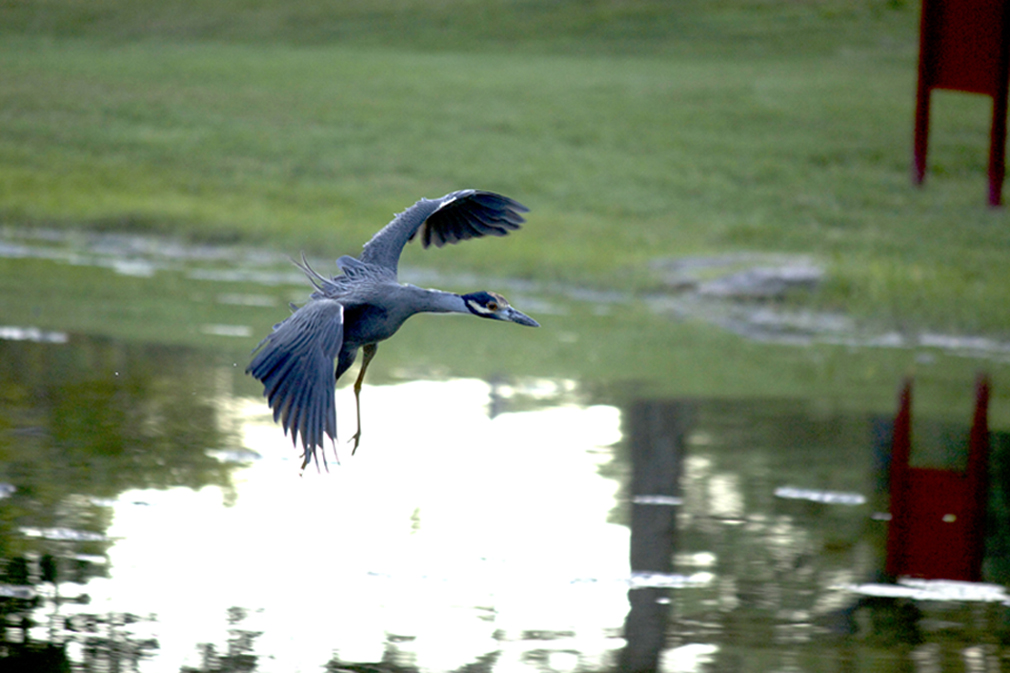
i am having a hard time learning photoshop but i am working on it. i like the capture here.
eos rebel t5i
55 to 250 lens
iso 400
ap. 5.6
ex. 1/640
how do i rid the photo of the exposure from the light in the water.
Comments
5 comments
Comment posted by John Tobias on September 29, 2014 at 8:56 PM
Hi Justin, I'm not much help as I struggle with Photoshop elements myself. But, first I would suggest a tighter crop. Get rid of the sign and reflections on the right, all they do is distract. This should also let you reduce the amount of bright water in the image. I am sure there are others who can tell you better means of correcting the big hot spot, but I would use the magic wand to select the area then use levels or the brightness control to reduce the hot spot. Also, your focus seems to be back on the birds body not its head. Keep those eyes in focus as best you can. I use the 55-250mm lens and find it to be nice and sharp if the focus in on. Thanks for sharing. Hope to see morel
Registered on September 12, 2009, 2120 Posts, 6455 Comments
Comment posted by Richard Ditch on October 1, 2014 at 4:02 PM
quote]how do i rid the photo of the exposure from the light in the water.[/quote]
The best way to deal with something like this is to avoid it when taking the original shot. A basic of shooting wild birds is an awareness of the surroundings. I would not personally attempt to "fix" such a problem in post processing - it would take far too much time and effort to convincingly repair the large hotspot with cloning or any other tool.
Registered on November 1, 2003, 1031 Posts, 12705 Comments
Comment posted by Ken Watkins on October 2, 2014 at 1:58 AM
Justin,
Looking at this I think it is not really possible to do much to correct the original image in Photoshop. I am not familiar with either the Rebel T5i or Elements so cannot give you any help there.
This is way over exposed in various areas, what exposure mode were you using?
Registered on December 15, 2010, 1537 Posts, 4877 Comments
Comment posted by Nate Chappell on October 3, 2014 at 5:01 PM
A belated welcome to NPN Justin, this looks like a tough one to fix in post processing because the bright area looks so blown out. But you could try by reducing just the highlights in a curves adjustment. I hope you will contribute by commenting on others photos as well, by critiquing others photographers it usually helps you to become more discerning of your own work as well helping the others on the forum to improve.
Registered on February 1, 2006, 1158 Posts, 19528 Comments
Comment posted by Lucy Aron on October 11, 2014 at 11:36 PM
Justin I agree that the bright white blowout and structure detract. But I do like the bird.
lucy
Registered on February 25, 2011, 189 Posts, 1160 Comments

Comments
5 commentsThe best way to deal with something like this is to avoid it when taking the original shot. A basic of shooting wild birds is an awareness of the surroundings. I would not personally attempt to "fix" such a problem in post processing - it would take far too much time and effort to convincingly repair the large hotspot with cloning or any other tool.
Looking at this I think it is not really possible to do much to correct the original image in Photoshop. I am not familiar with either the Rebel T5i or Elements so cannot give you any help there.
This is way over exposed in various areas, what exposure mode were you using?
lucy