Nature Photographers Network
This is the preserved archive of the original Nature Photographers Network. The community continues at naturephotographers.network.
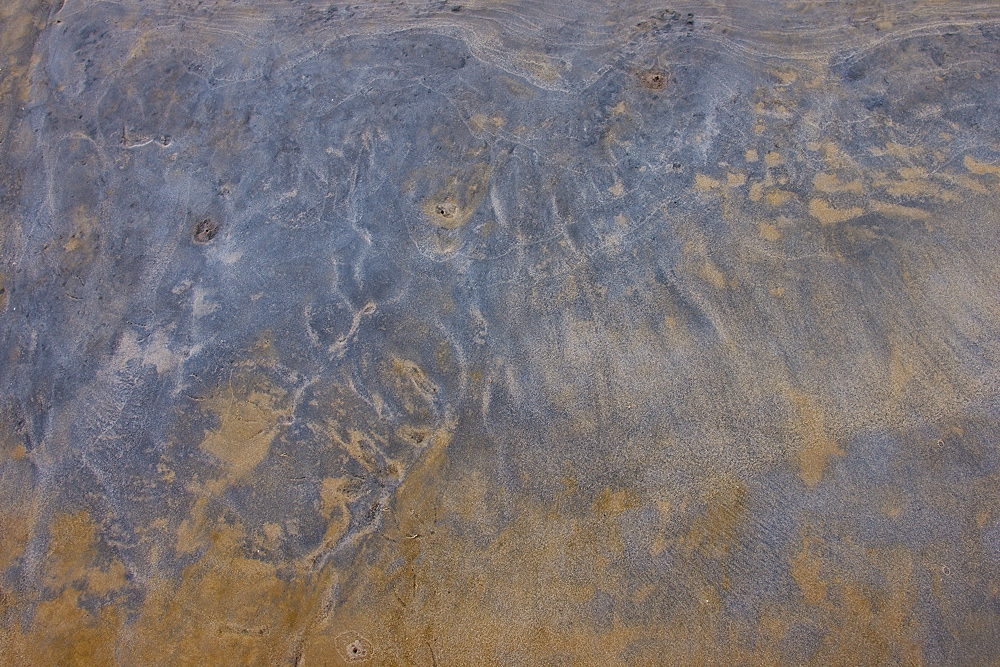
Low Tide Abstract
‹ PreviousLandscape GalleryNext ›

Low Tide Abstract

by Bill Leggett

Gallery: LandscapePosted August 9, 2014166 views8 comments
Shot on the beach in Gulfport yesterday, I found the colors of this a bit appealing. Looked a bit like a creature to me. The blue is some sort of mud that is common along the Coast. Cropped to 3:2 aspect from 4/3rds original, larger image included.

E-5 ZD14-54 (19mm) Manfrotto 3265 on GT2531, ISO 100 f7.1 0.0EV RAW processed in Olympus Studio 2, tweaked in CS4.

Comments

8 comments
Comment posted by Rick Turner on August 9, 2014 at 12:33 PM
Sweet.. Needs a bump of contrast, just a bump.
Registered on February 18, 2012, 534 Posts, 2755 Comments
Comment posted by Chet Dowell on August 9, 2014 at 1:20 PM
Love the tans and blues, Bill. Has a nice variety of lines and shapes to keep viewer engaged. Well done. Chet
Registered on December 3, 2012, 237 Posts, 1171 Comments
Comment posted by Pat Sampson on August 9, 2014 at 2:05 PM
Well seen Bill and a nice composition with complementary colors. For my tastes I'd bring the contrast up a little but other than that, no suggestions.

pat
Registered on May 19, 2007, 953 Posts, 15989 Comments
Comment posted by Harley Goldman on August 9, 2014 at 2:58 PM
Real nice abstract. Ditto on the contrast suggestions, but minor. Well done.
Registered on November 19, 2003, 586 Posts, 11271 Comments
Comment posted by Nick Bristol on August 9, 2014 at 6:15 PM
Very nice abstract image, Bill. It is quite interesting to look at this. I agree with the others and could see a bit more contrast I think. It also has the look of an aerial shot. Pretty cool.

Nick Bristol
Lone Rock, WI
Registered on February 1, 2004, 752 Posts, 14140 Comments
Comment posted by Preston Birdwell on August 10, 2014 at 3:05 PM
Neat abstract--I love these kinds images. One way to increase the contrast is to use a 'Selective Color' adjustment layer. Choose the color you want to darken (or lighten) and then use the 'Black' slider to either add black or reduce black. You can also check either 'Relative' or 'Absolute' to see which gives the best result. It's a neat trick.

Good eye to see this.

--P
Registered on November 1, 2003, 471 Posts, 5188 Comments
Comment posted by Bill Chambers on August 11, 2014 at 12:52 PM
Oh, I'm loving this Bill. This is downright gorgeous IMHO. I thought it was a rockscape until I read your description. A extremely nice example of a fine art abstract. Well done.
Registered on April 10, 2005, 753 Posts, 21216 Comments
Comment posted by Navin Sarma on August 13, 2014 at 11:34 AM
My type of image... I like the top portion with the curtain like texture racing across horizontally. The muted contrasting blues and golds work very well here.
Registered on July 17, 2011, 233 Posts, 1373 Comments