Nature Photographers Network
This is the preserved archive of the original Nature Photographers Network. The community continues at naturephotographers.network.
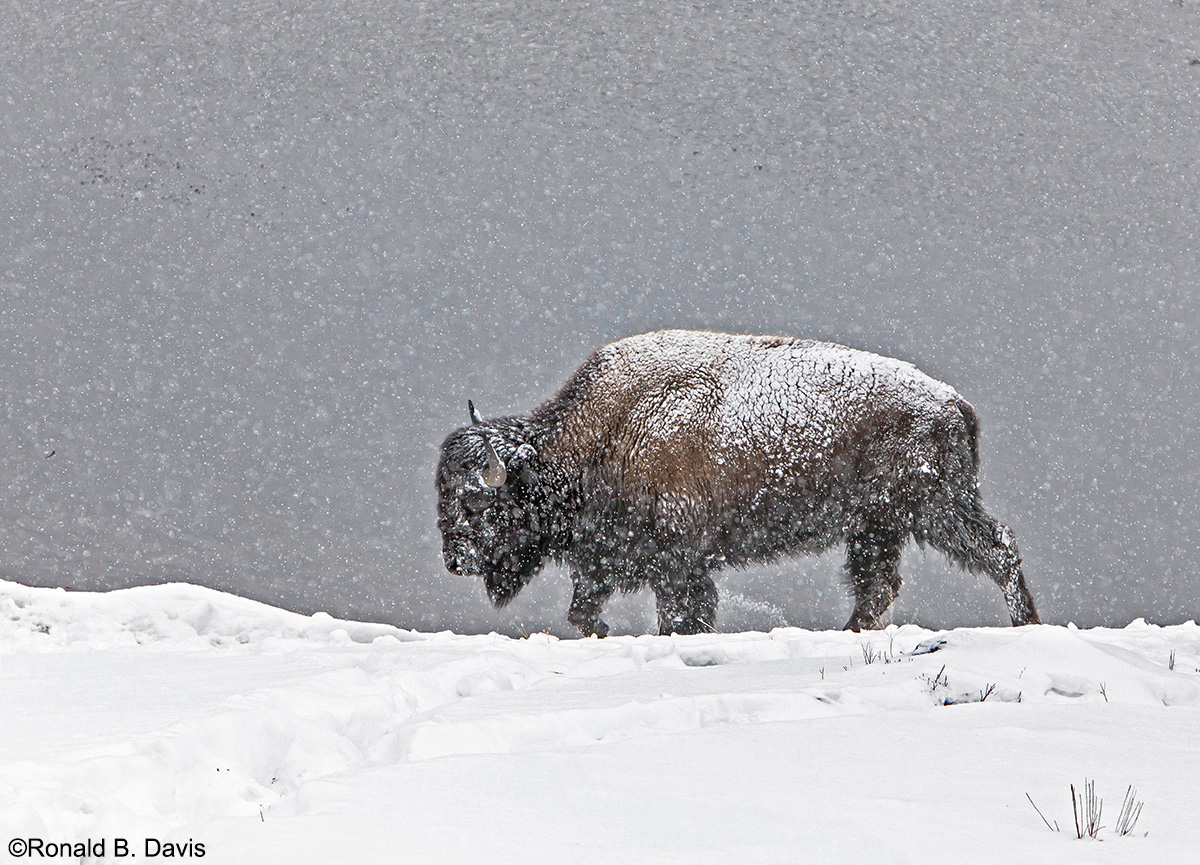
Bison in Storm II
‹ PreviousWildlife GalleryNext ›

Bison in Storm II

by Ronald Davis

Gallery: WildlifePosted July 28, 2014202 views12 comments
I took this photo on 30Jan2012 near the center of Yellowstone National Park, Wyoming, USA.
Canon EOS 5D Mark II
Canon EF70-200mm f/2.8L IS USM +1.4x at 215mm
1/1600 sec; f/6.3; ISO 800
Manual; Partial metering

I had posted a prior version of this photo on 26July, and got plenty of suggestions for improving it. This second (II) version adopts several of the suggestions. First I should say that the bluish-gray background is a very shallow water body with placid surface, and the black specks where the bottom pokes up through the surface. I have not removed these spots, as they're part of the scene, but can do so in a future version. I have restored more scene in front of the bison, and extended the water background at the top, but have cut off some of the bottom of the snowy foreground. Also, I have reduced the exposure of the foreground snow to show some detail. I have removed the red halo on the snow surface, and some of the light halo around the bison where I thought it was an artifact of processing, and left some "halo" were I thought it might be snow powder being raised from the surface by, or coming off the animal. ANY FURTHER COMMENTS? I plan to remove one of these two images from the wildlife gallery and my own gallery.

Comments

12 comments
Comment posted by Jim Zablotny on July 28, 2014 at 4:56 PM
Well done with the re-post and the explanation of the background answers my question from your initial posting. I like the details in the snow--it shows the snow depth clearly :toast: ...........................Jim
Registered on January 17, 2004, 705 Posts, 3594 Comments
Comment posted by Brad Hill on July 28, 2014 at 5:42 PM
Hi Ron,

I like this one better - for the most part. I'd personally take more foreground off, even if it meant losing that nice bit of vegetation in the lower right corner (some might suggest you could move that vegetation up as well, but that's not my style and guessing it's not yours either). Thanks also for explaining what the dark spots in the background are.

In terms of the light halo around the subject - without knowing anything about how you processed the shot it's hard to really say what caused it, but to me it really looks like masking artifacts - and for me they are really quite distracting (and based on their position almost completely around the bison it would be hard to convince me that they're natural). And sometimes the impression that something is a digital artifact (i.e., processing artifact) is as important as whether or not it actually is. The halo would be real easy to get rid of (in Photoshop). The attached sample with halo de-emphasized is a REAL quick and dirty (took under 60 seconds) and if I took 3 minutes there would be zero evidence of a halo or any digital editing...hope you don't mind I monkeyed with it.

Cheers...

Brad
Registered on May 29, 2007, 431 Posts, 6061 Comments
Comment posted by John Launstein on July 28, 2014 at 6:50 PM
Hi Ron! I think I like this one better on almost all fronts, but I must say the original definitely has impact, too--perhaps even a little more somehow in terms of the comp and balance. It's one of those interesting situations where this comp is almost certainly better (aka more "right"), but the original, while perhaps breaking the rules a little, seemed to hit me with a little more impact.

I immediately noticed your improvements here, but also noticed the halo remained around the bison as Brad pointed out and mostly corrected in his quick edit, but I'm still a little baffled by the "drop shadow" effect above the snow. While I'm not doubting it COULD be there in your original capture file, it has a look of being introduced in post somehow. I have some theories as to various approaches that might have resulted in this, but it's probably not helpful to speculate. Frankly, the effect is kind of cool, it just doesn't seem quite natural.

In any event, you already know I love the image and only offer these comments as items to consider or look at with the goal of making a great shot exceptional.

Still jealous!
:smile:
Registered on April 5, 2011, 223 Posts, 1193 Comments
Comment posted by Philip Hodgkins on July 28, 2014 at 8:38 PM
First, I like this photo very much, not only for it's composition, but also for the powerful story it tells. I don't know the answer to the presence of the haloing, but I do note that white on the gray produced a dark halo and dark on the gray produced a white halo. I suspect this is a processing artifact of bringing down the whites and bringing up the darks, all in the name of searching for detail. I think the answer can be found not in cloning, but in layer masking and treating the extremes as different entities, then flattening the result when one is satisfied. :toast:
Registered on July 24, 2006, 2741 Posts, 12349 Comments
Comment posted by Jerry Austin on July 28, 2014 at 9:04 PM
Much better in my opinion. Brad's treatment makes it even better.
Registered on January 6, 2012, 651 Posts, 3448 Comments
Comment posted by Gary Gulash on July 29, 2014 at 12:19 AM
Awesome photo Ronald, love the rugged bison enhanced by the harsh conditions well captured. I like what Brad has done, reducing the halo has helped, but I see that the foreground snow has been toned down a little with more detail and gives me the impression of a more balanced over all exposure.
Registered on January 28, 2005, 879 Posts, 12098 Comments
Comment posted by Ronald Davis on July 29, 2014 at 7:45 PM
Hi Brad Hill: Thanks for your help. Toward the end of your comment, you stated, "The attached sample with halo de-emphasized is a REAL quick and dirty (took under 60 seconds) and if I took 3 minutes there would be zero evidence of a halo or any digital editing...hope you don't mind I monkeyed with it." I'd like to learn what you did. Could you please be more specific? Ron
Registered on July 4, 2014, 38 Posts, 48 Comments
Comment posted by Ronald Davis on July 29, 2014 at 7:56 PM
Hi John Leinstein: I don't know what you mean by a "drop shadow" effect. I do perceive a fine dark line just above parts of the snow surface when I zoom up the image. Thanks for pointing it out. Is it that fine dark line you are referring to? I could probably manually remove it. Ron
Registered on July 4, 2014, 38 Posts, 48 Comments
Comment posted by John Launstein on July 29, 2014 at 9:33 PM
Hi Ron! Yes, its the dark line immediately above the snow. It basically amounts to a dark halo effect...I used the term "drop shadow" just because it actually did strongly resemble a drop shadow layer effect in PS (something I KNOW you didn't do!). In terms of your own processing steps, it might be worthwhile for you to identify the step that introduced both the light and dark halo effects...I suspect it occurred at the same time, because dark shapes have a light halo and light edges have a dark halo (for example, the BG immediately above the bison's snow-covered back has the dark halo as well). Those halos may have been further amplified if you increased contrast after the step that introduced the effect in the first place. I'm not sure any of this is very helpful to you, but I hope it may help avoid a similar instance in the future, as processing is enough of a taskon the to-do list for most of us photographers without having to go back and correct an issue we inadvertently created!
Registered on April 5, 2011, 223 Posts, 1193 Comments
Comment posted by Mario Moreno on July 30, 2014 at 7:51 AM
Stunning composition and light and it would be a superb image if it wasn't for the halo around the bison that is still visible. It seems that this is coming from the processing stage but maybe I'm wrong
Registered on January 24, 2012, 163 Posts, 369 Comments
Comment posted by Brad Hill on July 31, 2014 at 9:32 AM
Hi Ron,

In answer to how I removed the halo:

1. In Photoshop CC 2014 - but this method would work with virtually any version of Photoshop
2. Duplicated background layer and worked on the duplicated layer (simply so I would have more options in blending the halo with background if needed, which it wasn't!). One keystroke combination.
3. Changed foreground colour in Photoshop to that of your image's background.
4. Selected paintbrush tool.
5. Changed blending mode of paintbrush to "Darken", and opacity to 20% (with hardness set to 20%)
6. Painted over brighter regions of halo - slightly darkening it in the exact colour of the background.

And...in my quick and dirty treatment - that was it. About my comment about "If I had taken 3 minutes..." - what I was referring to there is that the method I used would also darken the snow flakes overlapping the halo. I knew this would be pretty much invisible in such a small image (720 pixels), but on a larger image a discerning viewer would be able to tell. So the additional time would be taken to do a LITTLE selective cloning from surrounding area to bring back a few of the snowflakes - not too many would be needed to make the halo removal (and addition of the lighter snowflakes) virtually invisible.

While there are MANY advantages to using an limited image editor like Lightroom in a digital workflow (infinitely less to learn, simplified method of making selective edits, automation of many processes, offers full range of "services" needed in a digital workflow without needing additional tools, etc.), the power of a full-feature image editing tool (think Photoshop) gives a capable user so much more control over their images. The massive downside with Photoshop is linked to its power - there's just so darned much to learn and MOST of the resources available to learn it are just awful (and most are written or designed for graphic artists, not photographers). While you can find SOME half-way decent books that will help you learn specific Photoshop techniques, virtually none tell you WHY you should learn technique X, Y, and Z first (versus techniques A through W).

Cheers...

Brad
Registered on May 29, 2007, 431 Posts, 6061 Comments
Comment posted by Josiah Launstein on August 2, 2014 at 12:47 AM
Oh man, this is an AWESOME picture! I love bison and think it's especially cool to photograph them in the snow. I really like that he's not just walking in the snow but there are snowflakes falling around him. The snow on his coat is really cool, too.
Registered on January 26, 2013, 52 Posts, 126 Comments