Nature Photographers Network
This is the preserved archive of the original Nature Photographers Network. The community continues at naturephotographers.network.
Wandering Stars
‹ PreviousLandscape GalleryNext ›

Wandering Stars

by Scott Smorra

Gallery: LandscapePosted July 7, 2014817 views14 comments
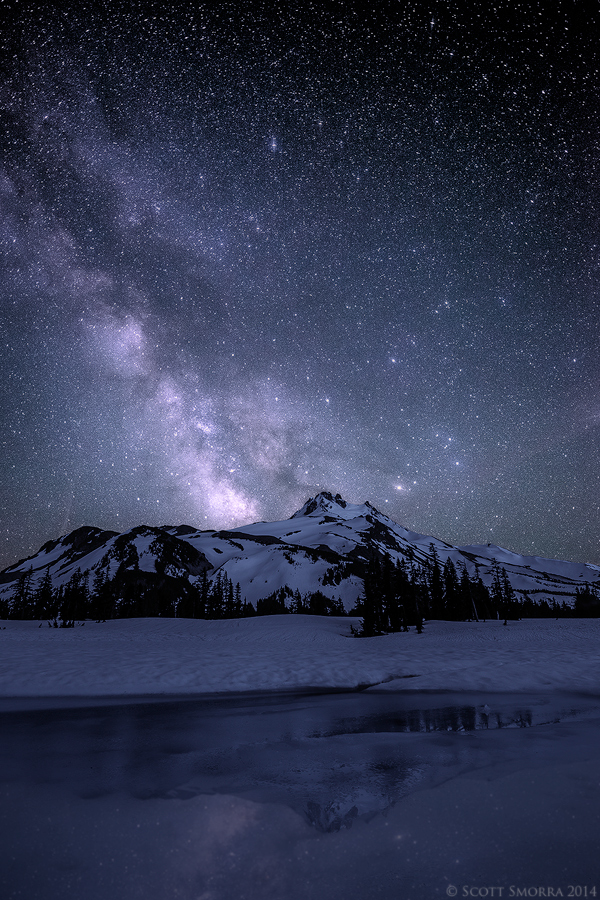
The Milky Way and millions of other stars above Mt Jefferson, Mt Jefferson Wilderness, Oregon.

This is an image from an early season backpacking trip to Jefferson Park several weeks ago with my buddy Jordan Ek. It was a completely moonless night and the stars were absolutely amazing. There was no light pollution at this location, which is an added bonus for central/western Oregon.

Technical info
Nikon D800, Nikkor 14-24 at 17mm
5 exposure blend for DOF and dyanmic range
2 sec at f/9, ISO 100 x4 for DOF in the foreground water/snow/mountain. These images were captured at ~9:20PM during twilight.
20 sec at f/2.8, ISO 3200 for the stars/star reflection. This image was captured 3 hours after sunset at ~12:20AM

Processing notes:
Water/snow/mountains - I prepped the 4 flies in lightroom and converted them to b/w and used the split toning feature to create a nice cool blue tone. I usually don't convert to b/w for my night images, but it worked here to create the cool tone I was after. I then blended the 4 twilight files together using the auto-align layers and auto-blend layers functions in photoshop and flattened the file.
Stars/Sky - I then pasted the file with the stars/sky onto the flattened water/snow/mountain file as a new layer and used the auto align feature in photoshop to align the images. I then created a selection of the sky using the magnetic laso and then used the refine edge feature to find the edges of the mountain. I created a layer mask with the selection and it perfectly selected the sky.
Foreground stars - the reflected stars were not showing up as well as I would like because the foreground pool kept freezing due to the cold mountain air. To solve this problem, I made a copy of the sky layer and hit it with some gaussian blur to blur it (reflected stars are usually a bit blurry). I then flipped this layer vertically and then horizontally and used the move tool to manually place it in the correct place in the foreground. I then used a layer mask and a low opacity brush to paint in the stars in the foreground.

Let me know if you have any questions or feedback. I'm curious to hear what you think. I appreciate everyone taking the time to share your thoughts on the image. Please check out the larger version.

Comments

14 comments
Comment posted by Mark Seaver on July 7, 2014 at 3:43 PM
The star field is awesome, Scott, and the foreground adds well resulting in a terrific image. I was wondering about the star reflections in what looks like a snow field at the very bottom. While I would expect to see star reflection in the water, I doubt that they would show in the snow...guess I'll have to go looking next winter. In my experience using auto-align and auto-blend to stack images in PS always leaves small blurred areas in the midst of sharpness. These areas are subtle enough that they won't show in an NPN post, but if you look at the blended image at 100% on your monitor, I think you'll see them and if you plan on a large print, you'll want to fix them.
Registered on January 23, 2011, 1103 Posts, 17270 Comments
Comment posted by Scott Smorra on July 7, 2014 at 3:51 PM
Thanks for the comment Mark. The reflection at the very bottom is of the Milky Way which is sitting just above the mountain. I will watch the comments and see if anyone else thinks it looks like snow down there. I agree that sometimes auto-blend doesn't work perfectly. When needed, I will go in and manually fix up areas that didn't blend correctly. Overall, I'm really impressed with auto-blend and it has saved me a ton of time since I don't have to hand blend everything anymore!
Registered on November 2, 2009, 161 Posts, 2143 Comments
Comment posted by Gary McGhee on July 7, 2014 at 4:10 PM
The sky looks amazing Scott, great photo overall. Thanks for the details too, far to technical for me though.

With regards to Marks and your comments, the foreground looks like semi frozen water to me.

Gary.
Registered on April 15, 2010, 142 Posts, 2416 Comments
Comment posted by Ian Cameron on July 7, 2014 at 8:01 PM
Gorgeous Scott. Outside the realms that my old camera can deliver which means I appreciate your efforts all the more.

Ian
Registered on August 6, 2004, 1125 Posts, 3318 Comments
Comment posted by Jared Warren on July 7, 2014 at 8:34 PM
Fantastic, Scott. Thanks especially for the detailed processing notes. You are quite the Master. Great planning in the field and execution throughout. This feels like a slightly lame piece of feedback, but the comp feels slightly left-heavy to me.

I think the foreground stars on the (frozen?) water would show up nicely in a decent sized print. A really nice element. :toast:
Registered on May 11, 2012, 84 Posts, 931 Comments
Comment posted by Brian Schrayer on July 7, 2014 at 8:45 PM
Scott, overall I really like this. The foreground composition is a bit static, but with this image I don't think that's a problem as it's primary role is to anchor the image for the stars of the show (pun intended :biggrin: ). I do like the reflection of Mt. Jefferson in the foreground lake. Very nice work!!

Registered on May 28, 2004, 114 Posts, 2890 Comments
Comment posted by Dan Kearl on July 8, 2014 at 1:34 AM
I like the mono color you chose.
a bit different from most star photos and effective.
Your technical info is appreciated.
My only recommendation is to look into Topaz denoise, a very good program for NR
For night photography.
Registered on September 2, 2013, 209 Posts, 1514 Comments
Comment posted by Bill Reid on July 8, 2014 at 10:17 AM
Beautiful scene Scott and wonderful processing on this. No nits from me and thanks for your processing info on how you achieved this. Great image. :toast:
Registered on January 27, 2013, 65 Posts, 2460 Comments
Comment posted by Nick Bristol on July 8, 2014 at 2:35 PM
Scott, This is a great scene and that sky just looks fantastic. I really enjoy the mood this has. I too say Thanks for all of the shooting and processing info. Most of it is above me but still very interesting to read how you made this image. Very Cool!! :toast:

Nick Bristol
Lone Rock, WI
Registered on February 1, 2004, 752 Posts, 14140 Comments
Comment posted by Morkel Erasmus on July 8, 2014 at 4:42 PM
A lovely nightscape, Scott, and I appreciate the processing detail you shared.
I need to start doing some DOF blending myself, I usually shoot a lazy single exposure at approximate hyperfocal distance. :smile:
Registered on March 22, 2011, 385 Posts, 2068 Comments
Comment posted by gary phillips on July 8, 2014 at 9:04 PM
Scott, really awesome nightscape and I really appreciate the processing notes. I agree with Mark, that the foreground appears to me to not support the reflection. With or without the foreground it is very solid. :toast:
Registered on October 24, 2013, 185 Posts, 4136 Comments
Comment posted by Kathy Barnhart on July 8, 2014 at 11:58 PM
This is a gorgeous image and I really appreciate all the detailed technical info and processing notes. That's something I wish we all did more of on NPN! The foreground is a little blurry, or something. I'm not quite sure what's going on there, but it doesn't have the crispness of the rest of the image. It looks like a chilly place to camp!
Registered on November 11, 2011, 404 Posts, 1639 Comments
Comment posted by Catherine Reilly on July 9, 2014 at 2:45 PM
Heavenly!!
Registered on August 16, 2006, 603 Posts, 9192 Comments
Comment posted by Mark Metternich on July 13, 2014 at 11:50 AM
I love this Scott. In a world of often grotesquely hyper star shots I like that you kept this fairly natural in the rendering. Sweet.

My only nit or preference would be to tone down the spot on the Milky way just above the ridge. It looks a little hot there.

I met Jordan the other day at St Helens. Nice talented guy!
Registered on June 19, 2009, 276 Posts, 6240 Comments