I'm happy to announce three of my images have been selected for the Pushing Reality Photography Exhibition and Sale at the Columbia Center for the Arts in Hood River, Oregon. If you are interested, you can read more about it on my
Blog
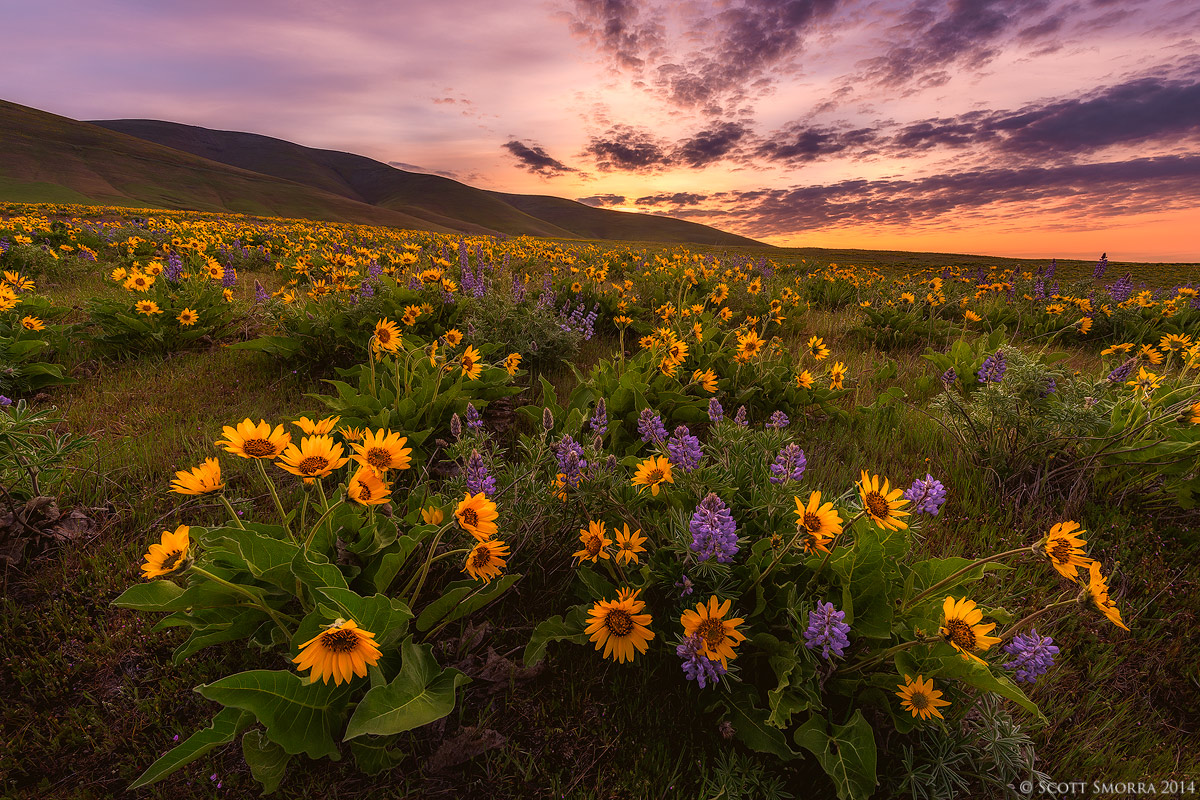
The image above is from a beautiful sunrise in the Columbia Hills of Washington a few weeks ago. This year's mix of lupine and Arrowleaf Balsamroot is just about perfect. I was really happy to have a sky which compliments the colors of the flowers in the foreground.
Nikon D800, Nikkor 14-24mm, no filters
6 image blend for dynamic range and DOF
1/40 sec at f/11, ISO 100 for the sky/hills
1/50 sec at f/13, ISO 400 x5 for the flowers
Thanks for any comments or critiques you have. Please check out the larger version.

Comments
21 commentsMy approach to this image was to first prep all of my raw files in Lightroom 5. The prepping just involves setting the white balance, exposure, shadows/highlights, sharpening/NR. When prepping the files, my goal was to make sure the exposure matches exactly on each file so that they could easily be blended together. If the exposures don't match exactly, the workflow below will not work. Once the raw files were prepped, I brought all 5 of the wildflower exposures into Photoshop CC as separate layers. I then auto aligned the layers by clicking on the "Edit" menu and selecting "auto-align layers". Once the layers are aligned, I click Edit --> auto-blend layers and select "stacked images" and "seamless tones and colors". Usually this works very well, but sometimes I have to do some manual clean up of the file to correct motion artifacts. Note: If it's really windy in the field and there is lots of movement, the autoblending usually doesn't work very well well. I then flattened this layer. Then I brought in the exposure for the sky/hills into photoshop as a separate layer. Luckily, I didn't have to do any dynamic range blending for the sky (this is a whole separate workflow). I then manually blend the 2 images together by auto-aligning again and then hand painting on layer masks. After the wildflower layer is blended with the sky/hills layer and everything looks good at 100%, I then start doing my normal creative edits in Photoshop. One other thing to note is that if the tripod/camera moves at all while capturing the different images in the field, the blending becomes significantly more difficult, since the layers don't want to align.
Hopefully this makes some sense (let me know if it doesn't). This is a workflow that I've been refining for the past 3-4 years and it's easy for me to do, but I find it difficult to explain.
Nick Bristol
Lone Rock, WI
Sairam - you are welcome. I hope you find the info useful.
Congratulations on the selection of your images in the exhibition. I've really enjoyed seeing your work here on NPN.
Congrats on the selection, I may get up to see them.
A couple of real minor nits on the photo.
I might crop a tad off the left to remove the cut off flowers and clone out the flower that intrudes the sky horizon.
Excellent work and thanks for the info.
I might add regarding the workflow. I often take an exposure at say 800 or 1250 for a FG to make sure the image is relatively free of movement. I then just paint in small areas that may be too blurred from the master image. It can be time consuming to go back and forth to inspect areas for sharpness, but it is very effective. Looks like you nailed it, at a very low noise ISO. Obviously, an aperture like f8 would have decreased movement, but make the focus blend a bit tougher.