Nature Photographers Network
This is the preserved archive of the original Nature Photographers Network. The community continues at naturephotographers.network.
Up and away
‹ PreviousAvian GalleryNext ›

Up and away

by Bob McQuade

Gallery: AvianPosted January 11, 201478 views7 comments
D800 200-400mm @400 F8 1/1500 ISO 400 handheld

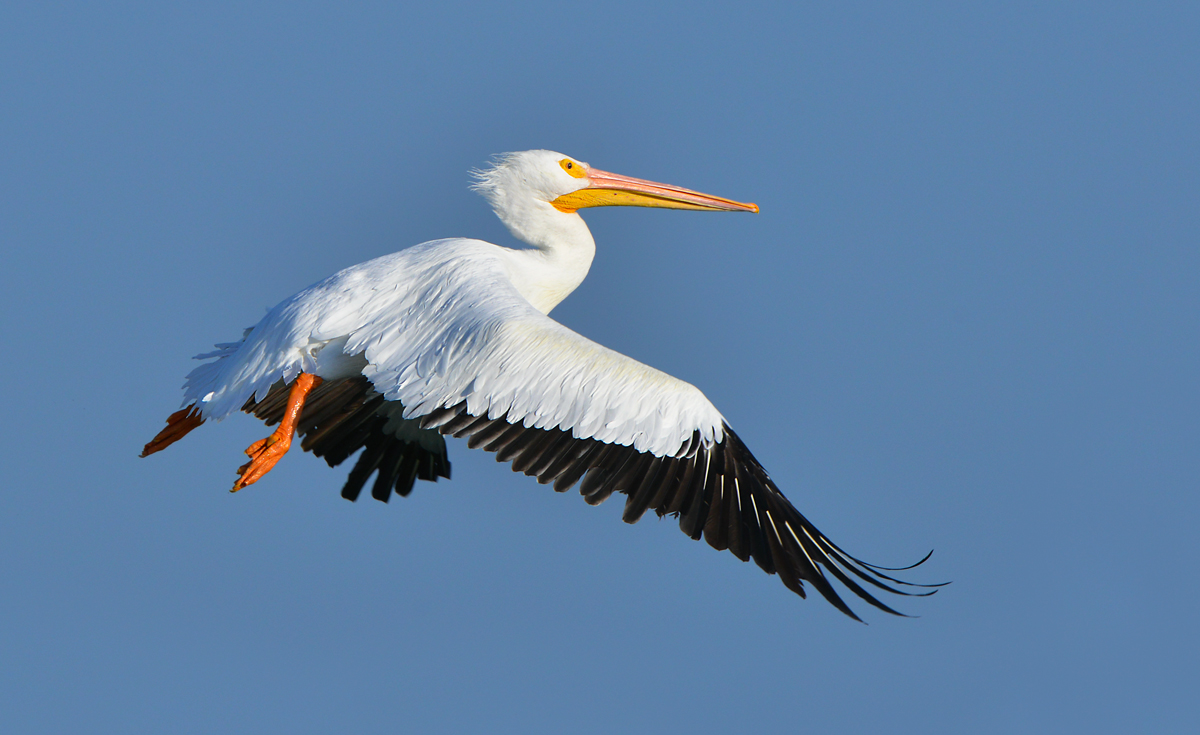
I celebrated the first glimpse of sun to be seen in a week here on the coast of Texas by finding a small group of white pelicans in Fulton Harbor basking in the setting sun. I sat with them for an hour or so as the sun sank lower, just waiting for them to take flight and was finally rewarded with this shot.

Comments

7 comments
Comment posted by Sharon Hallowell on January 11, 2014 at 11:34 AM
Nice exposure and and interesting flight pose. I like the curled wing tips. Sharon
Registered on November 1, 2003, 392 Posts, 4810 Comments
Comment posted by Brian Gatlin on January 11, 2014 at 1:55 PM
neat pose from this bird--it's interesting to see the different generations of flight feathers in the spread wing. it looks like you might be able to coax a little more detail out of the neck area with some highlight adjustment.
Registered on March 21, 2009, 202 Posts, 4187 Comments
Comment posted by John Robinson on January 11, 2014 at 2:20 PM
Love the large version ! Good white control too. Just the neck bit could do with a tweak maybe.
Cheers
JohnR
Registered on March 2, 2008, 535 Posts, 2453 Comments
Comment posted by Jim Hackley on January 11, 2014 at 3:58 PM
Good flight shot and nice job of waiting for the right opportunity. Interesting color contrast with the red feet, B&W feathers, yellow beak and blue sky.
Registered on September 17, 2009, 302 Posts, 5535 Comments
Comment posted by Richard Ditch on January 11, 2014 at 7:29 PM
I like the position, composition, and detail in this. but there are some issues with processing that give this a "halo" of darker blues in there sky, mostly around the upper edges of the pelican. You don't say if this was taken in jpg or raw, or what you might have done in processing. If you used Shadow/Highlight adjustments on the entire image, or if you used a brush to burn in the whites, that could be the cause. Making a clean selection of the subject before applying exposure/tone/contrast adjustments will usually keep this from happening. If you have trouble seeing the issue try one or both of these methods (in Photoshop) to make it more apparent:

- Image > Adjustments > Equalize

- add a temporary Threshold adjustment layer and move the marker below the histogram one point at a time below the large spike that indicates the sky
Registered on November 1, 2003, 1031 Posts, 12705 Comments
Comment posted by Balan Vinod on January 13, 2014 at 12:35 AM
Nice image of the pelican ..and a nice wing spread ..fantastic details too

Balan Vinod
Registered on March 20, 2006, 889 Posts, 2312 Comments
Comment posted by Dennis Plank on January 13, 2014 at 1:40 PM
Very nice pose, Bob, and excellent exposure control.

:toast:
Registered on January 28, 2008, 1767 Posts, 23192 Comments