Nature Photographers Network
This is the preserved archive of the original Nature Photographers Network. The community continues at naturephotographers.network.
 Fuchsia
‹ PreviousWeekly Challenge GalleryNext ›

Fuchsia

by Guy Nelson

Gallery: Weekly ChallengePosted August 17, 2013142 views5 comments
Hi Folks,
My favorite Flowers for hanging baskets.

Weekly Challenge #597

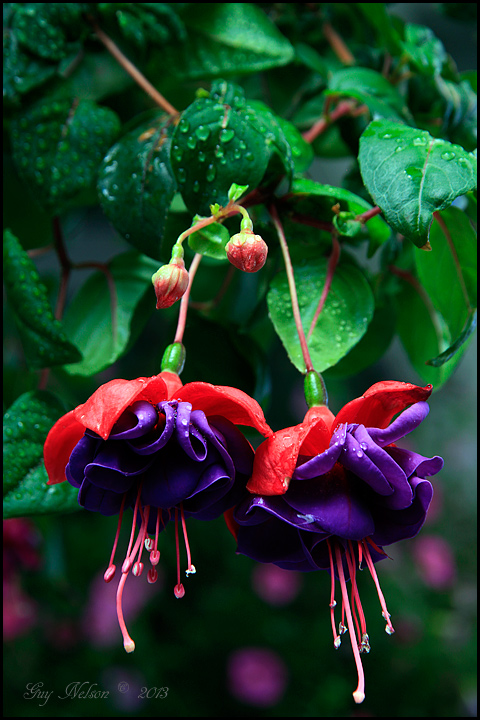
Fuchsias are elegant, exotic-looking flowers. I personally like the double-flowered variety in deep purple/red.

Canon 7D, 1/25sec, f8, @85mm, ISO100, Aperture priority

Thank you for viewing
Guy Nelson
Calgary, Alberta :smile:

Comments

5 comments
Comment posted by Allen Brooks on August 17, 2013 at 6:22 PM
Beautiful colors; sharp detail.
:toast:
Registered on July 27, 2011, 262 Posts, 2597 Comments
Comment posted by Yun Gao on August 18, 2013 at 12:00 AM
Amazing structure and gorgeous deep colors. They look like two beautiful skirts. I wish there was more room at the bottom. But that is minor. Well done.
Registered on September 11, 2012, 267 Posts, 1621 Comments
Comment posted by Carolyn Derstine on August 18, 2013 at 3:12 PM
Oh, I do love these flowers too, Guy! Especially the double-flowered purple and red as you have captured. The colors are so rich looking and the design so interesting IMO. The blurred background at the bottom is fantastic against the focused flowers. The green leaves with waterdrops also are rich looking and make a great, more in-focus background for the top portion. Agree more room at the bottom might be good. However, a crop down from the top to right above the top of the middle grouping of leaves would help balance it out more and improve the overall look IMO. Very nice! :smile:
Registered on February 16, 2011, 610 Posts, 3684 Comments
Comment posted by Guy Nelson on August 18, 2013 at 5:28 PM
Thank you all for your comments,
Carolyn - I thought the exact same thing when I first looked at here. Crop down from the top to that middle leaf with the droplets on it. But it was too late to delete it. I don't know how to add a cropped version to this post. Any tips on how to re post would be appreciated. I tried to add a crop version with the comments but I was not successful.
Registered on October 12, 2012, 24 Posts, 138 Comments
Comment posted by Carolyn Derstine on August 18, 2013 at 8:34 PM
Guy, you can still delete a picture after you post it, if no one has yet made any comments. Just hit the "delete" button under your thumbnail picture. Once someone makes a comment, that "delete" button disappears and only the moderators can delete from that point on. As far as adding a repost in the posting, just make your comments, if you wish to add any, in the comments box, click on the "choose file" button and then find your image to repost. Click "add comment" and you should be good! You can then add "+ repost" to your title by clicking "edit" under your thumbnail picture and then making any changes to your title so you make persons aware you made a repost. You can also make corrections to your comments this way too. Don't forget to click on the "update comment" button though on the bottom. Hope this helps! :smile:
Registered on February 16, 2011, 610 Posts, 3684 Comments