Varanger coast
by Chris Stenger
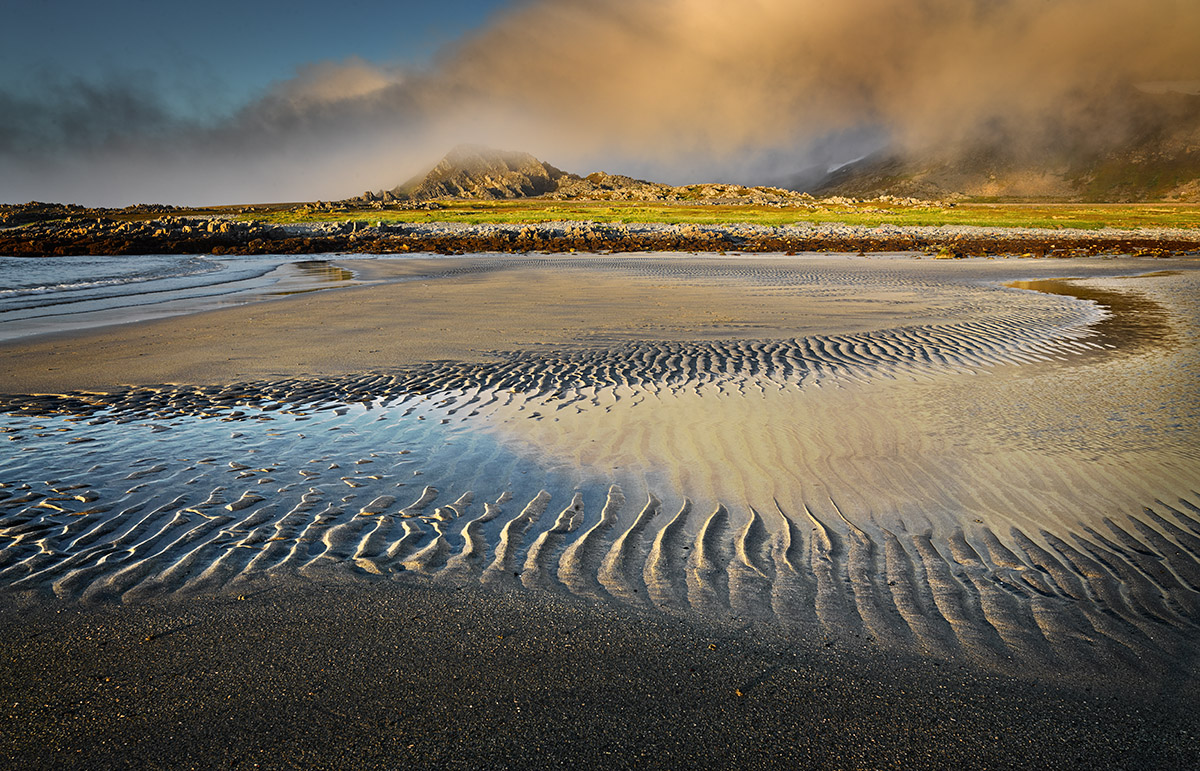
I took this picture during my recent spring trip to northern Scandinavia. The image shows the coast of the Varanger peninsula. In June the sun doesn't set at this location. Around midnight it gets a bit cooler though, resulting in the development of some fog (background of the image).
Mamiya 645DF with Leaf back
35 mm
ISO 80, 1/15 sec, f/14

Comments
8 commentsWonderful image. I really like the composition and the midnight light is just beautiful. The ripples/patterns in the water have a gentle curve that leads the eye around and then up in to the landscape, mountains and encroaching fog. A very nicely crafted image.
To me, this seems a tad over sharpened, or perhaps over USM'd, if that's a term. I think even in the larger view (I'm guessing you did the single 1200px upload?) Another possibility is jpg compression, but the sand at the bottom looks very good. Anyway, minor observation and it could just be me.
Lon
Thanks for the additional info. If you're simply resizing from 9300 to 1200 with no other sharpening steps, then it makes sense what we're seeing here. There are many techniques of course and there are even some actions developed by members here on NPN. I used Tony Kuyper's web sharpening action which comes as part of his package that includes the Luminosity masks, which I highly recommend if you're not already familiar. Although I have not personally tried, you can get Andreas Resch's sharpening action for free. It's also highly recommended by others.
Then there is the original, basic web sharpening technique put out by Marc Adamus a number of years ago. It basically goes like this:
1. Image>Image size to 1.67X your final desired size. for example, if your final size is 1200px, then do Image>size to approx 2,000px (from your 9300) I use the default Bicubic
2. Run the "sharpen" filter TWICE (Filter>sharpen>sharpen)
3. Complete the Image>Image Size to 1200px
Note: this of course is image dependent; experiment with the number of sharpening steps (usually 2, but sometimes 1 works, and sometimes you can even do 3!) Also, some might prefer to run in LAB. And of course with any sharpening technique, there are things like plain old blue sky or some continuous tone/color areas that shouldn't be sharpened, so masking those areas out might be recommended.
I'd give one of those options a try. BTW, the image quality isn't that bad, but enough that I noticed and thought to comment.
Lon
Catherine, concerning the dark beach in the foreground the following. I always like to have my subject a bit of space and therefore I hardly ever crop my images such that only the main subject is visible. In my opinion having the dark foreground beach in the image gives more depth and concentrates the eye on the lighter parts in the middle section. Of course all this is personal preference and interpretation. Thanks for your comments.
Lon, thanks for the advice and I tried several of your suggestions. The Marc Adamus technique didn't give any improvement, but the Andreas Resch technique works fine. I have therefore added a version resized to 720 px with the Andreas Resch technique. In my opinion, although subtle, it's an improvement. By the way the original file was not resized from 9300 to 1200 pixels in one step. I used a technique very similar to the Marc Adamus technique but as said above this didn't give the best result. Thanks again for your comments and help.
Lon