Nature Photographers Network
This is the preserved archive of the original Nature Photographers Network. The community continues at naturephotographers.network.
Luminous Fairyland (+RP)
‹ PreviousLandscape GalleryNext ›

Luminous Fairyland (+RP)

by Jared Warren

Gallery: LandscapePosted June 29, 2013343 views20 comments
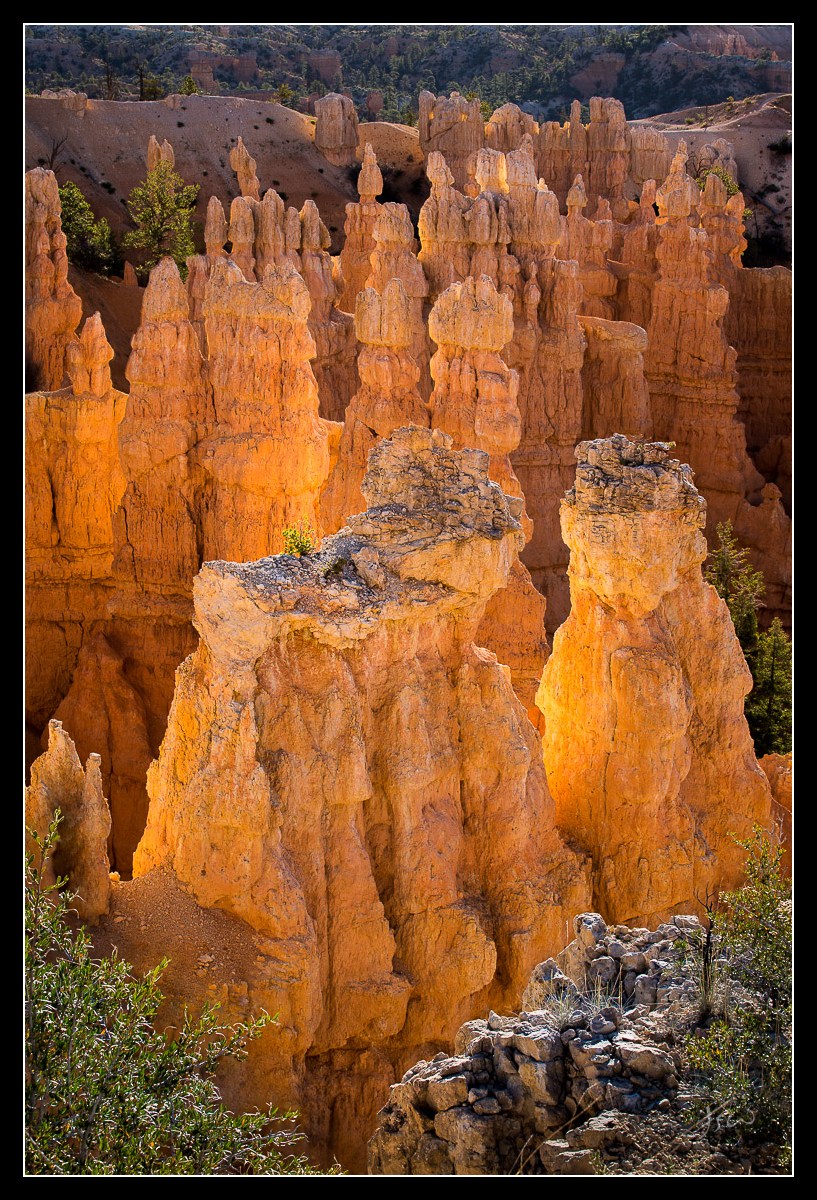
I snuck in a quick visit to Bryce a couple days ago while traveling with family. This image was made about 30 minutes after sunrise. I was trying to capture the beautiful reflected light, but was also intrigued by the small evergreen trying to make a life for itself on top of this inhospitable hoodoo.

5Diii, 70-200 2.8ii @ 70mm, 4 images at f/8.0, 1/100 sec.

It's a 4-image blend for dof, but the blending gave me fits. Here's where I could use some instruction/advice, being a novice at exposure blending. I believe due to focus breathing(?), the transition between foreground (foliage in LLC, particularly) and the subsequent layer left a blurry space that I didn't know what to do with. I first tried content-aware fill to fix those spaces, but didn't have much success with that. I ended up using a bunch of cloning/healing circles in lightroom to try to smooth the transition, but in a larger print this could look like an amateur effort (which it is) to a trained eye. Any suggestions on how to deal with this in the future? Similarly, if anyone has a favorite source of instruction for learning exposure blending in photoshop I'd appreciate suggestions. Thanks for looking.

Comments

20 comments
Comment posted by Rick Turner on June 29, 2013 at 11:10 PM
Wow Jared. Beautiful light and the little scrub growing on top is sweet.
Great vertical comp. :toast:
Registered on February 18, 2012, 534 Posts, 2755 Comments
Comment posted by Joseph Campisi on June 29, 2013 at 11:53 PM
You caught that glowing Brice light very well Jared! I too like the vertical comp.
Registered on November 24, 2008, 304 Posts, 3211 Comments
Comment posted by Harley Goldman on June 30, 2013 at 9:24 AM
Real nice take on Bryce. Beautiful glow. This one stands out quite nicely compared to most Bryce images I see. Very well done.
Registered on November 19, 2003, 586 Posts, 11271 Comments
Comment posted by Roger Kirchen on June 30, 2013 at 10:33 AM
Stunning image. Well composed in a sweet glow.

I'm just starting out with blending, so I'll learn more from this thread than I will be able to contribute. My thought is that if the areas in question are sharp in one of the four captures, it might be possible to blend them back in manually using layer masks.
Registered on March 6, 2011, 95 Posts, 847 Comments
Comment posted by Eva McDermott on June 30, 2013 at 12:06 PM
Love the golden glow Jared. Very nice light and composition. Can't help on the blending technique.
Registered on January 4, 2009, 1015 Posts, 13229 Comments
Comment posted by John Mumaw on June 30, 2013 at 12:09 PM
Tremendous light, and the composition is top notch! The tree is barely visible, even in the large version, but that really matters little in the larger scheme of things. Congratulations on scoring this winner, Jared!
Re: blending. What is your field technique for capturing images with different focal points? Was it windy, causing the foliage to move between exposures? How are you combining them? Do any of the images have that area sharp (as Roger noted)? If not, then you might be out of luck. Still, I did not see anything untoward in the larger version.
" I ended up using a bunch of cloning/healing circles in lightroom to try to smooth the transition.
Hmmm...probably much better off doing all of your 'healing' work in PS where you can incorporate layers and layer masks.
Registered on September 9, 2005, 62 Posts, 2289 Comments
Comment posted by Bob Miller on June 30, 2013 at 12:16 PM
Love the glow. Very nice.
Registered on January 24, 2005, 152 Posts, 405 Comments
Comment posted by scott lanz on June 30, 2013 at 2:15 PM
Very nice capture of the reflected light, Jared.
Registered on November 14, 2003, 840 Posts, 12902 Comments
Comment posted by Hamed Musharbak on June 30, 2013 at 2:17 PM
a very fine image Jared, i like the composition a lot

the light looks sweet and lovely
Registered on June 1, 2009, 372 Posts, 2282 Comments
Comment posted by Jared Warren on June 30, 2013 at 4:46 PM
Thanks for the helpful feedback and comments so far.

John, my focusing procedure was to leave focal length untouched (70mm) for each capture, and used liveview x10 with manual focusing starting with the nearest focal point (foliage in LLC) and worked my way back (rocks in LRC, main hoodoos in center, and background hoodoos). What I found though was that when focused on the foreground foliage, slightly less of the foliage was captured in the frame than when progressively focusing on the points deeper/further in the scene. Wind wasn't really an issue. I exported the 4 images from lightroom into photoshop together as layers, and starting with the foreground (foliage) as the top layer used layer masks to reveal just the in-focus foliage (then rocks in LRC, center hoodoos, etc.). But, for the transition area between the foreground foliage and base of hoodoo behind, I had to choose between the hoodoo layer that had OOF leaves or the foliage layer that had OOF base of hoodoo. Sorry, this is hard to explain. I'll try to attach samples of two of the layers to show the effect of what I assume was focus breathing with this lens.
Registered on May 11, 2012, 84 Posts, 931 Comments
Comment posted by Jared Warren on June 30, 2013 at 4:50 PM
Image 1, focus on foreground foliage in LLC:
Registered on May 11, 2012, 84 Posts, 931 Comments
Comment posted by Jared Warren on June 30, 2013 at 4:53 PM
Image 3, focus on center hoodoo (it's as if the focal length widened just a smidge, with the different point of focus):
Registered on May 11, 2012, 84 Posts, 931 Comments
Comment posted by John Mumaw on June 30, 2013 at 5:03 PM
I think that you should try an automated approach, Jared.
First, in PS select all of the layers in the layer stack (Ctrl-click each layer).
Next, Edit->Auto-Align Layers. This will reconcile the differences in image perspective from changing focus (the focus breathing you refer to?). This may well leave small empty areas along the sides of the image which you'll need to crop.
Next, Edit->Auto-Blend Layers. Choose 'Stack Images' and then let PS do it's magic in blending those images to show the sharpest pixels.
Registered on September 9, 2005, 62 Posts, 2289 Comments
Comment posted by Jared Warren on June 30, 2013 at 5:44 PM
John, you are my hero. :wink: Here's the quick result from following your instructions. A much easier process than the manual blending I started with. I did have to crop tighter as you indicated, and there are a few little blurry spots (a few spots on the foreground leaves), but these could be cloned out pretty easily, and it's a much better starting point for refinements than my manual blend. Thanks!!!

Man, I've got a lot of learning to do in PS. I've used Lightroom for almost all post-processing, and have been intimidated by photoshop, but I guess it's time I got over that. :rolleyes: I have Kelby's PS book- other recommendations/resources?
Registered on May 11, 2012, 84 Posts, 931 Comments
Comment posted by John Mumaw on June 30, 2013 at 6:05 PM
That looks great, Jared! I'm surprised at the amount of cropping you needed to perform. Shooting a bit looser next time you're going to focus stack would be a good idea.
That book is a great way to get started using PS, and it sounds like you have a good grasp of layers and layer masks, so you're relatively most of the way there already. Google and the knowledgeable folks here at the Digital Imaging forum will be your best resource from here on out. Capturing great images like this are 90% of the answer, though. :wink:
Registered on September 9, 2005, 62 Posts, 2289 Comments
Comment posted by Nick Palmieri on June 30, 2013 at 6:36 PM
Sweet light. Very nice.
Registered on September 1, 2011, 35 Posts, 748 Comments
Comment posted by Morris McClung on July 1, 2013 at 11:36 AM
Nice depth in the comp, and the glow from the light is exquisite.
Registered on May 7, 2007, 670 Posts, 19650 Comments
Comment posted by Nick Bristol on July 1, 2013 at 6:59 PM
Jared, This is beautiful!! Love the light and color in this great looking scene. The last image with the help from John's suggestions looks great to me! Very interesting seeing this. :toast:

Nick Bristol
Lone Rock, WI
Registered on February 1, 2004, 752 Posts, 14140 Comments
Comment posted by Bill Chambers on July 2, 2013 at 2:28 PM
Beautiful Jared. The quality of light is superb. Very nice effort.
Registered on April 10, 2005, 753 Posts, 21216 Comments
Comment posted by Mark Metternich on July 6, 2013 at 5:11 PM
Nice glow here! Blending looks good. I teach blending via Skype as a profession (and other Photoshop workflow) and I think you did great. Clean up of the blends is always tricky. :toast:
Registered on June 19, 2009, 276 Posts, 6240 Comments