Gallery: AvianPosted May 10, 2013106 views12 comments
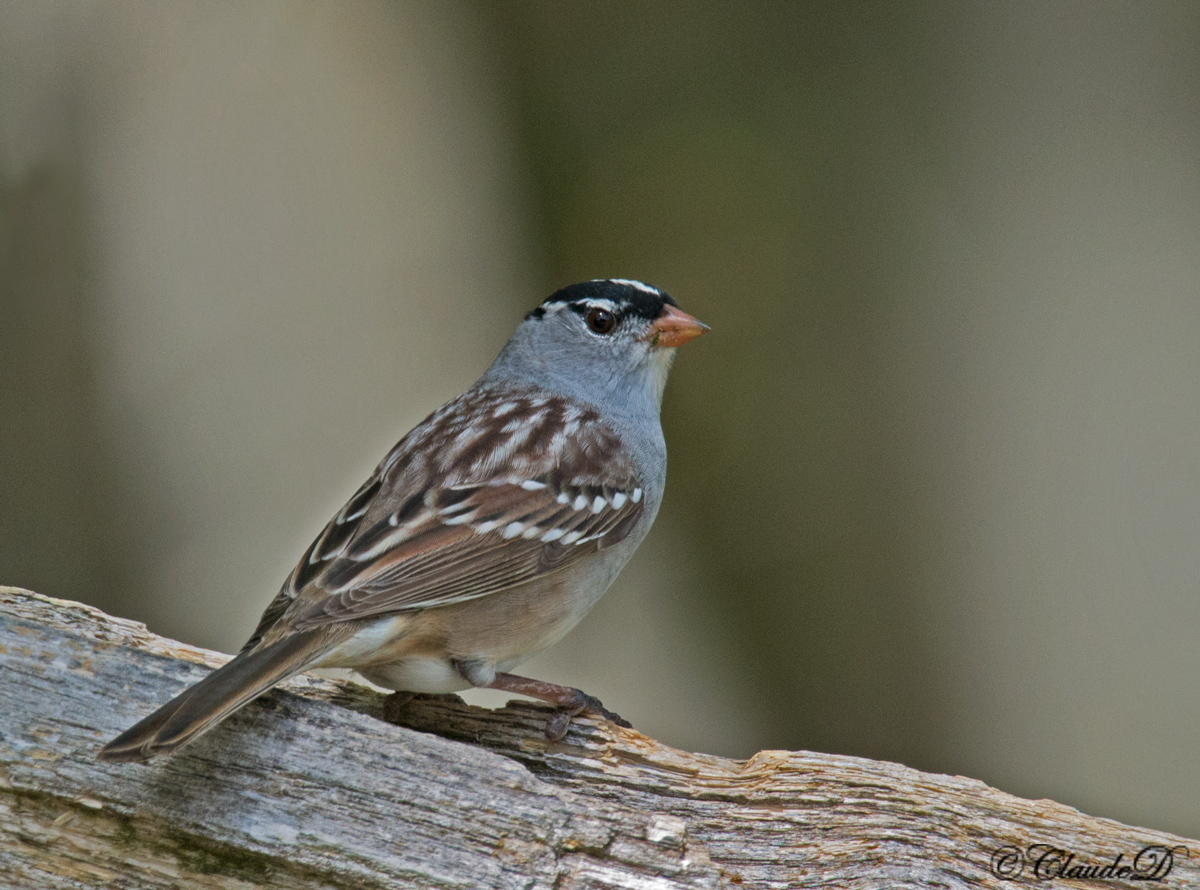
Taken yesterday, these are working their way back up North, stopped by for lunch and a rest.
1/1000s,f/10,ISO 1250. 600mm + TC 1.4X on D800.
Cropped to about 70 % of FF
Comments
12 comments
Comment posted by Hans Overduin on May 10, 2013 at 7:54 AM
I like these little guys Claude ! Well done, cheers, Hans
Registered on August 31, 2011, 491 Posts, 3807 Comments
Comment posted by Richard Ditch on May 10, 2013 at 12:38 PM
With that gear you should be getting tack sharp results which are unfortunately lacking in this and other recent posts.
Registered on November 1, 2003, 1031 Posts, 12705 Comments
Comment posted by Charlie VanTassel on May 10, 2013 at 5:47 PM
Nice, Claude. It looks to me like focus was at the point where tail meets the body. The head is not quite as sharp. Also, I think that you could raise the exposure slightly to bring out some color.
Registered on October 18, 2006, 644 Posts, 4801 Comments
Comment posted by Claude Dagenais on May 10, 2013 at 6:03 PM
Something is wrong with the preparation (resizing) that I apply for the web. This picture is tack sharp on PS6, every hair on each feather of the back is well detailed. When on the site it is foggy. Trying to work it out. Tks for the comments.
Registered on April 10, 2013, 56 Posts, 571 Comments
Comment posted by Kurt Bowman on May 10, 2013 at 11:07 PM
I like the head turn on this one Claude. I personally don't think the focal point was the issue since you were at f/10 (unless you were only 10-15 feet away from the bird.) I wonder if it was your ISO? I know Nikon handles the noise well, but all sensors loose pixels when you start increasing the ISO (more rapidly when you go over 800) which can make the detail not as good. Not sure this is actually the reason since I don't shoot Nikon, but I think it would be worth checking into. Then it's an easy problem...use a lower ISO. At 1/1000 you probably could have shot at 800 or even less if you opened up your aperture a bit more to maybe f/8...but then the focal point would become even more important.
Registered on June 19, 2008, 1005 Posts, 8028 Comments
Comment posted by Ken Watkins on May 11, 2013 at 2:26 AM
Claude,
A lot of the problems with "critiquing" technical aspects of images result from viewing a drastically downsized image , whether this is the case here, I am not sure.
Nevertheless it seems to be not very sharp to me, which is a pity as you have a great pose and BG,
Registered on December 15, 2010, 1537 Posts, 4877 Comments
Comment posted by Claude Dagenais on May 11, 2013 at 6:59 AM
Thank you all, I am trying to work out this problem which is quite frustrating.
Registered on April 10, 2013, 56 Posts, 571 Comments
Comment posted by Richard Ditch on May 11, 2013 at 7:39 PM
Thank you all, I am trying to work out this problem which is quite frustrating.
Tell us your work flow so that we might be able to make meaningful suggestions.
How much are you actually cropping (don't guess - calculate!)
Do you use a solid tripod or do you hand hold?
Are you shooting in raw or jpeg?
How do you resize to get to 1200 px and to 720 px versions?
How and when to you apply sharpening?
Registered on November 1, 2003, 1031 Posts, 12705 Comments
Comment posted by Ron Bielefeld on May 11, 2013 at 9:23 PM
Rich asked good questions. If you are sharpening and then reducing the size of your sharpened image, that will never result in a sharp reduction. Reduce the unsharpened image to the size you need and then sharpen. This is just a suggestion in case this is part of the issue.
Registered on December 6, 2008, 360 Posts, 7132 Comments
Comment posted by Claude Dagenais on May 12, 2013 at 3:56 PM
Sorry for late reply. Crop was 60% not 70% of FF, solid tripod used and lens is VR, shooting in RAW format. Open ACR and crop, exposure and color temp adjust, open in PS6, adjust shadow/highlight, sharpen, image re-size, save for web..., bring to required size using quality slider, bi-cubic sharpen mode and save to a file.
I appreciate your help.
Claude
Registered on April 10, 2013, 56 Posts, 571 Comments
Comment posted by Richard Ditch on May 12, 2013 at 4:51 PM
Thanks for the work flow details. I've broken this into the steps you listed to make it easier to comment. These are my preferences and certainly others may have different views.
Open ACR and crop, exposure and color temp adjust
I do not crop during raw conversion in ACR as that locks in a cropping choice much too early in the flow. If you change your mind later then you need to start over from scratch. I leave cropping until after I've made all my other color/tone/exposure adjustments so that I can perform alternate crops if needed.
Basically, I use ACR to fine tune the histogram (adjust exposure, recover highlights, shift midtones etc. as needed) and adjust white balance if needed.
open in PS6, adjust shadow/highlight
I avoid shadow/highlight expect in rare cases where I might use it on a selection of a white subject to bring out a bit of texture. I consider S/H to be the most dangerous tool in PS as it often creates tonal haloes where dark areas meet light areas. If you use it I recommend doing so on a separate layer with a selection and not moving the sliders very much.
sharpen
I don't sharpen until after I've re-sized for output. I don't see any benefit and only see an opportunity to introduce unnecessary artifacts into the image.
This is when (after all tonal fine tuning) that I crop.
image re-size
I re-size my flattened master tif file to get a 120 px image, and then again to get a 720 px image.
I then sharpen each size once, separately, using Sharp Sharpen on a selection (usually just the bird), and move the sliders as required for that image at that size. This is the only time I sharpen.
save for web..., bring to required size using quality slider, bi-cubic sharpen mode and save to a file.
I don't use Save for Web (I like to retain the EXIF in the file that gets posted) so I don't know if there's an option to select a sharpening mode. From what you've said it seems there is. Does it give you a preview before you commit?
Registered on November 1, 2003, 1031 Posts, 12705 Comments
Comment posted by Claude Dagenais on May 12, 2013 at 5:55 PM
Richard,
It does give me a preview.
Registered on April 10, 2013, 56 Posts, 571 Comments

Comments
12 commentsA lot of the problems with "critiquing" technical aspects of images result from viewing a drastically downsized image , whether this is the case here, I am not sure.
Nevertheless it seems to be not very sharp to me, which is a pity as you have a great pose and BG,
Tell us your work flow so that we might be able to make meaningful suggestions.
How much are you actually cropping (don't guess - calculate!)
Do you use a solid tripod or do you hand hold?
Are you shooting in raw or jpeg?
How do you resize to get to 1200 px and to 720 px versions?
How and when to you apply sharpening?
I appreciate your help.
Claude
I do not crop during raw conversion in ACR as that locks in a cropping choice much too early in the flow. If you change your mind later then you need to start over from scratch. I leave cropping until after I've made all my other color/tone/exposure adjustments so that I can perform alternate crops if needed.
Basically, I use ACR to fine tune the histogram (adjust exposure, recover highlights, shift midtones etc. as needed) and adjust white balance if needed.
I avoid shadow/highlight expect in rare cases where I might use it on a selection of a white subject to bring out a bit of texture. I consider S/H to be the most dangerous tool in PS as it often creates tonal haloes where dark areas meet light areas. If you use it I recommend doing so on a separate layer with a selection and not moving the sliders very much.
I don't sharpen until after I've re-sized for output. I don't see any benefit and only see an opportunity to introduce unnecessary artifacts into the image.
This is when (after all tonal fine tuning) that I crop.
I re-size my flattened master tif file to get a 120 px image, and then again to get a 720 px image.
I then sharpen each size once, separately, using Sharp Sharpen on a selection (usually just the bird), and move the sliders as required for that image at that size. This is the only time I sharpen.
I don't use Save for Web (I like to retain the EXIF in the file that gets posted) so I don't know if there's an option to select a sharpening mode. From what you've said it seems there is. Does it give you a preview before you commit?
It does give me a preview.