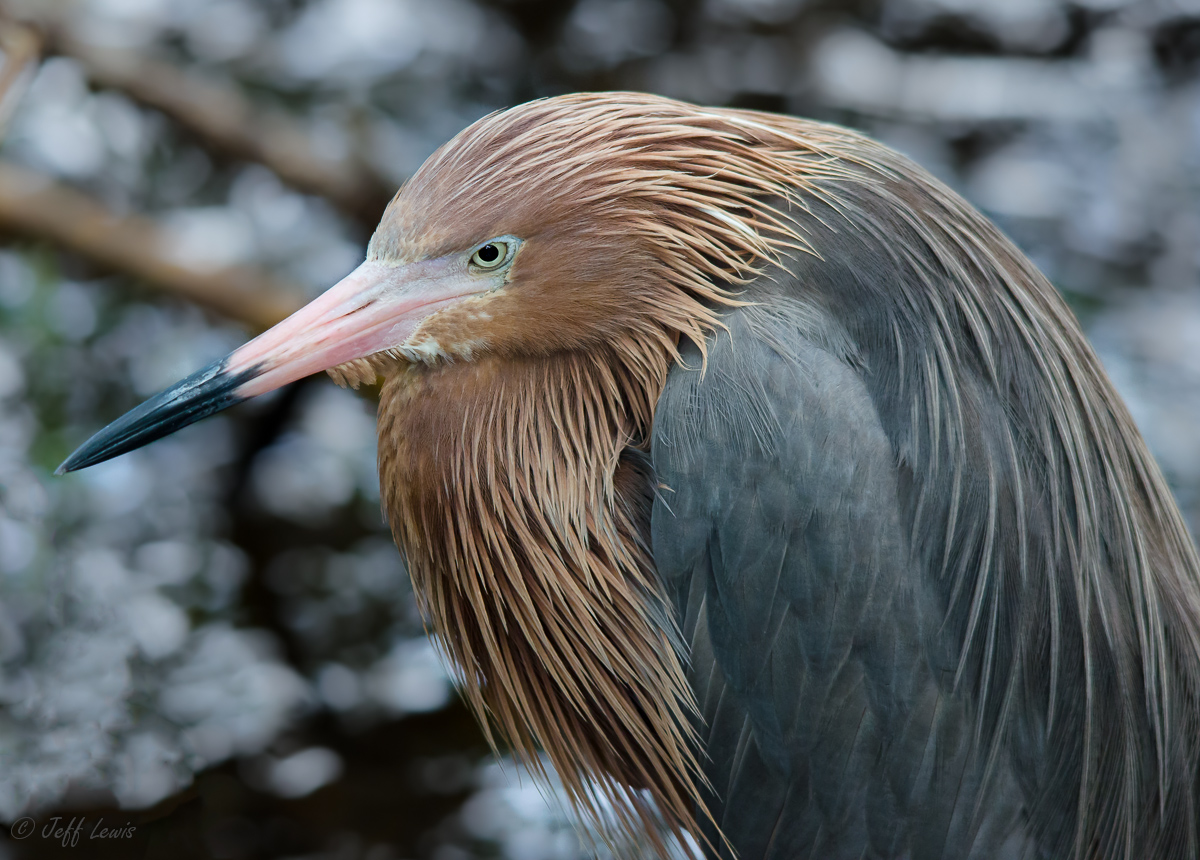
Reddish Egret from JJ Ding Darling on Sanibel Island, FL, from our trip last June (I'm taking the advice from some of you and stepping away from my recent Costa Rica shots for a bit :)
D7000, Sigma 150-500 @ 300mm (450mm equiv)
1/200, f6, iso1600, HH
About 85% of FF, mostly cropped off the front, a little at the top, making it a bit tight on the left, but there were several very distracting roots there. I cloned/healed to get rid of a big remaining root in the lower left, and did quite a bit of exposure, saturation, tone, color, NR and sharpness fiddling with my new LR4, as the original was noisy and washed out. But the eye was tack sharp so wanted to see what I could do with it. And one other tiny but distracting feather heal.
To help my learning would it be appropriate to post a jpeg of the unmodified original version below to get any thoughts on whether I did too much violence to the image? Or perhaps in the digital imaging forum?
thanks for any comments, everything helps


Comments
15 commentsAs for the portrait, I certainly like the detail and pose. The background is adequately blurred and the two OOF sticks do not distract me, as they lead the eye to the subject. A bit tight all around, but I understand how you got there.
I have begun shooting with the D7000 recently, and I am reasonably impressed with its high ISO performance, but I have only gotten up to ISO 1000 so far. I am impressed, not only with how it worked here, but also with how the "Bigma" behaved with it.
That's an excellent idea and very appropriate for the Avian Gallery IMO. Seeing what you started with is always worthwhile and a great baseline for any discussion of the post processing you've done. I won't critique this until the baseline image has been added.
It was shot under the mangrove trees in a mangrove hammock, so it was pretty dim. I took some Reddish egret pictures from out in the daylight and used them as reference when adjusting the color/saturation.
For me, this would be a discard because of the distracting heavy branch across the left side as I could not eliminate it with a simple crop of the image.
I think you did fairly well in the tonal adjustments, going darker overall and increasing the saturation. As Phil suggests I'd probably warm this up a bit by dragging the temperature slider to the right in raw conversion (I do this in ACR and I ignore the Adobe preset pulldown menu which seems to go way too far for me).
All the best Jeff.
Danny.
Phil/Rich/John - looking back at my processing I did in fact completely miss doing anything to the WB, which I guess means I worked harder than I had to get the heron's warm colors back. Also looks like going to "Camera vivid" instead of leaving it at "Adobe Standard" might have been my friend as well. Do you guys adjust the camera profile for every image you shoot? I was also wondering if I should just keep everything at "Camera neutral" and do everything else in LR4/PS. Good eyes and thanks.
Rich - thanks for the discard comment, it seems clear that my behind the lens composition and framing needs the most work, which is actually good news to me. Starting this, I assumed that there would be fundamental things that I'm doing wrong with my technicals and post processing as well, but based on everyone's comments I seem to be in the ballpark on those, which is excellent news. Looking back at my egret picts, basically every one has that large yellow root running through it in some fashion, messing up the shot, and I totally didn't see it or worry about at the time, even though it's so clearly a problem upon review. I'm sure I had a few feet I could have moved to the left to move it further out of frame, since the egret was very nicely perched 10 feet off a boardwalk we were on, and relatively comfortable with us there, but I just didn't see the problem at the time. I'll have to work on that, thanks.
Jim/John - I'll play with toning down the background spots. Burn with Auto Mask looks incredibly useful, I hadn't played with that before.
thanks everyone.
I'm not sure where you are picking up the Camera Vivid vs. Adobe Standard option. Is this in Adobe Camera Raw when you do raw conversion? Or in another raw converter? Or in Photoshop proper or Lightroom?
Obviously, that is something I don't mess with. I just open the raw image in ACR with Default on (Auto Off). I look at the overall warmth of the image and use the temperature slider (and rarely the second slider whatever it is called) to adjust the color temperature. I don't use the preset pulldowns unless I want to see a how the image changes with a big swing in values.
Then I adjust the group of sliders that control the histogram to make it better fit the entire range: exposure, recovery, brightness, shadows, fill. I rarely move the exposure slider more than .25 or .33 plus or minus as the raw images out of my Nikon are usually very close to correct. I use the Recovery slider to bring down any blown highlights, and use the Brightness slider to move the middle of the histogram to the right. I rarely touch the shadow and fill sliders - I can clip the shadows easily with a levels adjustment layer later if needed, and using fill just pumps up the noise and makes the image look unnatural to my eye. I do this for every single image (if the images are essentially the same then I can just use the Previous Image settings).
That's always important, and it can take some time before it becomes a natural part of your work flow.But it is definitely worth developing a critical eye behind the viewfinder since major issues with the original composition can rarely be fixed in post processing IMO.
Don't worry about vivid and standard settings if you are shooting RAW. Those are for "baking in" that color balance in jpegs, but the RAW files you end up working on don't bake in that info, hence the ability to tweak WB in post nondestructively. You will however notice the difference when looking at your camera's LCD as it displays a low res jpeg version of your file even if shot in RAW, and will show the vivid colors and contrast that isn't really in your RAW file. This can in turn be misleading when it comes to highlight blinkies showing in the LCD jpeg, that may or may not be burnt out in the RAW version - if you switch to neutral, things will look bland on the LCD but you'll get more accurate view of what your RAW info is, particularly the dynamic range and if your image exceeds it. When you get to Lightroom you can chose the Adobe vivid in Develop module if you choose.
I hope this helps,
John
I agree with you, more space in front would better though.
I like it as posted, only quick suggestion for improvement would be to warm the colors a bit..
Have a great weekend Jeff!