Nature Photographers Network
This is the preserved archive of the original Nature Photographers Network. The community continues at naturephotographers.network.
Vision to Failure!
‹ PreviousLandscape GalleryNext ›

Vision to Failure!

by Chris Chamberlain

Gallery: LandscapePosted November 27, 2012466 views16 comments
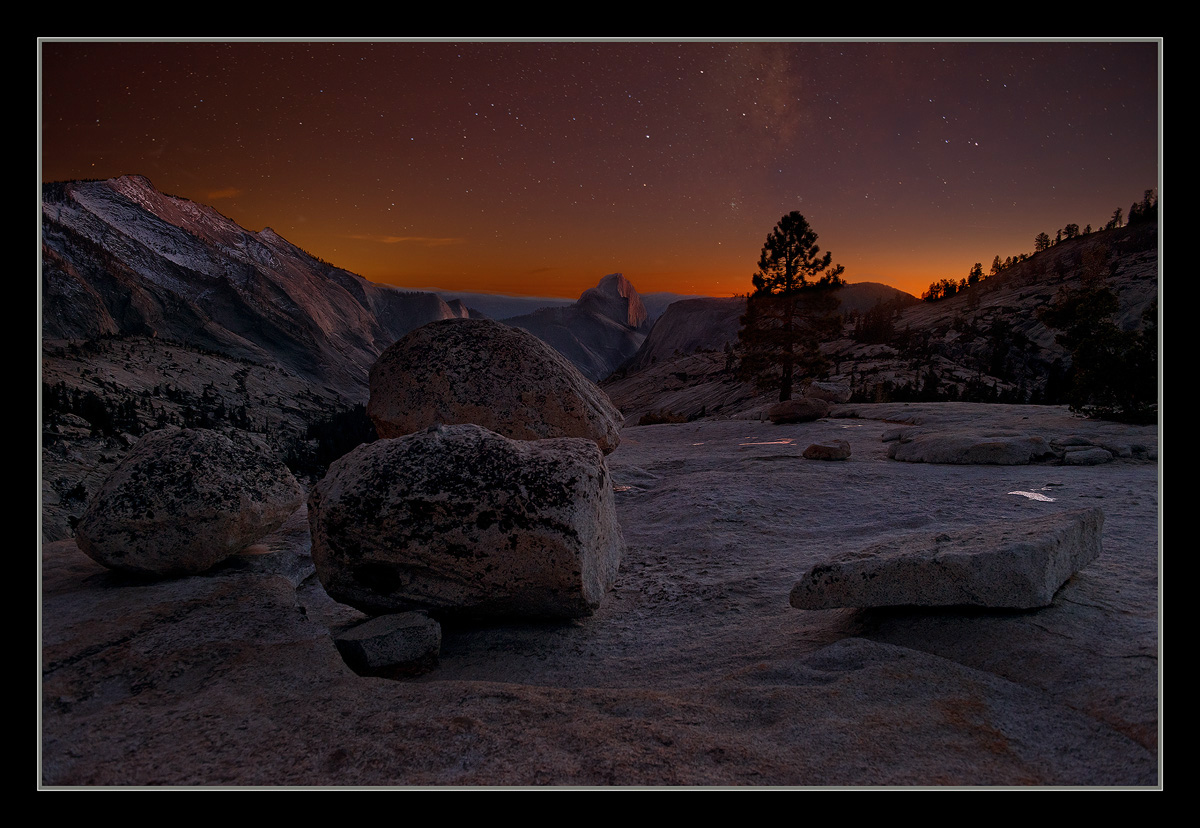
Since my last post garnered so much conversation, I thought I'd post this, and hope for the same. Mainly because I need some help! This is my first attempt at a blended image. At this size it looks okay(I think) but it cannot be printed. Reason one is that I don't know how to blend in the n ight sky without bleeding it over into the landscape exposure. I know there has to be a cleaner way of doing it besides just trying to use the smallest brush possible and be very careful. That can't be it, because I don't see how it's possible. Second, even at 20 seconds, the stars moved enough to be blurry. Third, there is more noise than I'd like even at just ISO 800. I don't see how you can get away with 3200 iso exposures. Maybe my expectations are too high where noise is the issue. I've never seen a(modern) blended night image in person, so don't know how they look compared to say a normal single exposure sunset print. My biggest issue is with the blending at the horizon. Here I just cloned in a rough edge in order to post the image.

I'd also like to know what you would think of this image in terms of aesthetics, and luminosity, and color if I were to be able to process it cleanly.

Please do look at the bigger one. I made some color adjustments to tame the purple/magenta mostly in the foreground granite.

I'd appreciate any help and suggestions.

D800,
24-70mm,
exposure 1 for landscape, 1/2sec, iso 800 F/5.6
exposure 2 for the sky, 20sec, iso 800, F/2.8

Thanks,
Chris

Comments

16 comments
Comment posted by Peter Coskun on November 27, 2012 at 8:39 PM
I like the image as is, even if you can't print it. Was this a blend of two exposures taken from the same vantage point hours apart? I have done images like this and the best way to blend them is to blend the night sky in as a lighten mode layer.Then play with a bunch of layer masks to bring out the stars and keep the landscape the way you want it. I think you could have gotten away with using a higher ISO speed for the stars and even used a lower one for the landscape. All of the night sky images I have seen in print look noisy, I don't think there is a sure way around it, but I could be wrong. I know there are also algorithms that give the exact settings to keep the stars from blurring while using high ISO speeds. Floris Van Breugel had a very good article that goes into blending for night shots if you haven't read it. http://www.naturephotographers.net/articles0509/fv0509-1.html
Registered on October 31, 2011, 170 Posts, 1240 Comments
Comment posted by Brian Schrayer on November 27, 2012 at 8:46 PM
Chris - beautiful image. I would recommend checking out this tutorial from NPN member Sean Bagshaw. In this tutorial he discusses using channel masks for exposure blending. Using the tonal masks allows you to create a mask based on the tonalities in the image. This gives you more control over the blending process. Since the channel mask is based on a map of the tones in the image it eliminates the need to create a manual selection because the mask is a greyscale version of the actual image. You can also narrow the mask selection to target specific tonalities in the image.

This technique is very similar to Tony Kuyper's luminosity mask technique except you use the masks for blending the exposures. I have found Sean's tutorials to be very helpful and worth the cost and he explains it much better than I do.

Regarding your image it looks great in terms of composition and color. I especially like the warm light on the horizon.
Registered on May 28, 2004, 114 Posts, 2890 Comments
Comment posted by Rudy Ruberti on November 27, 2012 at 8:55 PM
Chris,
I like this a lot. Interesting color and great comp. I do see some issues with the blend. The right slide looks pretty good, but there's an obvious dark line along the top of Clouds Rest and the horizon to the left of Half Dome could use some work. I suggest using the "refine edge" tool in PS to help with the selection and make sure the images are properly aligned, but I haven't done much blending with stars. Otherwise, cool shot and with a little work this will be really nice.
Registered on October 28, 2008, 179 Posts, 1875 Comments
Comment posted by Nick Bristol on November 27, 2012 at 9:10 PM
Chris, I really enjoy seeing this and I love the mood! I like your comp a lot and the light and colors here look awesome to me. Even if you can't print it...it looks very cool here. I can't help with the blends because I'm in the same boat with you. :confused: Glad you posted this and maybe I can learn too.

Nick Bristol
Lone Rock, WI
Registered on February 1, 2004, 752 Posts, 14140 Comments
Comment posted by Youssef Ismail on November 27, 2012 at 9:19 PM
Chris,

Tony Kuyper has a great tutorial on how to hand blend images using the luminosity masks. You should check it out on his website. I have tried using his technique and it works well and recommend it. But based on what I see here even with the larger image, the blend seems to look pretty good. Since I do not do blends all that often I stop commenting on that now.

Aesthetically I like the composition very much but it just seems weird that stars would be out in that quantity at that time of the evening when you still had twilight glow. Not that there is no interest in the scene, there is, but it just seems off.
Registered on November 1, 2003, 474 Posts, 5555 Comments
Comment posted by Harley Goldman on November 27, 2012 at 9:46 PM
Beautiful scene, Chris.

I am literally right now trying to learn how to blend images. I was just googling how to do it. I finally got CS6 and was going to give it a go on some digital images.
Registered on November 19, 2003, 586 Posts, 11271 Comments
Comment posted by Vance Gese on November 27, 2012 at 10:02 PM
Beautiful and fascinating image, Chris. Love those rocks in the foreground and that wonderful sky. I rarely do blends so can't be of much help. Seems that part of the issue is making selections and masks which I hope those in the know can provide some suggestions for as I find that a real challenge as well. Really nice.
Registered on November 13, 2008, 298 Posts, 6629 Comments
Comment posted by Aaron Feinberg on November 27, 2012 at 10:17 PM
d800 i could print 40x60 @ 3200 no problem. wouldnt even think twice about it. hardest blend i did was something like this. looks a bit too fake here w/ the mountains being the most suspect. pretty neat idea though. surprised you got that much milky way even w/ all the light pollution coming from the valley. for blending try the smart mask shiz. it's tricky but super super helpful

woop!

aF
Registered on October 26, 2009, 399 Posts, 2789 Comments
Comment posted by Morris McClung on November 27, 2012 at 11:47 PM
Well, you got all of the suggestions already, so I'll just say it's worth the work to make this as good as you can get it. A ton of potential to make a superb image.
Registered on May 7, 2007, 670 Posts, 19650 Comments
Comment posted by Eva McDermott on November 27, 2012 at 11:52 PM
I can't provide any guidance on blending but do find I like the image as is. What's right and what's wrong is always so subjective IMO.
Registered on January 4, 2009, 1015 Posts, 13229 Comments
Comment posted by Stan Rose on November 28, 2012 at 12:02 AM
Luminosity masks. Use them. The brightness level looks good here--just gotta get the transition seamless.
Registered on September 15, 2005, 836 Posts, 17099 Comments
Comment posted by Lon Overacker on November 28, 2012 at 1:10 AM
Hey Chris,

Isn't there a tool in PhotoShop called "perfect-two-exposure-blend"?? Automerge-HDR-focus-exposure-luminosity-blend-stack?" How hard can it be? :biggrin: :rolleyes: :razz: :wavey: JK - I wish I could help ya, but I do know there is lots of help out there.

I say that because the image is sensational! And I do hope you can process this so you can get a good print out of this; I think the potential is worth the effort. I think this is a wonderful combination of the granite landscape and the twilight sky.

good luck with the processing and I hope you get a great print from your efforts.

Lon
Registered on November 24, 2006, 521 Posts, 19147 Comments
Comment posted by John&Patty Benway on November 28, 2012 at 5:23 AM
Chris, you captured a very pretty scene here, and I love the sky, but when it comes to blends, I'm lost, as I said, love the scene, and you got a lot of good suggestions, hopefully it will work out for you.
John
Registered on May 12, 2006, 626 Posts, 8700 Comments
Comment posted by Chris Chamberlain on November 28, 2012 at 8:46 PM
Thanks everybody! I look into getting myself some tutorials.

Youssef,
This was not visible to the eye at the time of the second exposure. Just that the camera picks up a lot more light and color than we can see over 20 seconds of exposure.

Thanks
Registered on March 13, 2007, 500 Posts, 8365 Comments
Comment posted by Mark Hespenheide on November 30, 2012 at 5:46 PM
Chris,

As others have said, it's a terrific start. :toast: The only thing that's really bothering me is the tonal transition between Cloud's Rest and Half Dome to the horizon line behind them, to the sky. I'm not even sure if you want to take that ridge brighter or darker (which might say that you should leave it as it is...), but it just plain looks "off" to me.

On a lesser note, the section of rock in the middle ground between the boulders and Cloud's Rest (above Tenaya canyon?) looks a little imbalanced in color -- it's bluer than the surrounding rock. Did you blend that in from a different exposure?

Like I said it's a great beginning.

Cheers.
Registered on August 14, 2010, 3 Posts, 61 Comments
Comment posted by Mark Metternich on December 1, 2012 at 9:57 PM
A little burn on the horizon and this will soar! Killer scene! :toast:
Registered on June 19, 2009, 276 Posts, 6240 Comments