Nature Photographers Network
This is the preserved archive of the original Nature Photographers Network. The community continues at naturephotographers.network.
Carriage trail
‹ PreviousMan & Nature GalleryNext ›

Carriage trail

by Catherine Gagne

Gallery: Man & NaturePosted October 14, 201242 views2 comments
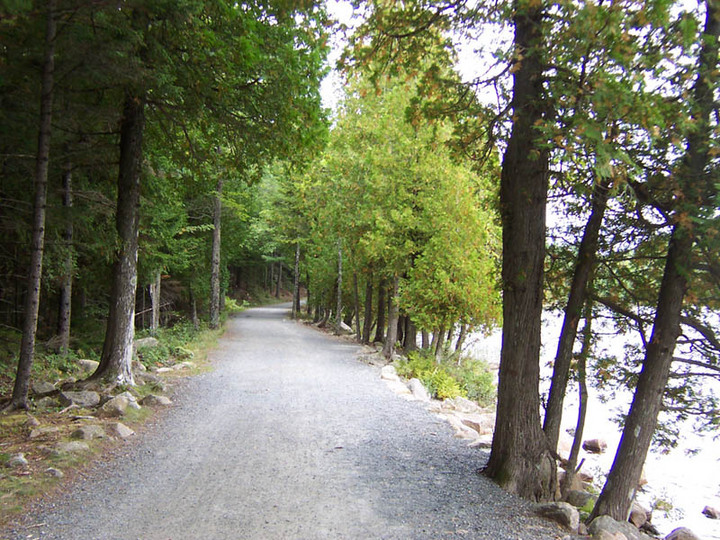
This is one of the Carriage Trails in Acadia Park in Maine. It was a hazy morning so the water and sky didn't look blue. Summer was over but too early for the fall colors.

I've never been shown anything on photography, so I know nothing about exposures and shutter speeds. all my pictures were taken with a Kodak easy share digital. So I am keeping track of all the comments I receive, invested in a few books and plan on spending the winter learning as much as possible and then upgrading to a better camera.
So thank you all. I will continue to post pictures for additional feedback. And I am hoping that soon I will feel educated enough to offer my own opinions of your pictures. :wavey:

Comments

2 comments
Comment posted by John Neukirch on October 14, 2012 at 6:45 PM
I like the perspective of the road/lane. The river and sky are blown out pretty bad, think I would crop some off the right as it doesn't add anything to the image. Maybe dodge the little sky that's shown a bit. You've captured the DOF really well.
Registered on July 9, 2012, 207 Posts, 1476 Comments
Comment posted by Brad Strong on October 15, 2012 at 12:36 PM
This is a tough picture to take technically speaking. Most camera's automatic exposure settings will overexpose images that have a mixture of dark shadows and bright sky or other highlights. You need to learn how to control your camera's exposure time. Exposure compensation is pretty standard even on pocket cameras. It is usually a dedicated button with a +- symbol on it. Press it and adjust accordingly. For this image, you would need to decrease the exposure by setting it to the minus side. Even expensive cameras need help setting the exposure. I run my Canon 5D in manual mode most of the time.

I also recommend learning to use the histogram while reviewing pictures on the camera immediately after taking them. An image like this would show a histogram bunched up on the right hand side, indicating overexposure and a total loss of highlight details in the image.

As you decrease the exposure on an image like this, the shadows may go completely black. This will cause a histogram that is bunched up on the left side. The ideal exposure will show a histogram that is not bunched up on either side. If I have to choose one or the other, I will let it bunch up on the left side, settling for black shadows rather than a blown out highlights.
Registered on October 1, 2012, 43 Posts, 302 Comments