Oxbow with river otter with REPOST
by Andrew Sentipal
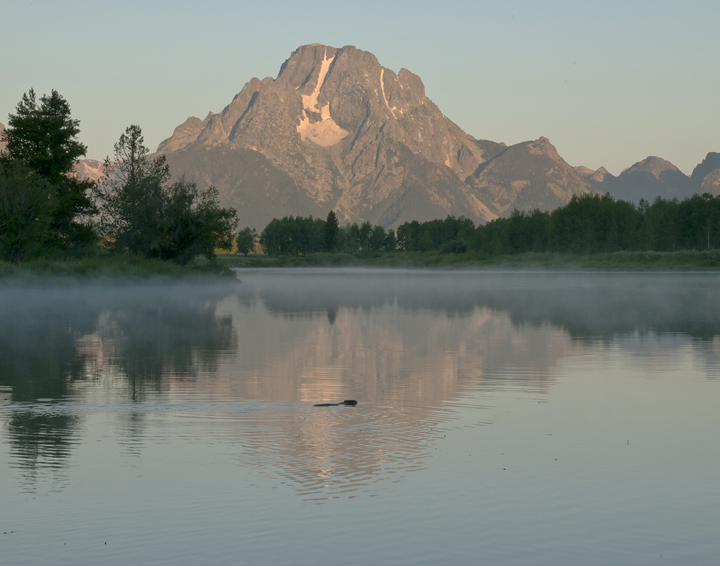
I was shooting Oxbow Bend looking at different angles, at the parking area, rivers edge, etc. A river otter moved silently across the water making the image something more than just a landscape for me.
Nikon D300 ISO 200 F22 1/25 Nikon 24-120 F4 @65mm
Comments and critiques please. I know this is a popular spot and that many of you have shot here too. Always learning.

Comments
5 commentsAndrew
One more thing that I noticed - I see that you were stopped down to f22 on this image. With most lenses you lose contrast and sharpness as you stop down to the smallest aperture. Sometimes you need to stop down to f22 to get adequate depth of field. With this image you probably didn't need to stop down any more than f11- f16 and you could have gotten sufficient depth of field. This probably would have given you a sharper image with better contrast. If you are familiar with using curves adjustment layers I would try using an s-curve to boost the contrast in the mountains.
As a side note - it must have been a fun moment watching the otter. They seem like fascinating animals with great "personality".
A great moment indeed to have this little guy swim in to your frame. I think it makes for a great nature story and adds some interest to the bigger picture.
I agree with Brian that I prefer the original composition. I like that the water includes all the rings/wake from the otter - the cropped version cuts in to that a little and throws the comp off balance a little.
I think the issues come in with the softness, lack of depth and even a little lack of pop to the colors and contrast. The softness I expect is a combo of the f/22 pitfalls. And even a shutter speed of 1/25 is probably not going to freeze the moving animal - and he looks soft too, even more so with the enlarged cropped area. I'm assuming you had this on a tripod? If not, that would add to the softness as well. It's a tough combo to have enough SS and depth to get everything sharp front to back with a moving subject too.
The other thing is the color contrast. I think you've got some room to boost the saturation a little. As far as the contrast goes, even a simple curves layer adding a little s-curve to it (brightening the highlights, darkening the shadows) could help. There's also the USM trick (I always forget... High radius like 50, low percentage and 0 threshold?) An Orton layer could accomplish something similar. Lot's of ways to skin a cat as they say (sorry for you cat lovers.
Oh, one last thing. You have quite a few dust bunnies in the sky as well as some little specs in the water - those are probably natural floaters, but could be cloned if you were so inclined.
Like John mentioned, you've got some good things going for you and perhaps there are some things you can do to improve it a bit.
Hope this helps,
Lon