I really appreciate the comments on my last post. Floris' was very instructive:
The hues are being pulled apart and purified by other parts of your workflow, and the result is similar to an increase in saturation.
Makes sense. Extreme processing can sometimes lead to a preponderance of Photoshop's primary colors—red, green, blue, cyan, magenta, yellow. Once you get to these "pure" colors, they start to look saturated in the image regardless of their actual saturation values. That would provide a very good explanation of why the colors in that image were perceived as saturated even though their saturation was relatively low.
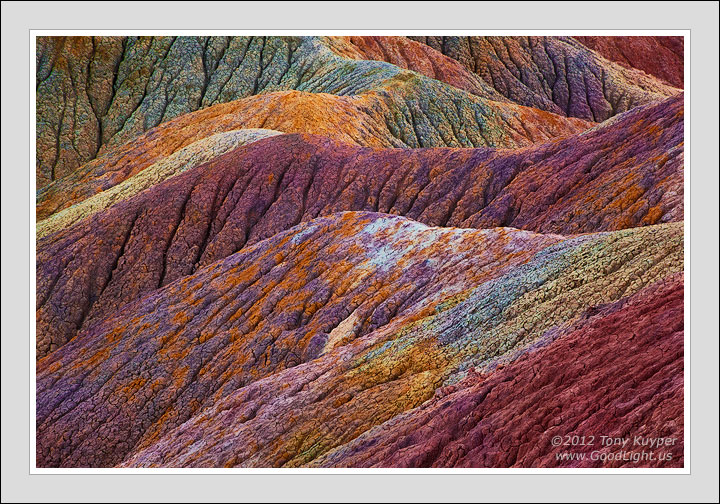
For this image the effort was directed towards NOT letting the colors go so "pure" during processing. Out of deference to some previous comments, I won't show the RAW image or go into processing detail except to say that the goal was to once again enhance some subtle colors but to do so in a way that looks more natural.
Would be interested in your thoughts as to how this is working for you.
5D2, 28-300@209, f/16, 0.6 sec, ISO 100, six focus-blended images.

Comments
22 commentsThis one does look more natural to my eyes that your last post, and what a feast of color and design you've captured.
Nicely done!
Having not seen your last post, nor having any idea how you processed and specifically what part of the image Floris was referencing, I'm wondering about something I've noticed when using your actions and how it may have contributed to an "over saturated" appearance. When using the luminosity mask actions for curves and levels the default blending mode remains at normal which can and often does affect color. I've noticed that the cumulative effect of several layers can often introduce a strong boost in color, when the intended purpose of the layer may have just been for adjusting contrast, exposure or the like. Obviously this can be corrected by switching the blend mode to luminosity. Not sure if that's the issue but I thought I'd throw it out there...
Nick Bristol
Lone Rock, WI
First off, any adjustment in Normal blending mode that has the same effect as increasing the curve's slope (making it more vertical and less horizontal) on a Curves adjustment layer (example: an S-curve) also increases saturation in those tones where the slope of the curve is increased . This is generally the mid-tones with an S-curve. A simple bowing of the curve up or down can have a variable effect. In some parts of the bowed curve the slope is increased and in the other parts it is decreased. So depending on which tones are revealed by the luminosity mask and where the bowing occurs, saturation can be increased or decreased depending on whether the curve slope is increased or decreased in the revealed tones.
By isolating and blending specific tonal ranges, luminosity masks can sometimes allow for more extreme adjustments on adjustment layers. If these more extreme adjustment include a slope-increasing curve in tones revealed by the layer's luminosity mask, then the there will be increased saturation in these tones. This is commonly the case when doing an S-curve adjustment through a mask that selects mid-tone values.
The advantage of using luminosity masks is that they allow targeting of specific tones and then seamlessly feather the adjustment to these tones into the surrounding pixels. To some degree, this ability to target specific tones is part of the reason that more extreme adjustments are possible. By confining an adjustment to just the mid-tones, for example, it's possible spare the delicate light and dark tones from accidentally being included in the selection and subsequently being over-adjusted. In other words, a more "severe" mid-tone adjustment is now possible since these non-mid-tone values are excluded from the tones that actually get adjusted.
What this means in practical terms is that larger increases in the curve's slope through tones selected by the mask will cause correspondingly larger increases in saturation, which is likely the situation you're describing, and yes, I think the effect would probably accumulate if the curve's slope is increased on multiple adjustment layers. In my experience this is most noticeable when increasing contrast through masks that target mid-tone values.
You are correct that changing the blending mode of the adjustment layer to "Luminosity" negates the saturation increase compared to what happens in "Normal" blending mode. However, this change-to-Luminosity-blending-mode solution generally only produces pleasing results with small adjustments. Too extreme of an adjustment and the images seems to start wanting more saturation, and Luminosity blending mode allows none.
So it's sometimes necessary to try to find the right balance, especially when doing more extreme or repetitive adjustments. While I generally deal with saturation (and vibrance) using Hue/Sat adjustment layers, I'll sometimes address the situation by "splitting" the Curves adjustment if I'm getting a saturation increase in "Normal" blending mode that looks excessive. This is done by simply duplicating the Curves adjustment layer, setting the opacity of both the original and duplicate layers to 50% (at least initially), and changing the blending mode on one of the layers to "Luminosity" while leaving the other set to "Normal." This splits the adjustment so saturation can be taken into account a little better. Both layers adjust brightness and contrast, but saturation can also be adjusted somewhat by varying the opacity of the two layers—higher opacity of the "Normal" layer increases saturation and lower opacity leaves it more unchanged. And while the original idea in this split was to have the opacities of the two layers add up to 100%, this really becomes a matter of personal preference. Once the split is done, it's up to the photographer to decide what looks best.
Hope that makes a little sense. It seems to work much easier in actual practice than when writing it all out.
Also, if colors are well corrected (white balance and overall color balance) and an image is brought into PS a little mute (or even a lot) the use of advanced LAB color variation sometimes does wonders to break apart similar colors. A lot of people don't know that RGB renders a lot of similar colors the same. Breaking them apart goes a LONG WAY in landscape where color variation is so important. Dan margulis' man from mars technique is one way.