Gallery: Macro & Close-upPosted June 22, 2012175 views7 comments
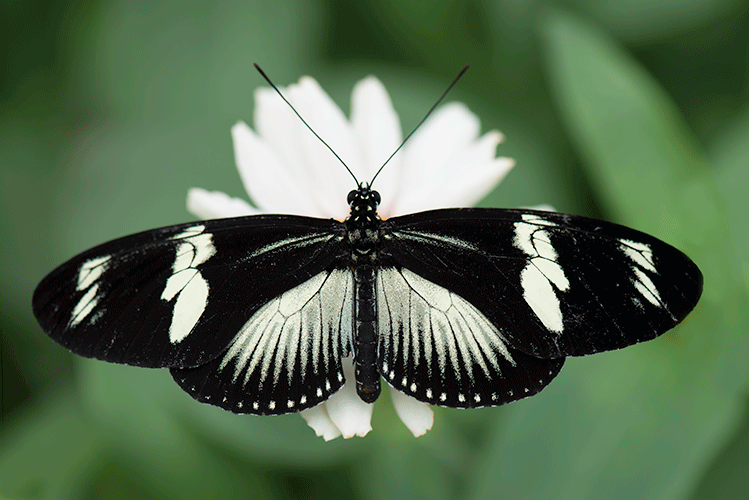
Nikon D800E, 105 Macro. Not sure how this will present. I use a Mac, Lightroom and CS6.
Comments
7 comments
Comment posted by Toya Heatley on June 23, 2012 at 7:56 AM
Oooh I really like the composition of this image! The stark black and white on white is awesome and it's sharp in all the right places too. Nice!
Registered on June 13, 2012, 36 Posts, 98 Comments
Comment posted by jack jaeger jr on June 23, 2012 at 8:27 AM
This image doesnt have the halos that the other one did.
Registered on April 2, 2012, 26 Posts, 355 Comments
Comment posted by Howard Cheek on June 23, 2012 at 9:32 AM
I like the centered comp with space up top Bunn, good exposure & detail from what I can see at this size.
BTW - Your large view's not large, just letting you know if you didn't realize it.
The LP makes it much easier to give you an accurate critique
Registered on July 24, 2008, 1201 Posts, 10758 Comments
Comment posted by Bunn Martin on June 23, 2012 at 10:36 AM
Large? 1200 by 500. I have been resizing the small side to 500 and posting?
Registered on September 17, 2011, 38 Posts, 167 Comments
Comment posted by Carolyn Derstine on June 23, 2012 at 7:47 PM
Very beautiful butterfly with its sharp black and white coloring. It shows off well on the white flower against the nicely blurred background. Good focus on the butterfly. Nice shot, Bunn!
Registered on February 16, 2011, 610 Posts, 3684 Comments
Comment posted by scott lanz on June 23, 2012 at 10:04 PM
It presents very well, Bunn. I like the balanced comp a lot. The black and white moth with its beautiful wings spread over the white flower makes a very artistic presentation.
Yes, you can post a larger image that is up to 1200 pixels on the long side. Generally, when I resize, I'll first resize to 1200 on the long side (or maybe less if the image has lots of color and detail and getting it to 500 kb would require a significant loss of resolution), and then save that image for posting. I'll then reduce it further to 720 on the long side (or again a little smaller if the image has lots of color and detail), and then save that one for posting. When you go to post, first upload the smaller image, then upload the larger.
Also, don't forget that you have the option to "save" the image to your personal gallery. You need to check the "save to gallery" box when posting to do so. If you don't, the image will disappear from your gallery (unless it is selected as a weekly pick) in about 30 days. If you don't save it when initially posted, you can always "edit" your image to save it up until when it is removed from your gallery because it has not been saved. If it is saved, it remains in your gallery, but it can be removed in the future by editing the image and checking the "do not save to gallery" option.
Please let me know if you have any questions.
Registered on November 14, 2003, 840 Posts, 12902 Comments
Comment posted by Nancy Wolfe on July 7, 2012 at 7:47 AM
Beautiful shot. I love the black and white.
Registered on April 7, 2012, 42 Posts, 103 Comments

Comments
7 commentsBTW - Your large view's not large, just letting you know if you didn't realize it.
The LP makes it much easier to give you an accurate critique
Yes, you can post a larger image that is up to 1200 pixels on the long side. Generally, when I resize, I'll first resize to 1200 on the long side (or maybe less if the image has lots of color and detail and getting it to 500 kb would require a significant loss of resolution), and then save that image for posting. I'll then reduce it further to 720 on the long side (or again a little smaller if the image has lots of color and detail), and then save that one for posting. When you go to post, first upload the smaller image, then upload the larger.
Also, don't forget that you have the option to "save" the image to your personal gallery. You need to check the "save to gallery" box when posting to do so. If you don't, the image will disappear from your gallery (unless it is selected as a weekly pick) in about 30 days. If you don't save it when initially posted, you can always "edit" your image to save it up until when it is removed from your gallery because it has not been saved. If it is saved, it remains in your gallery, but it can be removed in the future by editing the image and checking the "do not save to gallery" option.
Please let me know if you have any questions.