Spectre and Stars
by Jared Warren
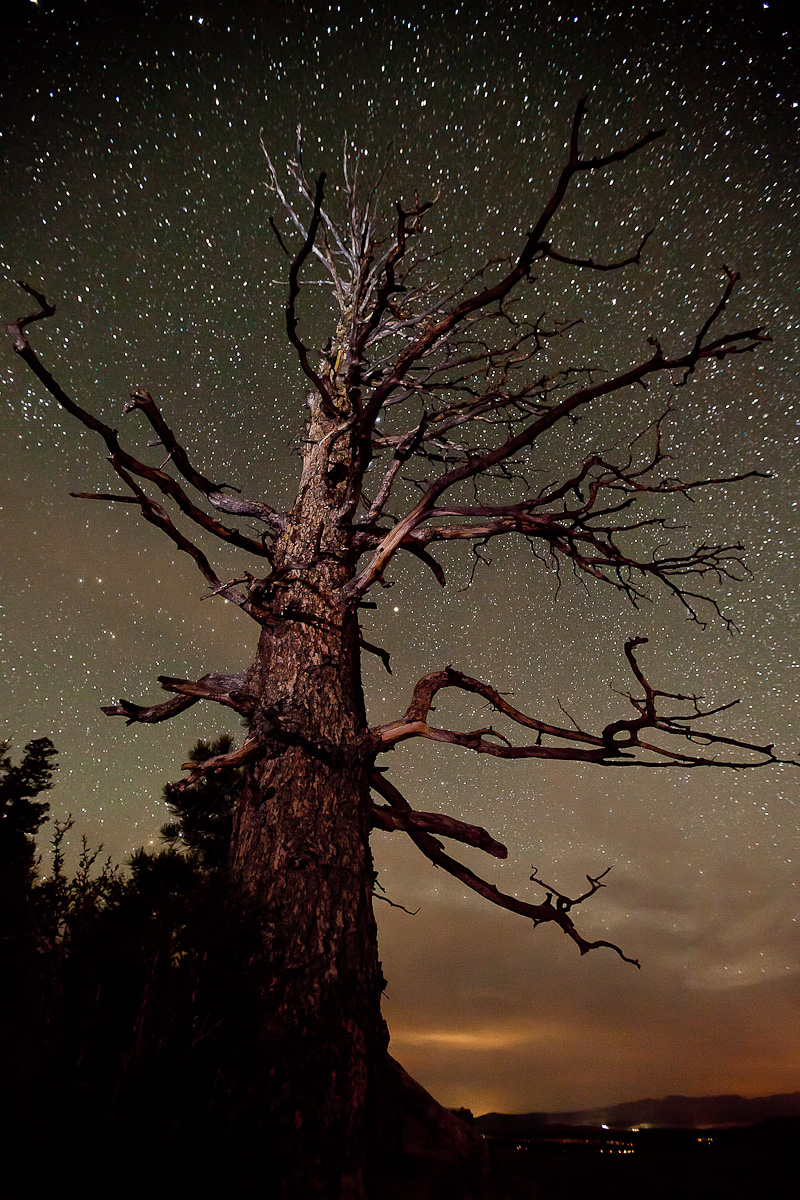
I recently started experimenting with night landscapes. This was last week at Bryce Canyon near Bryce Point. The tree was briefly painted with a flashlight filtered through my sweater. :) Any recommendations for a cleaner starfield or avoiding/fixing what looks like a little distortion of the stars toward the top? Thanks in advance for any feedback/critique you'd like to provide.
5DII, 16-35mm f/2.8 @ 16mm, f/2.8, 30 sec exposure, ISO 3200

Comments
7 commentsI would maybe go cooler and more magenta on the sky to help it look a little cleaner, as then you can adjust the hue of reds/magentas in the sky (the colors you'll see most in high-iso noise) more toward blue, to make the whole thing a bit more uniform. If you want to do it all in one exposure, use a warmer light to still keep the tree looking warm - or do a blend, as I'll describe a bit below.
As far as having both the tree and stars in perfect focus, you can do a blend - one image for the stars at perfect infinity focus (set manually with Live View on a distant point of light), and in this image don't light paint the tree, so you can easily make a mask where you subtract the black landscape silhouette. Then take another exposure focused specifically for the tree, which, in this situation, you can do at ISO 400 and f/4 for a longer period of time, since you're blending and don't need to freeze the star motion! The only issue here is that focusing at different distances can distort the image slightly differently ("focus breathing"), and so you may need to do some manual blending work to fix the slight difference. Depends on the lens. This whole thing would only be necessary if you were close enough to the tree - if you're far enough away that it falls under perfect infinity focus, then ignore this section of my rant.
Sorry to bombard you with not-so-well-organized words, and sorry if you know all this already.. it's tough to tell with a web-sized version what's really going on in your shot. I have a lot to say on the subject. :)
I've shot a lot of night shots with the 16-35mm on a 5DII. The elongated stars are because of lens distortion or coma as Alex mentions above as I understand it. Stars are the toughest to get right as any little distortion is quite evident. It's not the length of the exposure as you were at 16mm. I tried some at less than 15 seconds & 16mm & still got the elongation in the corners (especially one corner). I ended up buying a Nikkor 14-24mm for night photography and saw a drastic reduction in the distortion, along with much sharper images from this incredible lens. It's not for everyone, as the lens is expensive, and there's a $150 - $250 fee for the Nikkor/Canon adapter.
The alternative is to zoom in to about 300% on the photo in Photoshop, and use the spot healing brush tool to clone out the long tails on the offending stars. It takes time but is worth the effort if you've got a shot like the one above. Well done!
http://www.lensrentals.com/blog/2010/10/the-seven-deadly-aberrations
I also heard from Kevin Adams, who does a lot of night photography, including clinics. He had told me before to stop down to F4, as it helped reduce the star "tails". He didn't mention coma, but it sounds like what he was referring to.