Nature Photographers Network
This is the preserved archive of the original Nature Photographers Network. The community continues at naturephotographers.network.
1st DOF blend...
‹ PreviousLandscape GalleryNext ›

1st DOF blend...

by Nathan Apodaca

Gallery: LandscapePosted April 24, 2012264 views11 comments
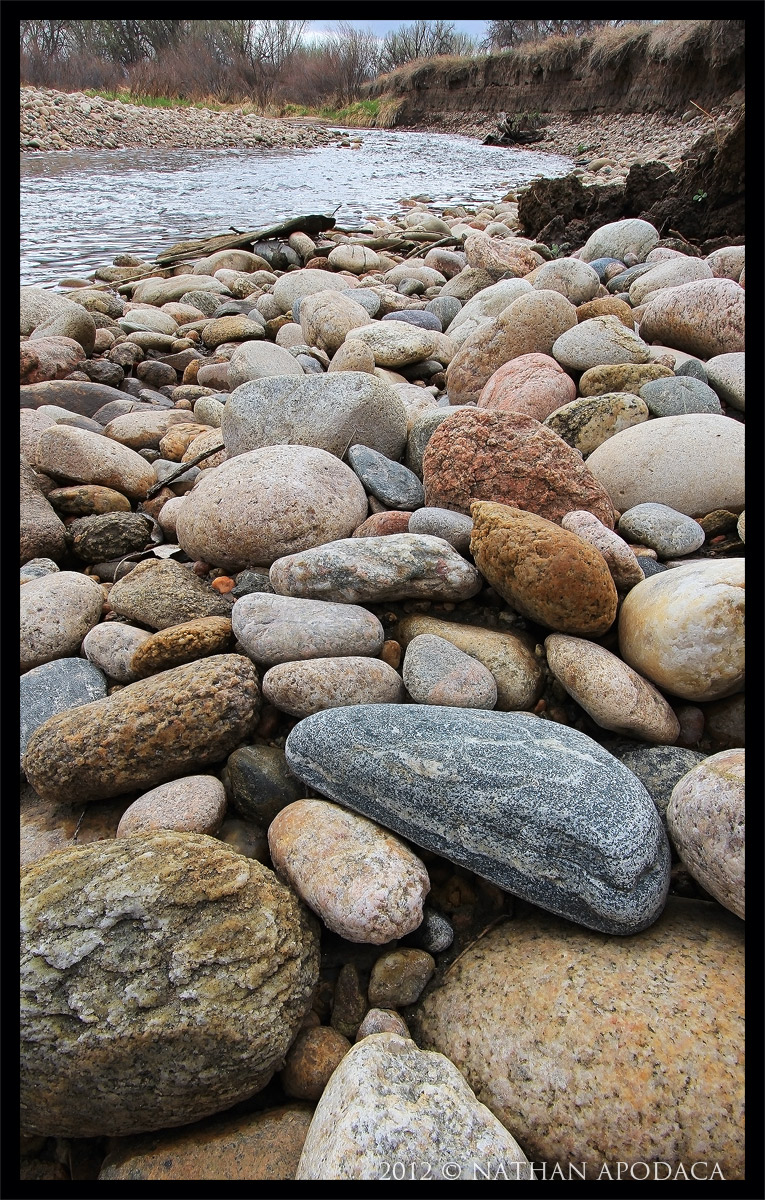
Here's my first try at depth of field blending. The main blue/grey rock in the foreground sat about 4"-6" away from my wide-angle lens. I took 7 images at f/7.1 from fg to bg, trying to cover everything. Fortunately the lighting was good enough for only one exposure per focus section.

I opened them all up in Photoshop CS5, and sort of worked back to front (I have not seen many tutorials on how to do this technique, so I was sort of winging it...), erasing the out-of-focus, that revealing the sharp image underneath.

This was really a test shot, so the subject isn't necessarily all that interesting. I'm looking mainly for comments on the DOF blending, although I won't complain on any other suggestions!

Canon 60d 10-22mm @ 10mm
ISO 100 --- f/7.1 --- 1/160 --- Manfrotto 190XPROB tripod w/ ball head

C & C welcome! :biggrin:

Comments

11 comments
Comment posted by Brian Schrayer on April 24, 2012 at 8:15 PM
Nathan, I'm not an expert at DOF blending as I have never tried it. NPN photographer, Chip Phillips recently made these tutorials available. He covers both exposure blending for dynamic range and DOF blending. I have purchased them and found them to be very helpful. I just haven't had time to try it yet because of work obligations.

At this size the blend looks good. I would imagine that the real proof is how does it look at 100%.
Registered on May 28, 2004, 114 Posts, 2890 Comments
Comment posted by Aaron Feinberg on April 24, 2012 at 8:47 PM
Depending on the subject DOF could be done using the PS automatted align-layers, then auto blend. But auto-align works great then hand blend. Cant tell at this size, but keep at it!
Registered on October 26, 2009, 399 Posts, 2789 Comments
Comment posted by Walt Sterneman on April 24, 2012 at 8:53 PM
This is very good Nathan. Usually when you shoot different focuses the size of the OOF object is slightly different than the size of the in focus object. This can lead to ghosting when you manually blend them. I have tried it a few times and was never happy with the results. That is why I purchased Helicon Focus to do it automatically. You however, seemed to have it mastered as I cannot see any ghosts for objects or lines where the different shots were blended. Nice job.
Registered on March 24, 2010, 73 Posts, 1268 Comments
Comment posted by John Mumaw on April 24, 2012 at 8:54 PM
Looks like you were successful. Sharp from fore to aft.
As Aaron mentioned, focus stacking can be done in an automated way in CS5. Check out this short 4 minute tutorial to get started.
Registered on September 9, 2005, 62 Posts, 2289 Comments
Comment posted by Matthew Goldsmith on April 24, 2012 at 9:30 PM
Nicely done Nathan. Like Walt, I use Helicon focus. I don't think it does a better job than you have done. I have also experienced occasional problems with ghosting. Very prominent foreground objects will sometimes "bloom" as you focus more distantly. For me it seems subject specific. Seems to not be a problem here.
Registered on June 29, 2010, 37 Posts, 286 Comments
Comment posted by Harley Goldman on April 24, 2012 at 10:33 PM
Focus looks good. I think the rocks alone make an excellent tight subject, even though you were just doing a test image. It is a place well worth going back for more and perhaps cropping this one, as well.
Registered on November 19, 2003, 586 Posts, 11271 Comments
Comment posted by Nathan Apodaca on April 25, 2012 at 12:49 AM
Thanks for all the comments, everyone. Helicon Focus looks like something I may be interested in. Have I heard right that it does good with 'ghosting', or 'blooming', some of you mentioned?
Brian/John---I'm glad you shared those tutorials with me. Very helpful!
Aaron---I've tried the auto-align-layer-auto-blend way, but it seems to leave areas blurry. A lot of touch up might be required, or something. But I may not have tried it on enough images. As you said, it may depend on the subject...
Registered on November 16, 2011, 67 Posts, 1127 Comments
Comment posted by Rodney Ninow on April 25, 2012 at 9:57 AM
Nice job. CS5 has a script to do this automatically that I played with, seems to work well.
Registered on January 11, 2009, 7 Posts, 123 Comments
Comment posted by Nathan Apodaca on April 26, 2012 at 12:57 PM
Thanks, Rodney. I'm hoping to get a few more test shots, of very different subjects to play around with and experiment on. I'll be trying that script out...
Registered on November 16, 2011, 67 Posts, 1127 Comments
Comment posted by Tony Kuyper on April 26, 2012 at 9:57 PM
Blending looks good, Nathan. Could see maybe adding a bit of saturation to give a greater presence to the rocks.
Registered on November 1, 2003, 364 Posts, 22328 Comments
Comment posted by Nathan Apodaca on April 27, 2012 at 7:46 PM
Glad to hear it looks good. Although I finally figured out the sRGB issue with uploading images to this site, I think a tad extra saturation is needed for some reason. Thanks for pointing that out! :wavey:
Registered on November 16, 2011, 67 Posts, 1127 Comments