Well, after all the comments about me clipping the legs on my last bighorn picture, I was mighty tempted to post the vertical version next which did NOT have that comp issue

but frankly I just have too many pictures from the past couple weeks I'm pleased with and wanted to move on.
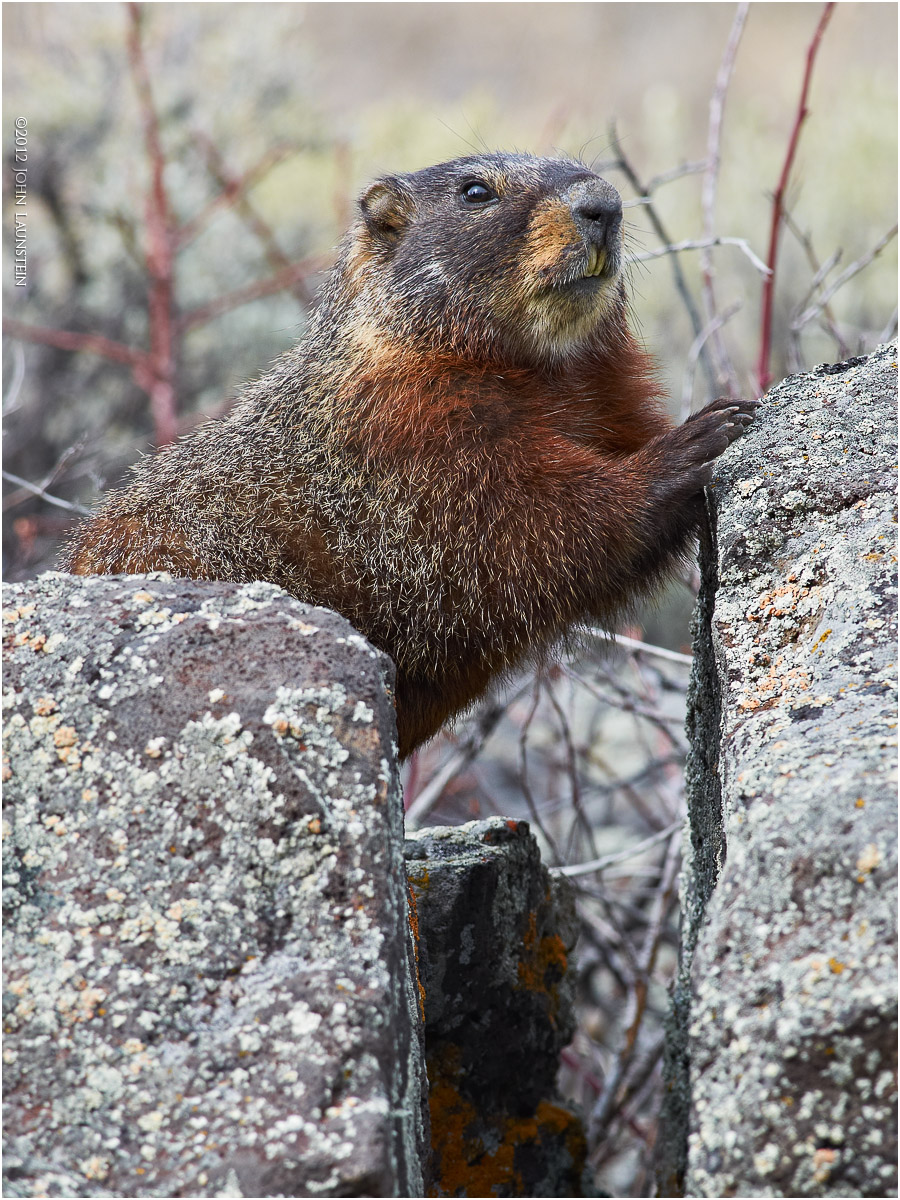
So, here's the first of a couple images of a VERY cooperative--and very cute--yelow-bellied marmot from our time in Yellowstone earlier this month. I've always loved these guys, and this one was putting on a marmot modeling clinic! A few of my kids joined me for pictures, and he must have thought he was on the red carpet surrounded by photographers and decided to make the most of it. Literally, we eventually decided after 20 or so minutes and him posing on nearly every rock at every angle and even coming so close we had to back up, there wasn't much he could give us that we didn't have, so we left him (still posing) and moved on in search of other critters.
I wish I had brought my tripod down with me for this guy, as I would have attempted to find the right DOF to nail the full rock face and the marmot while still keeping the background as soft as possible, but as it was, this was the best I was able to do on that front.
I love how he is "bridging the gap" here...almost looks like he's holding up the other boulder!
Interested to hear your comments on this one...it's always hard to know if you like an image because of the experience the animal gave you, or if it has more universally appealing qualities.
Thanks in advance...
Nikon D7000
Nikkor AF-S 300mm f/4 IF-ED with TC-14EII
ISO 400
1/400sec @ f/8
monopod mounted
cropped slightly from bottom to remove excessive OOF area
**if you think this guy is at least KIND OF cute, you owe it to yourself to view the large version!

Comments
9 commentsMax
Hmmm...this is really interesting. I just love the coat on this guy (and the job you did on the processing of it) and the pose is interesting. And the light - and how you've handled it in processing - is superb. I also like the separation from the background - the result is that this marmot really pops. On my monitor the standard version looks just a tad over-sharpened, but the larger version looks perfect (sharpening-wise). I DO wish there was slightly more DOF so that the foreground rocks were a little sharper, but fine DOF control is tough (and, if you hadn't noticed, one of my "hobby horses"!) and the shallow DOF here hardly detracts. I looked at the larger version, and examined the background, before looking at your techs and I instantly knew a TC was used. That, to me, is one of the most interesting (and most ignored) aspects of TC use - with careful aperture choice you can get very sharp images with TC's, even when viewing an image at full res. But, they definitely impact on the quality of the bokeh.
Overall I'd say this is one of my favourite John Launstein images. Very well done. And, I'd be willing to bet you processed it with Capture One? It has that unmistakeable look to me...(and I hope to heck I'm not wrong on that!).
Cheers...thanks for sharing this one...
Brad
Brad, yes, you're right...I used Capture One for conversion processing on this file. Good call.
Man, I struggled with the sharpening on the smaller file...frankly the texture of the marmot's fur almost makes it inevitable that it will appear to be over-sharpened at this size I think. The fur look over-sharpened before the eyes were affected much at all! I ended up choosing the best overall settings then masking back some of the fur. Worked great for the larger, but I think the contrast and angles of his coat just messes with the lower size, lower res file. Maybe I should just pull it off completely from that area.
Thanks again!
On the sharpening of the smaller version: Just an FYI that on images like this I almost always REALLY back off the sharpening during both raw conversion and then on my final output sharpening (often pulling the output sharpening down to zero). Also, not sure how (in your workflow) you downsample to get to your 720 pixel image, but if it's in Photoshop stay away from Bicubic Sharper interpolation on shots like this - that's another source of sharpening (I have got to the point where I almost always use simple "Bicubic" interpolation). Note also that if you're using the crop tool in Photoshop to cut dimensions and resolution simultaneously, it inherits the down-sampling method specified in your Photoshop's preferences (Photoshop>Preferences>General...) - so easy to have Bicubic Sharpening "sneak in" that way too...
Cheers...
Brad
Here's what I normally do on my workflow.
- open RAW file in ACR or Phase One Capture One and make the needed adjustments to colour, exposure, comp (cropping), overall tone (through decreasing sat when needed, bumping clarity a touch if needed, etc.), and capture sharpening (always just getting things to a reasonably sharp level and holding back for appropriate output sharpening).
- do all my PS adjustments and tweaks in 16bit, ProPhoto RGB, save with layers as full res "master" file as it were
- resize to 1200px USING BICUBIC (haven't used anything else, almost ever, for a few years), convert to sRGB and drop to 8bit
- duplicate background layer, apply appropriate sharpening and mask as needed
- flatten and save at appropriate jpg quality for file size constraints
- go back to unflattened version, disable sharpened layer
- resize to 720px USING BICUBIC
- repeat the steps of duplicate and sharpening (though different settings are needed than for the larger file, and I always find the this second resize considerably softer than the initial one to 1200px, but I've found working with the sharpened 1200px file results in very unnantural sharpening IMO)
- to save time steal the masking I used for 1200px file and tweak as needed
- flatten, save, done.
See any obvious points where there's room for improvement?
Thanks!
Your workflow on producing these images is very similar to mine, so I see no obvious areas where uncontrolled sharpening is sneaking in. Could just be a "devil is in the details" thing, such as your exact settings in doing the final sharpening (in this case on the smaller 720 pix version). I tend to go maximally small (0.1 pixel diameter) on my sharpening settings on shots like this, and even with that will mask a lot of the sharpened area off. And, on a shot like this one where the subject already has strong local contrast between the grizzled hairs and darker fur behind, I may pull sharpening of my master back super low (close to zero)...
Anyway...nothing else really stands out...
Cheers...
Brad