Gallery: FloraPosted December 10, 2011121 views9 comments
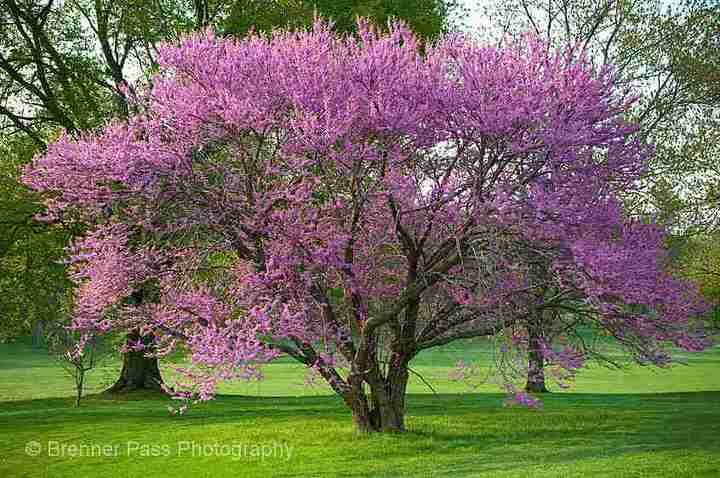
Nikon D300, 18-200mm lens
Burke Lake, Virginia
I welcome your comments. Thank you.
Comments
9 comments
Comment posted by Carol Nichols on December 10, 2011 at 3:26 PM
Spencer, this is a beautiful tree. The pink blossoms against the green grass is a great color combination. I much prefer your original post as to me the repost is oversaturated and no longer looks real.
Registered on November 7, 2007, 161 Posts, 1420 Comments
Comment posted by scott lanz on December 10, 2011 at 6:00 PM
I love redbuds. Probably my favorite flowering tree. Like carol, I prefer the first, softer version. The color looks more accurate. However, there seems to be something off with the processing of both as, on my monitor, the images are distorted or "pixelated," for lack of a better word, in various areas, especially noticeable in the grass. Maybe someone else can venture a guess as to the cause.
Registered on November 14, 2003, 840 Posts, 12902 Comments
Comment posted by Bill Fach on December 10, 2011 at 8:33 PM
Spencer: I love redbuds and this is a good one. Says Spring to me. Well done. >=))>
Registered on November 1, 2003, 1805 Posts, 26981 Comments
Comment posted by Spencer Cake on December 10, 2011 at 9:22 PM
Carol, Scott, and Bill,
Your comments lift my spirits. Thanks!
I note the same pixelated portion in the grass Scott mentioned. It is also in the JPG in the folder from which I upload. It is not in the Raw photo in Lightroom 2.7. I use Mogrify to export to the holding folder but the problem is primarily with this particular photo. I have seen some distortion along limbs and tops of mountains in some photos as well (after exporting from Lightroom). One can almost read letters and numbers in the grass. If someone has any thoughts, please let me know.
Registered on November 28, 2011, 39 Posts, 34 Comments
Comment posted by Paul Duval on December 11, 2011 at 10:26 AM
I've noticed and issue with Lightroom myself, but if you check the image size after importing you might find as I did that software automatically downsized it when importing. So I have had to adjust the size in Elements after tweaking in lightroom. I don't know if that's the issue but I thought I'd pass it on. Very nice image of a redbud, by the way.
Paul
Registered on June 30, 2009, 508 Posts, 1907 Comments
Comment posted by Spencer Cake on December 11, 2011 at 12:49 PM
Thank you Paul. I'll look into your solution and report back.
Registered on November 28, 2011, 39 Posts, 34 Comments
Comment posted by Spencer Cake on December 11, 2011 at 7:30 PM
Carol, Scott, Bill, and Paul,
I resized the exported jpg from 100 to 300KB and that seemed to correct 90% of the pixelization. Thanks again for your comments. Sincerely, Spencer
Registered on November 28, 2011, 39 Posts, 34 Comments
Comment posted by Anne K. Rusk on December 11, 2011 at 10:04 PM
The second post has fixed the issue! This looks wonderful!
Registered on October 10, 2010, 65 Posts, 904 Comments
Comment posted by scott lanz on December 12, 2011 at 1:11 PM
Good job on the fix.
Registered on November 14, 2003, 840 Posts, 12902 Comments

Comments
9 commentsYour comments lift my spirits. Thanks!
I note the same pixelated portion in the grass Scott mentioned. It is also in the JPG in the folder from which I upload. It is not in the Raw photo in Lightroom 2.7. I use Mogrify to export to the holding folder but the problem is primarily with this particular photo. I have seen some distortion along limbs and tops of mountains in some photos as well (after exporting from Lightroom). One can almost read letters and numbers in the grass. If someone has any thoughts, please let me know.
Paul
I resized the exported jpg from 100 to 300KB and that seemed to correct 90% of the pixelization. Thanks again for your comments. Sincerely, Spencer