Sunset buffalos + Repost
by Johan Malmros
We had been spending the better part of the late afternoon photographic mongoose, but eventually they got tired of us and moved on.
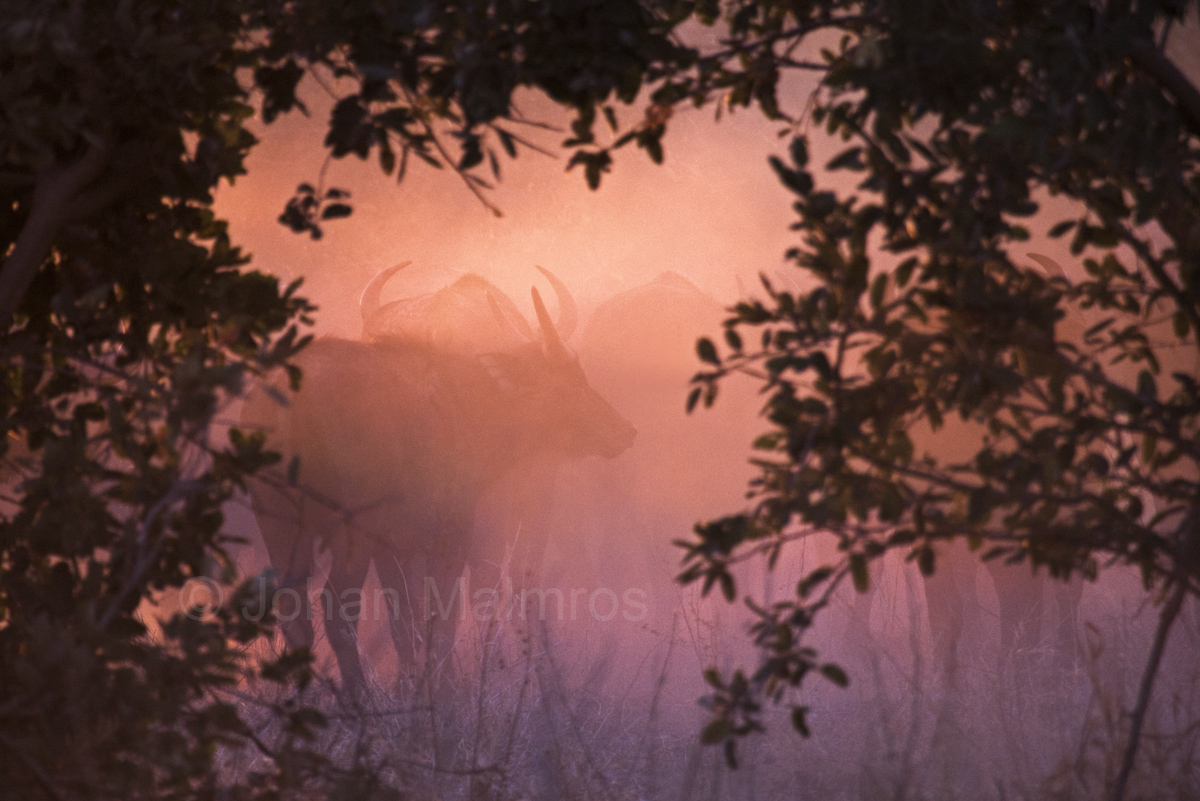
Just after packing up and leaving the place we noticed the buffalos on the move. We could hear and see them though the brush as we hurried along to get a clear view. This shot was taken when we and the heard passed on each side of a small gap in the bushes. The oppertunity disappeared as suddenly as it had revealed itself and there was only time for a few fast shots before we had to move on in search for another clearing.
The buffalos were kicking up a lot of dust as they moved and it cought the light of setting sun creating the colored haze.
Comments and critiques greatly appreciated.
Khwai, Botswana
Canon EOS-1D Mark 3
100-400mm f/4.5-5.6L IS USM @ 400
Shutter Speed: 1/400 Sec.
Aperture: f/6.3
ISO: 800
Metering Mode: Evaluative Metering
Exposure Compensation: -1

Comments
16 commentsThe vegetation make a good window, and the colors are lovely.
Dust and a setting sun are a good combination in Africa.
Thx
Jef
I like the natural frame and the colours in the "window" are very striking. While the image is already a strong one, if it were mine I'd probably play a little with the contrast - first darkening the blacks in the framing vegetation (especially on the right side) and I'd also experiment a little with the mid-tone contrast - I think having the shapes of the buffalo a little more distinct and visible would help. Just a thought...
Cheers...
Brad
Good work!
It was a good mix of new ideas as well as some things I struggled with during processing and wasn't sure where to go.
I hadn't thought about the darkening of the branches and the alternative crop (I liked that crop as well, but didn't post it here because I wanted a comparable image for the other things).
More details on the buffalos was something I struggled a lot with during the processing of the original. I tried a narrow midtone mask from TK combioned with contrast as well as curves. I posted pretty much the amount I thought it could take before the colors exploaded. I desaturated (naturally), but couldn't really compensate in a good way.
The original was desaturated using TK saturation mask and that was probably not the right choice this time, since it pretty much left the pink colors Vincent commented on unaffected (they were hardly visible before midtone curves was applied).
Anyway, since you thought it needed some more buffalo detail I tried again (and struggled again :-). Except for giving the midtone contrast and curves another chance, I tried lightening and darkening through different masks and I think that was better from a color point of view.
How would you do this?
I tried to address all your comments. Please let me know if any or all of the changes improve the image. Thanks.
P.S.
Thanks to Tony K for his masks - This is my first attempt at processing an image with them. It was fun and there is definately a lot more to learn there.
This is the type of image where I prefer to use a totally different tool to work on the mid tones. The tool is called Light Zone and while it does many things, what I like about it is the control I get over the mid-tones. It would take about 10 seconds in Light Zone for me to tweak the mid-tones of the buffaloes to pull out a little more detail.
So...the way I would approach this image (your original one) would be to:
1. Adjust mid tones with Light Zone and
2. Produce a luminosity mask that selects the dark bushes only (I have built my own actions to do this - similar to Tony K.'s but with a few tweaks I prefer) and then I'd likely simply use that mask in combination with an exposure adjustment layer to darken the bushes a little more.
I could grab your larger version and take a few seconds to play with it if you want to see what these two changes would do to your image (it will be similar to your re-post, but with subtle difference in a few regions - the average layperson wouldn't notice the differences but I'm sure you would). Do you want me to go ahead and do this (and post the tweaked version here)? It will be take me about 2 mins to do (really).
Cheers...
Brad
OK - a 90 second tweak. I did exactly what I said I was going to do in my previous comment. Bear in mind I was editing a low-res 8-bit JPEG, so there are some artifacts. As discussed, I went darker on the vegetation to give it a more graphic feel and then played with the mid-tones as described before. Changes are subtle but I'm sure you'll notice them!
Cheers...
Brad
Nicely captured!
Don't know if the post is getting for old for you to revisit Brad, but thank you once more for your recommendations and the reworking. It sure did bring out some more of the buffalos.
I downloaded the Light Zone trial version. I have only spent a day or so with it, so I'm still a rookie. Pressing my luck with some more questions. I hope you don't mind?
Were you primarily using the ZoneMapper for this work or something else?
I mostly worked with that (blend mode: Normal), but had a couple of issues:
1. Reasonably smooth gradients between light levels or colors in the original had a tendency to turn into "blotches" (hope that makes sense). I can't see this in your version to the extent I experienced it (even if you were working on much lower res).
2. Changing one region inevitable makes other areas darker (primarily the leg/grass area in my case) or lighter. I see you managed to control this. Trying to restrict the luminosity range setting, I felt, had a tendency to introduce some banding.
Posting once more to illustrate. I hope the points are visible on the web and that you don't mind another post (even if there are quite many already).
Tried the RGB setting instead of Luminosity and managed to bring out a little of the animals, without the drawbacks of darkening. I also tried a couple of the other filters but didn't find many of them useful for this purpose.
The "light" buffalos in the background were definately the hardest. Couldn't really get more detail in them to start with. Had some luck with one of the HDR filters finally.
How did you do?
Thanks
/Johan
Let's take this offline - I'll email you...
Brad