Deep in Thought - Rework
by Ashley Vincent
Canon EOS 7D, EF 500mm f/4L IS USM, Shutter Priority @ f/4 (1/320 sec), 0 EV, ISO 400, Tripod, Cropped about 40% in Total from Lower to Draw Subject in Closer and Create Better Composition, Captive Subject
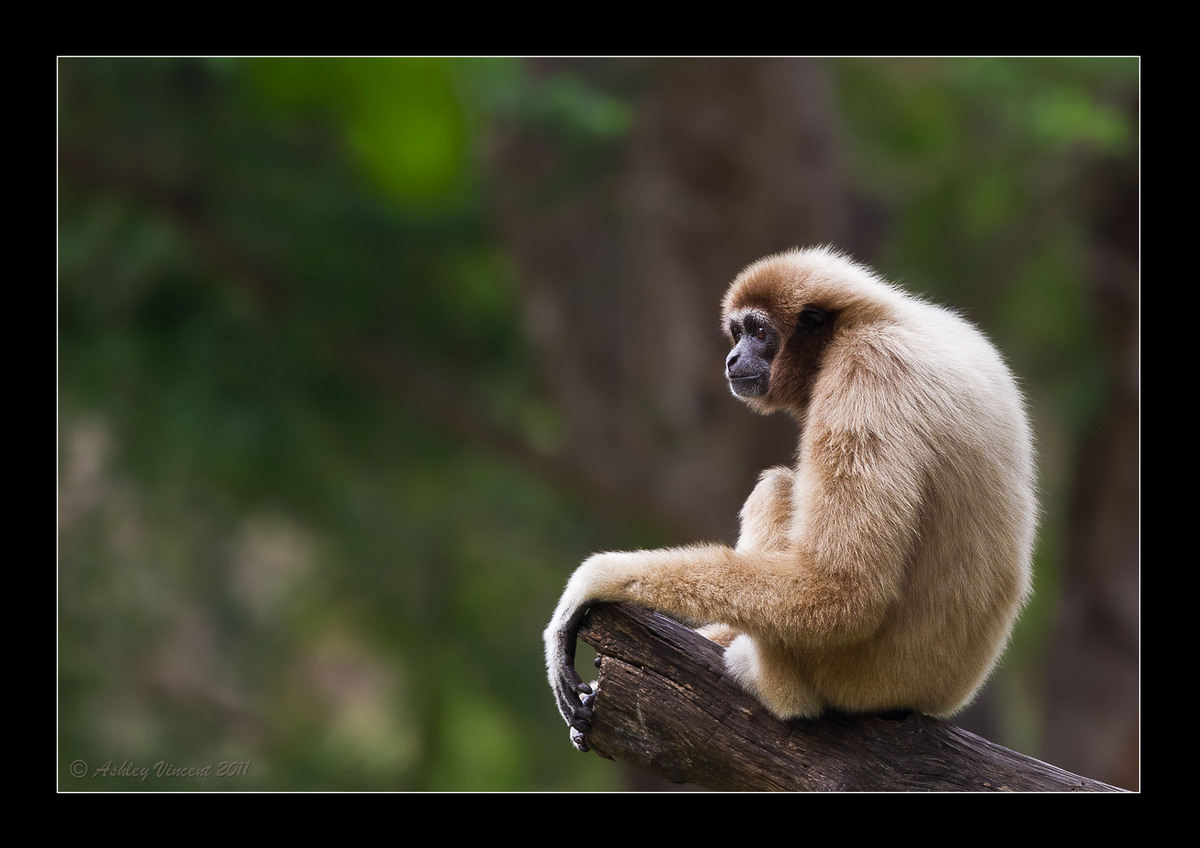
I was actually still busy relating stories of my life while shooting candid responses of the male Pileated Gibbon when, through the trees, I saw a perfect opportunity to catch this White-Handed Gibbon on the neighbouring island in what appeared to be deep reflective thought … if only we really knew what it was thinking ay? ;^)
Comments and critique always welcome :^)

Comments
16 commentsThe brightest whites on the hand and back are a little hot, but easy work to bring them down a bit.
Sandy
TFS
Steve
Ashley, this is wonderful. Love the pose the face detail and perch, overall a great image. One thing though, it seems to border on over exposure on the highlit areas.
In line with some of your observations I'm posting a reworked version.
Sandy & Wayne: Used the recovery slider in LR3 to bring down the highlights in the back and bring up a bit more detail, hope you can see the difference :^)
Stephen: I reintroduced "a fraction more space at the foot of the image", I also cut back on the sharpening on this one a bit and added a double helping of Surface Blur to the background, hope this all works better for you :^)
Not quiet sure what you meant by, " ... is the camera front focusing ...?" I'm pretty much always using single centre point focus aiming always for the eye; if I have time then I go to Single Shot, half depress the shutter release once I've acquired focus on the eye, then move the camera to gain a more favourable composition. For this shot however, I was still on AI Focus (having been messing about with the Pileated Gibbons in motion just moments before!), so I simply put the single point focus dead on the eye.
Wayne: Yep, not the first time I've "communicated" with this one, hence the reason she/he was showing me a total lack of interest; couldn't even manage to elicit a yawn ... one of the best ways I can measure a high level of intelligence in all creatures, be they birds, mammals or even my own species, is how quickly they learn to ignore me ...... Wayne? ... Wayne, you still there? ...... LOL ;^p
Ashley these are just my initial thoughts and it's all subjective.
Steve
As you suggest, many opinions offered are indeed subjective. I see a great benefit though in reading alternative points of view, some of which I agree while others, after consideration, I may end up settling back on my own opinion as to what appears more pleasing in an image. I think this is really the only way to learn from critique offered; to use the opportunity to see what you've seen through a new set of eyes and make up your own mind in the end whether an image can be improved with a little fine-tuning or not.
As it happens, having reworked this particular image, the only thing I would change from the original version as and when I print it up again would be to bring back a little more detail in the hairs of the back, as I've done in the reworked version.
Unfortunately I don't have specialised software for NR, so I work with the best tool I've come across in PS for smoothing out the grain. I learned about this by way of a CD Tutorial I have for PS CS5, in which the teacher seems to only recommend Surface Blur (Filter > Blur > Surface Blur) for targeted areas of the background, and having experimented with the NR tools in CS5 seeing only negligible results, I can understand why.
Although I have heard of and seen Gaussian Blur as one of the choices on the drop-down menu, I've only just taken a look at the effects that it creates having read what you wrote here. It also appears to be a powerful way to remove grain from the BG, although I think Surface Blur is probably recommended more for subtle adjustments (though I could be wrong!).
As I've said before to others, I'm sure the further I progress with my photography skills in the field, the less I'll be looking to adjust or correct in PP, as I also believe the benefits are far greater getting as much right as possible through the camera is the best way to go. All the same, if it weren't for the tools I've learned to use in PP I doubt I would have had the confidence to post up as many images as I have thus far, which no doubt would have had me learning at a much slower pace, as I wouldn't have had nearly as much feedback as I've had to date.
While not wanting to be argumentative, one thing I would like to add is that I don't see a whole lot of difference between using "a small amount of Noise Reduction" or achieving pretty much the same end by way of Surface Blur, as unless I'm missing something completely (certainly wouldn't be the first time!) in both cases this could be considered "applying artificial means" as opposed to "leaving it to 'within camera'".
Anyhow, the central message I believe you're aiming to convey - investing more time in learning how to get things right through the camera in the field rather than in PP sitting in front of one's monitor - is well noted and, as suggested above, something I'm constantly striving toward.
Many thanks again Stephen for your valued feedback :^)
Thanks for taking the time to view and leave a comment my friend :^)
BTW, just to make it clear, this is one a series of images I'm posting up of Gibbons taken at my local open zoo. Although this is something I went into in more in detail on the first posted image of this series (The Makings of a Yawn), not wanting to be overly repetitive with each new image of this series, I may only make it clear again in the shooting data I post at the top of each thread, that this is a "Captive Subject", as I've done here with this one, in case you missed it ;^)
If you did miss it though, and your impression was that this was shot in the wild, then thank you for the additional complement, as one of my chief aims when photographing captive subjects is to have the viewer's imagination running away with the subject in the wild :^)
Hope this have sense.
Cheers Luca